7. Data Interface and
Accessories
40
7. Data Interface and Acc essories
7.1 Data Interface Functionality
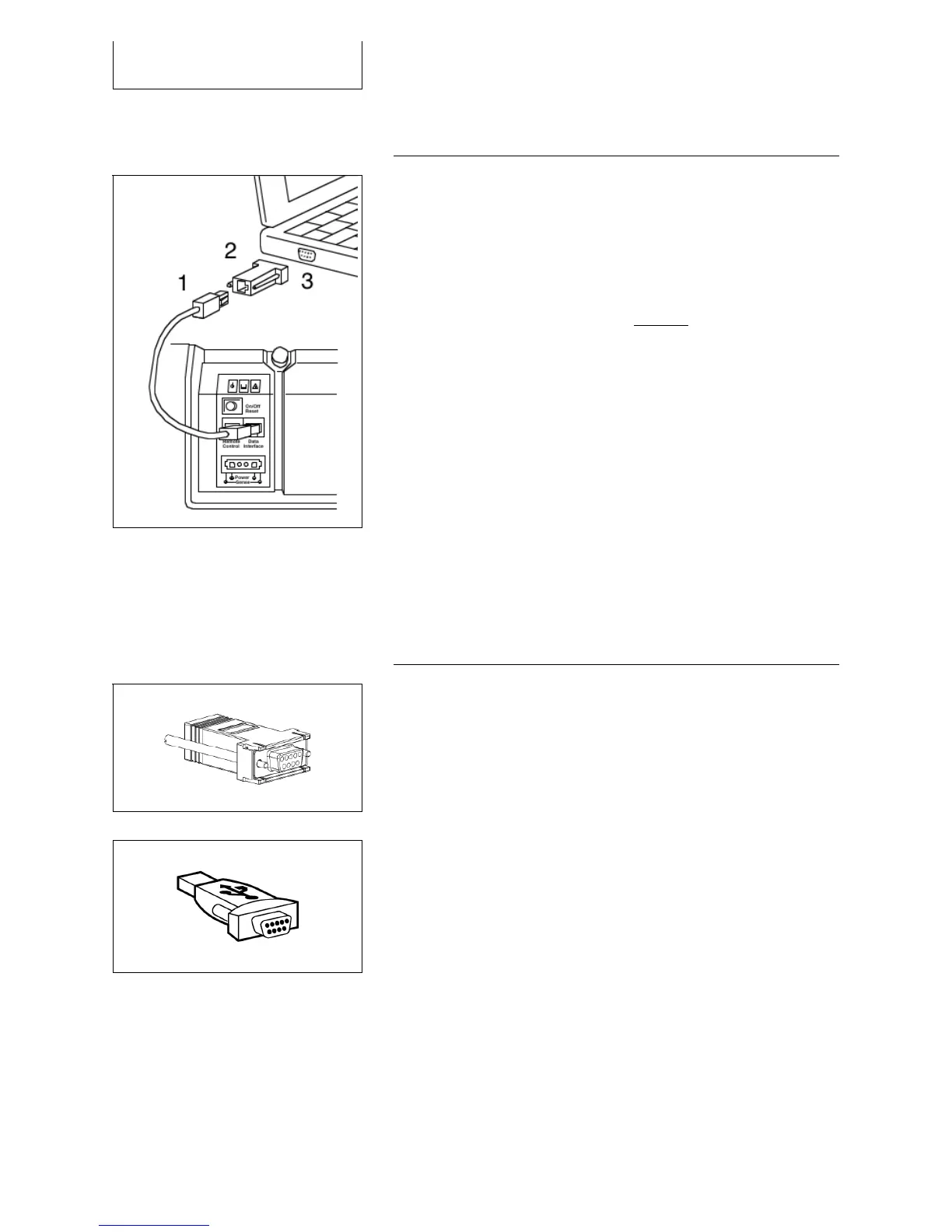
1 data line
2 interface adapter
3 PC (COM interface)
The EFOY Pro data interface enables the connection of:
Computer or Modem with the interface adapter IA1
Fuel cartridge sensor FS1
Cluster Controller CC1
Important: the data interface cannot be connected
directly to a computer - the interface adapter is
required for this.
Pin configuration of data interface:
Pin 1: Output (reserved)
Pin 2: RS232 RxD (Receive)
Pin 3: RS232 TxD (Transmit)
Pin 4: Ground
Pin 5: + Battery voltage
Pin 6: Input fuel cartridge sensor (FS1)
Pin 7: Input Remote-on contact (CC1)
Pin 8: Master/slave parallel operation control (CC1)
7.2 Computer Interface Adapter
With a computer it is possible to communicate with the
EFOY Pro via a serial COM interface. By using a modem
this can also be done remotely.
This enables to check the current system status,
change parameter or remote control the EFOY Pro.
For a detailed description please see the computer
interface adapter user manual.
The Interface Adapter IA1 is used to connect the EFOY
Pro to a computer COM-interface.
The USB-Adapter is used to connect the interface
adapter to a computer USB-interface, if no COM-
interface is available.



 To Next Page