10
11
7
8
Wiring diagram
23
10 V
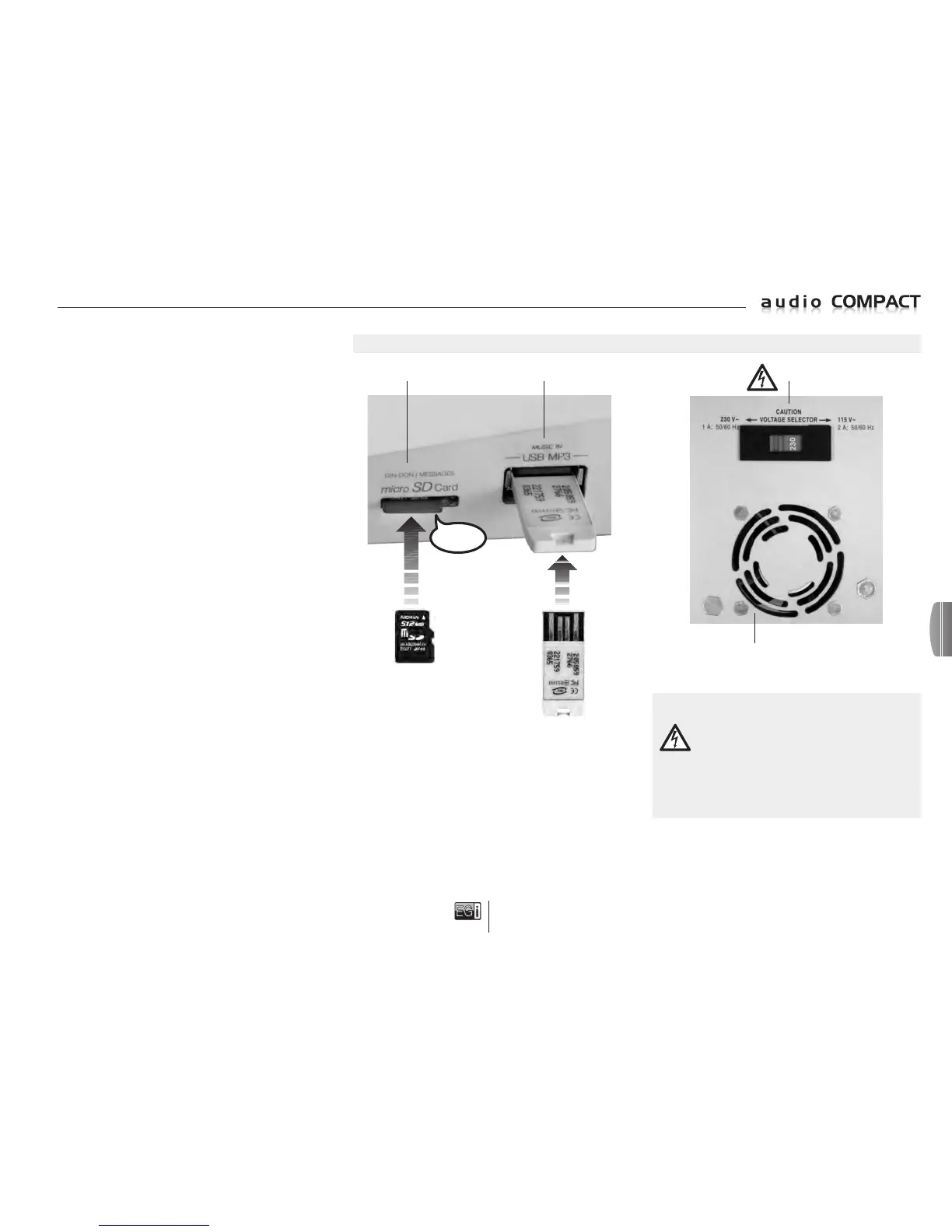
oltage selector 110 V~ / 230 V~.
ATTENTION: Before connecting the unit to the power
supply unit or mains, check that the correct voltage
has been selected using the selector on the bottom of
the console. 230 V~ (default voltage), 115 V~
(depending on country).
If the console selector is set to 115 V~ and you connect it to
a 230 V~ mains supply
, this will cause the breakage of the unit.
11 Electric fan and ventilation grille.
IMPORTANT: Due to the bottom electric fan ventilation outlet, it
must NOT BE COVERED by any object that blocks the exit of air.
7 Micro SD memory card input for DIN-DON and pre-recorded
messages.
IMPORTANT: Insert the SD micro card with the contacts facing
downwards and push until the SAFETY CLICK is activated.
8 USB memory input to play MP3 music.
Insert with contacts facing upwards.
CLICK!
CHARACTERISTICS
Console for message broadcasting and music for 3 zones.
2 auto-amplified (2 x 50 W) and 1 active zone for MILLENNIUM
connection.
Playing of 3 music channels that can be selected by zones.
FM/RDS radio with list of radio stations, 3.5 mm AUX audio jack,
MP3 and WAV audio input via USB flash drive, input and playing
of DIN-DON and pre-recorded messages on SD micro cards.
General message broadcasting or message broadcasting
by zones.
Built-in adjustable unidirectional Electret microphone.
Message broadcast indicator LED.
Adjusting and equalizing of volume and music, zones by zones.
Calls volume adjustable per zone.
Dual-voltage supply 110 V~ / 230 V~.
DETAILS OF ELEMENTS
en


 To Next Page
 Loading...