56-VOLT LITHIUM-ION CORDLESS LAWN MOWER — LM2160SP/LM2160SP-FC34
SELECTING BLADE SPEED MODE
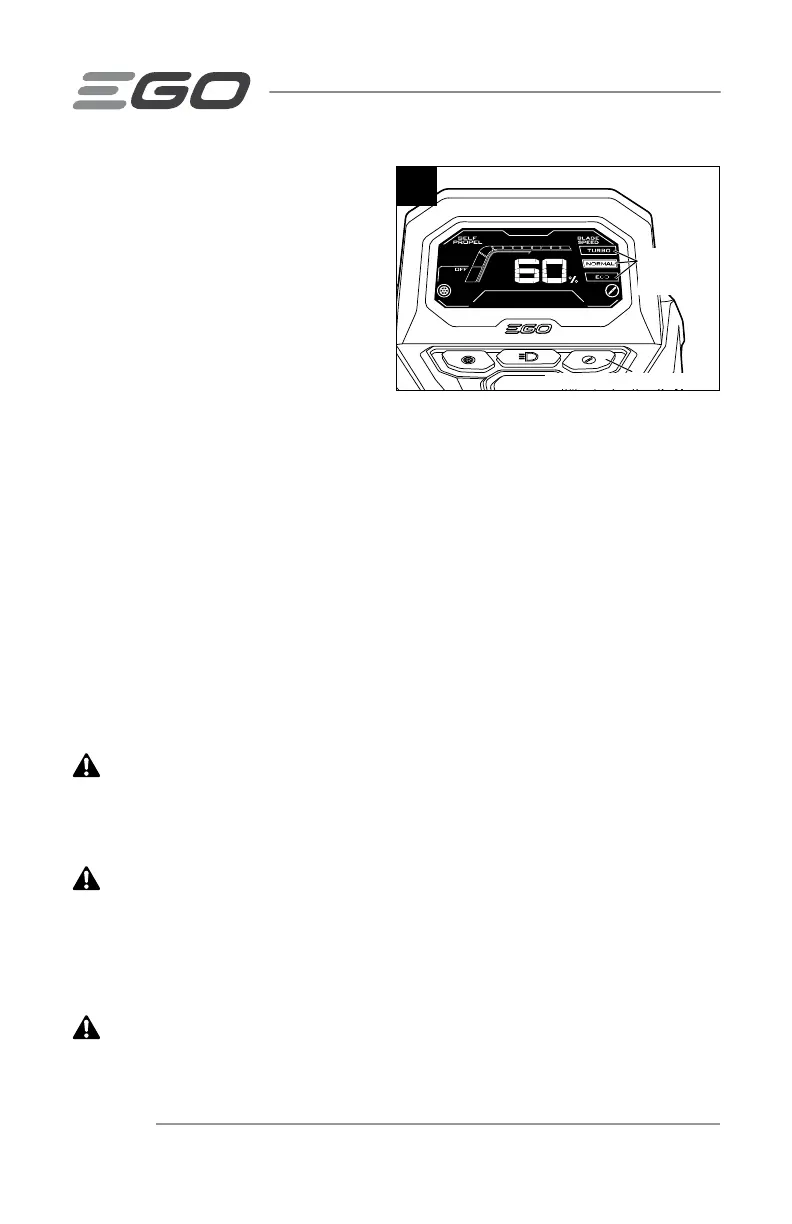
Select Blade Speed Mode
(Fig. 26)
The mower features three blade speed
modes:
◾
TURBO mode is high blade speed
mode for high-lift performance to
improve suction force or cutting
performance.
◾
NORMAL mode is the best balance between performance and runtime.
◾
ECO mode provides the lowest noise level and longest runtime from your battery
pack.
NOTE: Higher blade speed will significantly affect runtime.
NOTE: The blade speed cannot be adjusted during operation. The change will take
effect only the motor is stopped and started again.
Select among TURBO, NORMAL and ECO modes by sequentially pressing the blade
speed mode button below the LCD screen.
NOTE: The default blade speed mode is NORMAL.
STARTING/STOPPING THE MOWER
WARNING:
The operation of any lawn mower can result in foreign objects being
thrown into your or others’ eyes, which can damage eyes severely. Always wear safety
glasses while operating the mower or while performing any adjustments or repairs on
the mower.
WARNING:
Ensure that other people and pets remain at least 100 ft. (30 m)
away from the mower when it is in use.
NOTICE: The blade will continue to rotate for a few seconds after the mower is turned
off. Allow the motor/blade to stop rotating before starting it again. Do not rapidly turn
the mower off and on.
CAUTION:
Do not attempt to override the operation of the safety button and bail
switch.
26
Blade Speed Mode Button
Blade Speed
Mode
Indicator



 To Next Page