56V LITHIUM-ION COMPACT AREA LIGHT — LT0300/LT0300-FC 15
WARNING: Make sure the
tripod is sturdy enough to support the
combined weight of the light and the
battery pack.
◾
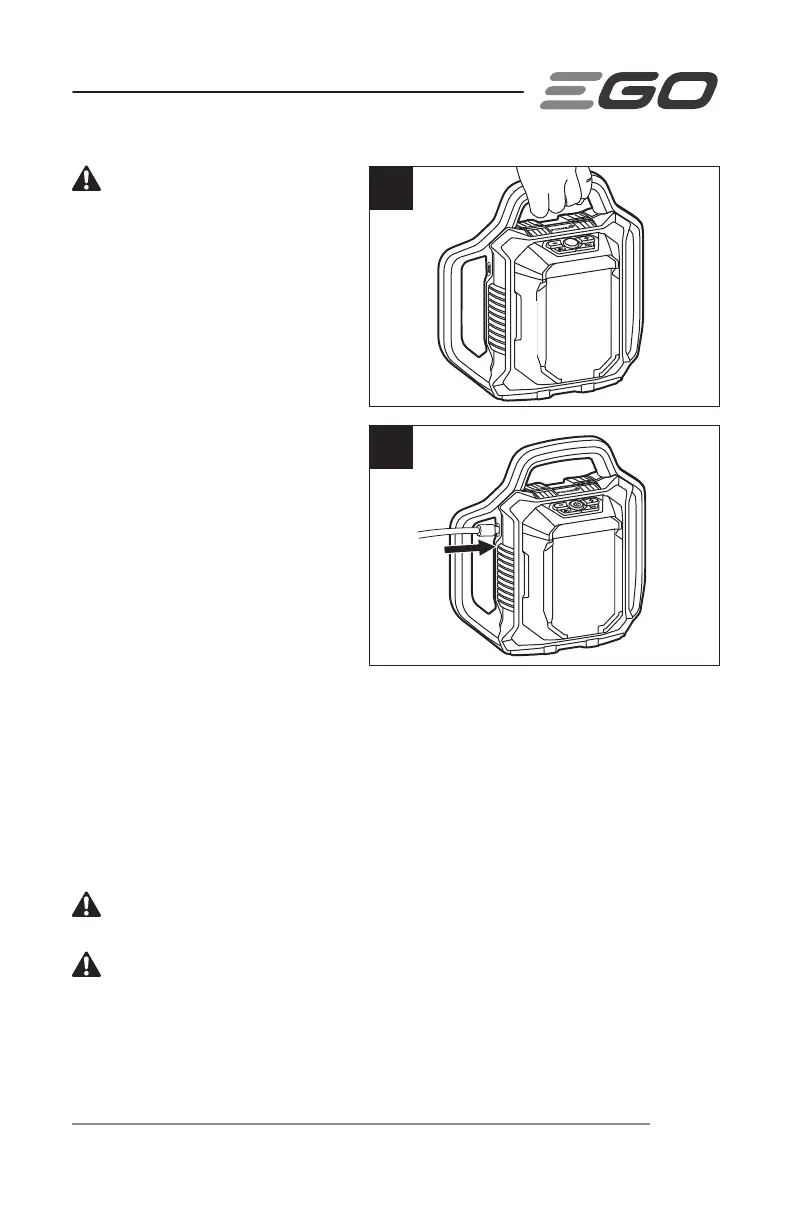
For portable illumination,
carry the light by the top handle
(Fig. 4c).
POWERING USB DEVICES
(Fig. 5)
The USB-C port provides power of 5
Volts DC at up a combined draw of
1.5 Amperes for your USB device.
◾
Install a battery pack into the
compact area light.
◾
Press the power button to turn
the light ON.
◾
Insert one end of the USB-C
cable (not included) into the
USB-C port and the other
end into the device that needs to be powered or charged. The light will begin to
charge/power the device automatically.
◾
When the light is not in use, disconnect the device from the light, then press the
power button to turn it OFF.
◾
Remove the battery pack from the light.
NOTE: If the light is turned off during USB charging process, the connected USB
device will continue charging for about 2 hours.
WARNING: Runtime of the connected device is dependent upon the device and
the EGO battery capacity.
WARNING: Do not insert a nail, wire, etc. into the USB-C port. Otherwise a short
circuit may damage the USB-C port.
4c
5



 To Next Page