EasyManua.ls Logo

EI 3016 - User Manual

EI 3016
52 pages
Print Icon
To Next Page IconTo Next Page
Loading...
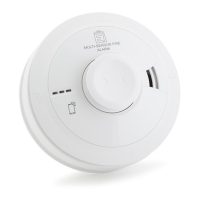
Ei3024 / 3016 / 3014
Alarms
Instruction Manual
Mains Powered
Read and retain carefully for as long as the product is being used. It contains vital
information on the operation and installation of your Alarm. The leaflet should be
regarded as part of the product.
If you are just installing the unit, the leaflet MUST be given to the householder. The
leaflet is to be given to any subsequent user.

Questions and Answers

  • B
    Bruce JonesAug 13, 2025
    What to do if my EI Security System alarm goes off for no reason?
    • R
      Roberta YoungAug 13, 2025
      If your EI Security System alarm sounds but there's no smoke, heat, or fire, first ensure your family is safe. Then, carefully inspect your house for any smoldering fire. If you find nothing, locate the alarm with the flashing red LED and press the Test/Hush button to silence it for 10 minutes. If you need more time, press the button again. If false alarms happen often, consider moving the alarm or replacing it if cleaning doesn't help.
  • T
    taylorjonAug 17, 2025
    Why aren't all my interconnected EI 3016 alarms sounding during a test?
    • E
      Emily MurphyAug 17, 2025
      If interconnected EI Security System alarms aren't all sounding, hold the test button for at least 10 seconds to ensure the signal sends to all alarms. If you have a hardwired system, consult a qualified electrician. For wireless systems with an RF module, ensure all alarms are powered and house-coded correctly.
  • W
    wrodriguezAug 20, 2025
    What to do if the Test/Hush button doesn't silence my EI 3016 alarm?
    • W
      William ContrerasAug 20, 2025
      If pressing the Test/Hush button doesn't silence your EI Security System alarm, be sure you're pressing the Test/Hush button on the alarm that is sounding and has the flashing red LED.
  • T
    Tricia ParkerAug 25, 2025
    What does it mean when my EI 3016 has a low battery backup fault?
    • R
      Raymond AndersonAug 25, 2025
      If you have a low battery backup fault in your EI Security System, check that the green LED power indicator is on continuously. If it's off or flashing every 48 seconds, the alarm is running on battery. Check fuses, circuit breakers, and wiring for power interruptions. If unsure, contact an electrician. After power is restored, chirps should stop within 2 hours as the battery recharges. If chirping continues with the green light on, the alarm might need repair or replacement.
  • D
    Devon MoralesAug 28, 2025
    How to fix maximum dust compensation on my EI3016/Ei3024 Security System?
    • L
      Lori CowanAug 28, 2025
      If your EI3016 or Ei3024 Security System has reached maximum dust compensation, remove the alarm from the ceiling, disconnect it for 5 minutes, and then reinstall it in a clean, dust-free environment.
  • E
    Elizabeth BooneSep 1, 2025
    How can I temporarily silence fault chirps on my EI Security System?
    • E
      Eric MarshallSep 1, 2025
      Press the test/hush button on the EI Security System alarm that is chirping and has a flashing yellow LED to silence it for 12 hours. The yellow LED will continue to flash to show the fault is still there. This is useful at night to minimize disturbance.
  • P
    Patrick PerezSep 5, 2025
    What should I do when my EI 3016 Security System indicates 'End of Life'?
    • T
      Tammy AndrewsSep 5, 2025
      When your EI Security System reaches the end of its life, the entire alarm must be replaced. First, disconnect the mains power and then replace the alarm.
  • V
    Vincent CopelandSep 8, 2025
    What happens when my EI 3016 Security System reaches maximum dust compensation?
    • J
      Jesus DuncanSep 9, 2025
      The EI Security System alarm will continue to operate as normal, but there is an increased risk of false alarms caused by dust contamination.

Summary

1 Introduction

1.1 Overview

Provides a visual guide to the features and components of the Ei3024 Multi-Sensor Fire Alarm.

1.2 Technical Specifications

Details technical specifications for Ei3000 series fire alarms, including sensors, power supply, and connectivity.

2 Installation

2.1 Safety Instructions for Installation

Critical safety precautions and warnings for installing mains-powered fire alarms correctly.

2.2 Recommended Alarm Locations

Guidance on optimal placement of fire alarms in dwellings according to standards.

2.3 UK Alarm Location Requirements

Details UK requirements (BS 5839-6:2013) for fire alarm placement in dwellings.

2.4 ROI Alarm Location Requirements

Details ROI requirements (IS 3218:2013) for fire alarm placement in dwellings.

2.5 Alarm Type by Room

Specifies recommended alarm types (Smoke, Heat, Multi-Sensor) for different rooms.

2.6 Room Placement Details

Explains precise ceiling and wall mounting positions and measurements for alarms.

2.7 Locations to Avoid

Lists areas and conditions to avoid for alarm placement to prevent false alarms.

2.8 Mounting and Wiring Procedures

Step-by-step guide for the physical mounting and electrical wiring of the alarms.

2.9 Interconnecting Alarms

Instructions on how to connect multiple fire alarms for system-wide alerts.

2.10 Removing the Alarm

Procedure for safely detaching the alarm unit from its mounting base.

3 Testing

3.1 Testing and Maintaining Your Alarm

Guidelines for frequent testing and ongoing maintenance to ensure alarm functionality.

3.2 Cleaning Your Alarm

Instructions on cleaning alarm units to maintain performance and prevent false alarms.

4 What to do in case of alarm

5 Troubleshooting and Indicator Summary

5.1 Test Button Issues

Troubleshooting steps for when the alarm test button does not produce a sound.

5.2 False Alarms and Nuisance Sounds

Guidance for resolving alarms that sound without a clear fire indication.

5.3 Interconnected Alarm Communication Issues

Resolving issues where interconnected alarms fail to sound together.

5.4 Test;Hush Button Functionality

Troubleshooting when the test/hush button does not silence the alarm.

5.5 Alarm Fault Signals

Interpreting unusual sounds, beeps, or light flashes from the alarm.

6 Important Safeguards

6.1 Limitations of Fire Alarms

Discusses factors affecting fire alarm effectiveness and inherent system limitations.

7 Service and Guarantee

7.1 Getting Your Alarm Serviced

Instructions for contacting support and returning the alarm for service or repair.

7.2 Product Guarantee

Details the warranty terms, conditions, and coverage for the alarm.

EI 3016 Specifications

General IconGeneral
BrandEI
Model3016
CategorySecurity System
LanguageEnglish