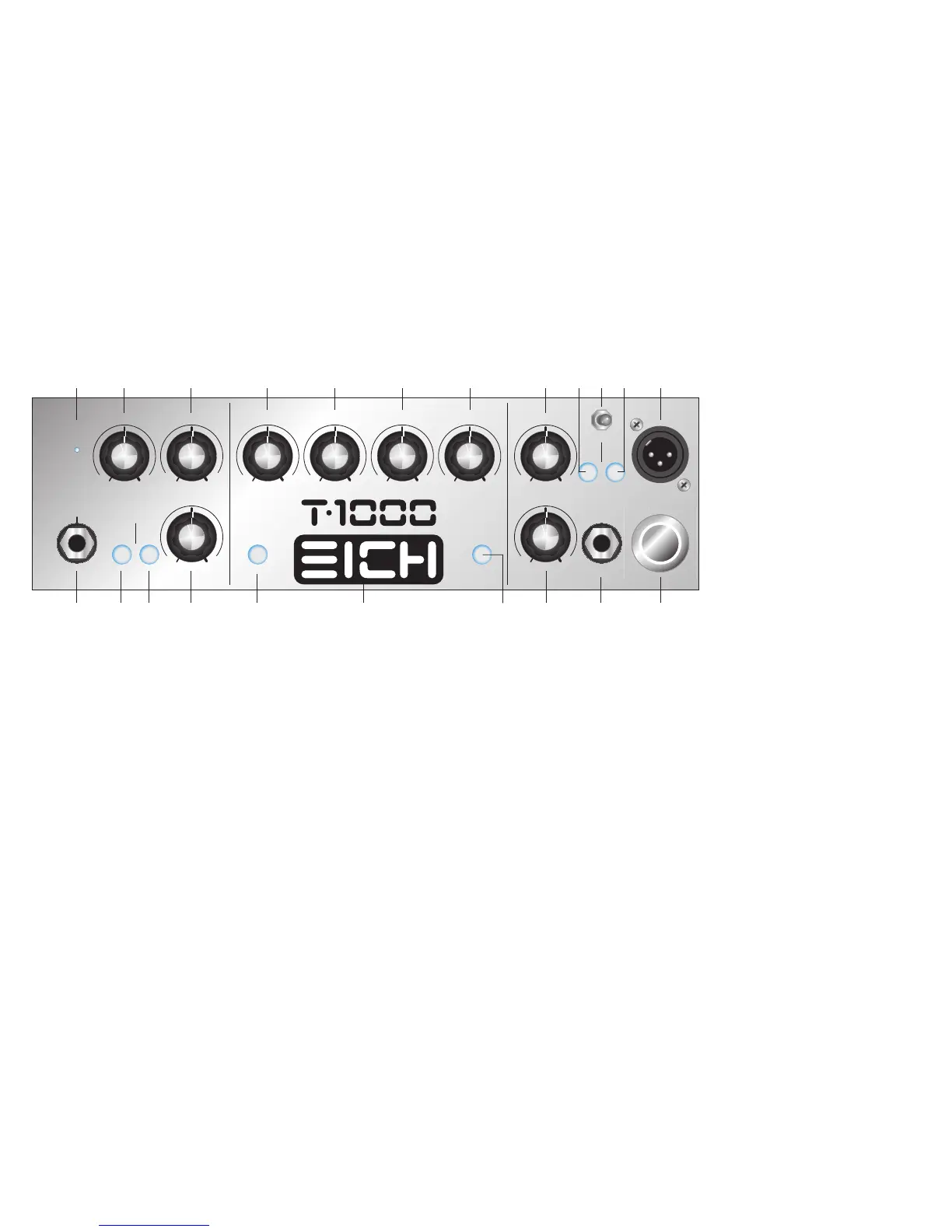
4 GAIN
This control adjusts the basic signal level in the preamp
and thus determines it’s sensitivity and overall dynamic
characteristics. In order to best adjust your instrument’s
signal level to the internal operating level of the T 1000
watch the »CLIP« LED (#3). Set the »GAIN« and/or the
»–10 dB« function (#2) that the »CLIP« LED just doesn’t
come up.
Do not leave the volume control on your instru-
ment set too low, otherwise noise picked up along
the cable will become more prominent and thus
lower the signal-to noise ratio of the amp.
5 TASTE
This unique feature adds to the superiority of the T
1000’s tonal qualities. Leave the control in the centre po-
sition if you seek a more “natural” sound. When turned
to the right (clockwise) towards »RICH« the sound gets
increasingly fatter with lots of low-end punch, ending in
a warm, vintage-like tone. When turned to the left (coun-
ter clockwise) towards »DRY« this control adds urgent
attack and midrange growl.
The »TASTE« control allows you to quickly and
effectively soften those instruments which sound
a little harsh and scathing. At the same time bass
guitars with a muddy, booming neck pickup gain
definition by turning the »TASTE« control towards
the »DRY« position.
6 ATTACK TIME
This switch allows you to alter the attack time of the in-
cluded high-end »COMPRESSOR« (#7). When the switch
is not engaged the attack time is short which means that
the signal is compressed immediately – great for fretless
sounds. When you depress the switch, which is accom-
panied by the illuminated push button switch, the attack
time is longer. Now the transients of the signal (the very
first moments of a note) pass the circuit unprocessed re-
sulting in a hot, lively bass sound – great for rock and
funk sounds.
7 COMPRESSOR
The »COMPRESSOR« of the T 1000 gently pulls up low
notes, thus providing a great, even sustain. The more you
turn up the »COMPRESSOR« (to the right, i.e. clockwise),
the more audible is the compression effect. The level
reduction usually associated with compression is made
up by an internal automatic gain control. No matter how
much compression you apply the signal level will always
stay the same. In order to use the compressor conveni-
ently and effectively adjusting the input sensitivity (refer
to #1 through #4) is of crucial importance.
>> FRONT PANEL
1 INPUT
Plug in your shielded instrument cable into this jack. We
advise you to always turn down the volume control on
your instrument before plugging it into this jack.
2 -10
When using a bass guitar with active pickups or basically
delivering relatively high output levels we advise you to
use this function. When this switch is engaged the signal
will be attenuated by 10 dB before it reaches the »GAIN«
and TONE controls. This mode is accompanied by the
illuminated push button switch. Attenuation allows the
»GAIN« control (#4) to be used in a more subtle way by
somehow altering the taper of the pot – the »GAIN« con-
trol can be brought up to a higher position now.
If, on the other hand, the »GAIN« control must be turned
all the way up without reaching a satisfying gain range,
you better deactivate the »-10 dB« switch.
3 CLIP
The red »CLIP« LED helps you adjust the input sensitivity
of the T 1000 preamp so that the signal from your instru-
ment best matches the preamp’s internal operating level.
Turn up the »GAIN«- control (#4) while you hit the strings
of your bass hard until the »CLIP« LED starts flashing.
Now back up the »GAIN« control a bit until the LED goes
off. The flashing »CLIP« LED tells you that the input stage
of the preamp is clipping somewhere and that you should
either turn down the »GAIN« control (#4) or engage the
»-10«function (#2). Keep in mind that excessive use of
the »LO« control (#9) and »BASS BOOST« (#8) will raise
the internal level and thus make the »CLIP« LED come on
much earlier.
54
Gain
Clip
Input
Attack
Time
Bass
Boost
High
Boost
Taste Master
Mute Post
Gnd Lift
DILo HiLoMidHiMid
Compressor Line/Effect Mix
Footswitch
Compressor/
Mute
Power
-10
0 10 0 10 0 10 0 10 0 10
010
0 10
010
RichDry


 To Next Page
 Loading...