59
(If EUC cannot be successful paired in 2 mins, it will automatically exit the pairing mode.)
1
Red light and blue light are on
at the same time
Red light and blue light are on
at the same time
A
+
B
C
FM
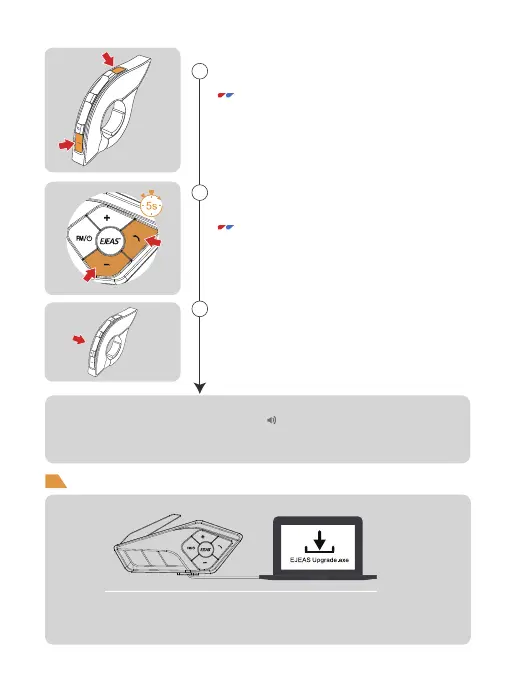
Long press both<Phone Button> and <Volume-> for
5s to enter the handle pairing mode,the red and blue
lights flash alternately and quickly.
Click any button of EUC
Long press both <Button FM> and <Volume -> of
EUC for 5s to clear the pairing record of EUC.
EUC Pairing
Firmware Upgrades
Connect to the computer with a USB data cable, then download and open
the "EJEAS Upgrade . exe" to upgrade software. Click the "Upgrade" button
to start and wait for the upgrade to complete.
Pairing Successfully
"Pairing Successful"
A
+
B
C
FM
2
3


 To Next Page