81
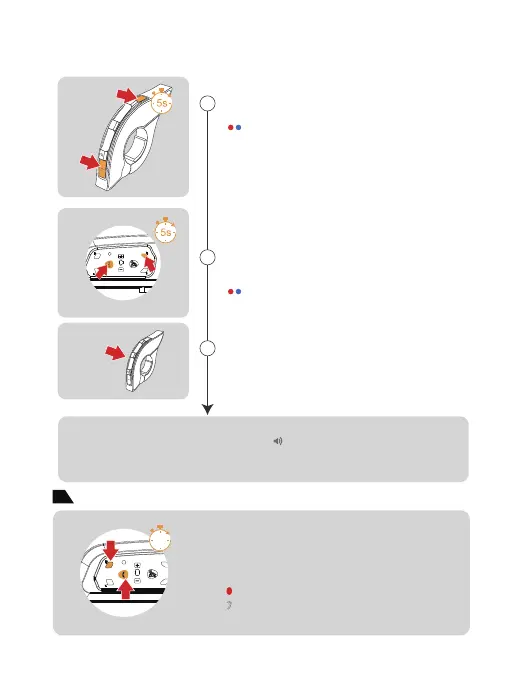
EUC Pairing
2
3
(If EUC cannot be successful paired in 2 mins, it will automatically exit the pairing mode.)
Pairing Successfully
1
A
+
B
C
FM
A
+
B
C
FM
any
"Du,Du"
Restore Default Settings
2s
Red light and blue light are on
at the same time
Red light and blue light are on
at the same time
Long press both<Phone Button> and <Button E> for
5s to enter the handle pairing mode,the red and blue
lights flash alternately and quickly.
Click any button of EUC
Long press both <Button FM> and <Volume -> of
EUC for 5s to clear the pairing record of EUC.
3 Quick Flashes
Press and hold both <B button> and <Phone button>
for about 2s, the red light flashes 3 times quickly to
delete the pairing record, and then the intercom will
automatically power on again.
“Di,Di,Di”


 To Next Page