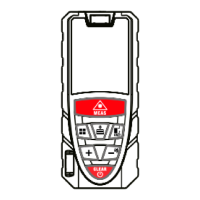
Laser distance meter
LDM-50 EXPERT EKF
LDM-70 EXPERT EKF
Thank you for choosing an EKF product!
Carefully study this manual to ensure safe and efcient use of the
product.
Before using the product for the rst time study the safety
precautions.
1 DESCRIPTION
The laser distance meter is a compact, portable measuring device,
capable of:
– single distance measurement;
– continuous distance measurement;
– area measurement;
– volume measurement;
– indirect (Pythagoras) measurement;
– addition and subtraction;
– value storage and retrieval.
The laser distance meter is intended to be used indoors and at
construction sites.
The device complies with IEC 61326-2-1:2020 electromagnetic
compatibility (EMC) requirements.
2 TECHNICAL DATA
Characteristics Values
Measuring range, m 0,04 – 50 / 70*
Measurement time, s 0,5
Measurement error, mm ±2,0**
Single measurement Yes
Continuous measurement Yes
Area measurement Yes
Volume measurement Yes
Indirect (two-point Pythagoras)
measurement
Yes
Indirect (three-point Pythagoras)
measurement
Yes
Add/Subtract Yes
Sound indication Yes
Tilt sensor Yes
Internal memory capacity 20 records
Reference points Front / Rear side
Units of measurement m / ft / in / ft + in
Laser class II
Laser wavelength, nm 630–670
Laser auto power off, s 30
Device auto power off, s 180
Max laser power, mW 1
Degree of protection (IEC 60529) IP54
Battery type 2 x AAA, 1,5 V
Battery life
Up to 5000
measurements
Operating temperature, °С 0 - 50
Dimensions, mm 115 х 20 х 29,5
Service life 10 years
*Depending on the model: LDM-50 – 50 meters,
LDM-70 – 70 meters.
**The highest accuracy and maximum measurement range are
achieved under favorable environmental conditions (suitable lighting
and ambient temperature). Measurement accuracy may decrease
under unfavorable conditions: bright lighting, low reectivity of the
target surface, high/low temperature, etc.
**Measurement accuracy of ±2,0 mm is achieved when measuring
distances of up to 10m. Above 10m, the measurement accuracy
is calculated as follows: ±2,0mm ± 0,05 x (D-10) (D=measuring
distance in meters).
**Attention: under intense sunlight or low reectivity conditions use
a target plate or a retroreector.
2.1 Troubleshooting
Potential laser distance meter errors, display codes and methods
for resolving them are shown in Table 2.
If a malfunction is detected after the warranty period has expired,
the product must be disposed of.
All errors or failures will be shown as error codes.
Code Cause Solution
204 Measuring error
Refer to operating manual,
repeat the measurement
208
Excess current
Contact the manufacturer
220
Low battery
Replace batteries
255
Return signal is too weak
or the measuring time is
too long
Change the surface
targeted or use a target
plate
256 Return signal is too strong
Point the meter at a target
with lower reectivity or
use a target plate
261
The measured distance is
shorter or longer than the
measurement range
Use the meter within its
measurement range
500 Hardware error
Turn the device on/
off several times. If
the error code symbol
still reappears, contact
your service center for
assistance.
3 SAFETY REQUIREMENTS AND PRECAUTIONS
Your device is a precision laser measuring instrument. Please, study
the following requirements and precautions prior to operating your
laser distance meter.
Do not point the device at the sun or any other powerful light
sources. This may result in measurement errors.
Do not use the device as a level.
Do not use the device in high-humidity, dusty, smoky, or any
other unfavorable environmental conditions. If used under
such conditions, internal components may be damaged and the
instrument's accuracy may be impaired.
When moving the device from cold to warm, wait until the device
reaches the ambient temperature before using it.
Measurements taken through transparent liquids (e.g. water), other
translucent materials (glass, plastic, polyethylene), or low-density
materials may be inaccurate.
Surfaces with anti-reective coating refract the laser beam and, as
a result, measurement errors may occur.
Shiny and bright surroundings, coupled with a low-reective surface
will reduce the measurement range and accuracy.
Do not place the device under water. Clean the device with a damp
soft cloth. Do not use aggressive cleaning agents or solutions. Take
extra care not to damage optical surfaces.
If the device has been dropped or subjected to shock, its accuracy
must be veried before use.
Laser radiation. Avoid direct eye exposure. Do not point the laser
towards people. The laser beam may cause temporary blindness.
Turn on the laser beam only when you are using the device. Do
not look at the laser beam through any optical device, as this will
amplify the damage of the laser beam to the eyes.
Do not place the device in a position where someone may look
directly into the laser beam, either intentionally or unintentionally.
Do not point the laser beam at polished, reective surfaces (e.g.
mirrors, sheet metal).
A polished surface can reect the beam back.
Do not attempt to repair or disassemble the device. Repairs to this
device should only be carried out by an authorized service center.
Follow industry standards and safety precautions when operating
the device.
Do not use the device when tired or while under inuence.
This device is not a toy, keep away from children.
Inspect the device before starting the work.
Do not use faulty devices.
Do not use the device near ammable substances.
Do not use the device near medical devices.
Do not use the device on an airplane.
Do not use accessories not intended for this device.
This list of warnings and precautions is not exhaustive. This manual
cannot cover all potential cases. Caution and common sense cannot
be integrated into the device, but should be practiced by the user.
Use the device only as intended. Do not use the device for any
purposes not described in this manual.
1. Display
2. Measure button
Activates measurement mode. Short press for instant
measurement, long press for continuous measurement.
3. Menu button
Press to change the measurement mode: Area / Volume /
Pythagoras
4. Memory button
Press to recall values from memory.
5. Reference / Measurement unit button
The rear surface of the device is the default reference point.
Press to toggle between front/rear surface. Press and hold to
change measurement units (m/ft/in/ft+in).
6. Add button (+)
Short press to add the values together In the distance, area
and volume measurement mode.
7. Subtract (-) button / Beeper control
Short press to subtract values, long press to turn off/on the
beeper.
8. On/Off/Reset/Return button
Long press to turn the device on/off, short press to clear
previous operations or return to main menu.
9. Battery compartment
4 DESIGN AND APPEARANCE
1
2
3
6
4
5
7
9
8
4.1 Display
1
10
12
13
14
15
11
2
3
4
5
6 7 8 9
1. Laser on/off indication
2. Reference point (front)
3. Reference point (rear)
4. Distance / continuous measurement
5. Conguration
6, 7, 8, 9. Measurement mode indication
10. Battery status
11 Memory icon
12. First row of measurements
13. Second row of measurements / minimum value
14. Third row of measurements / maximum value
15. Primary measured value / nal calculation result


 To Next Page
 Need help?
 General