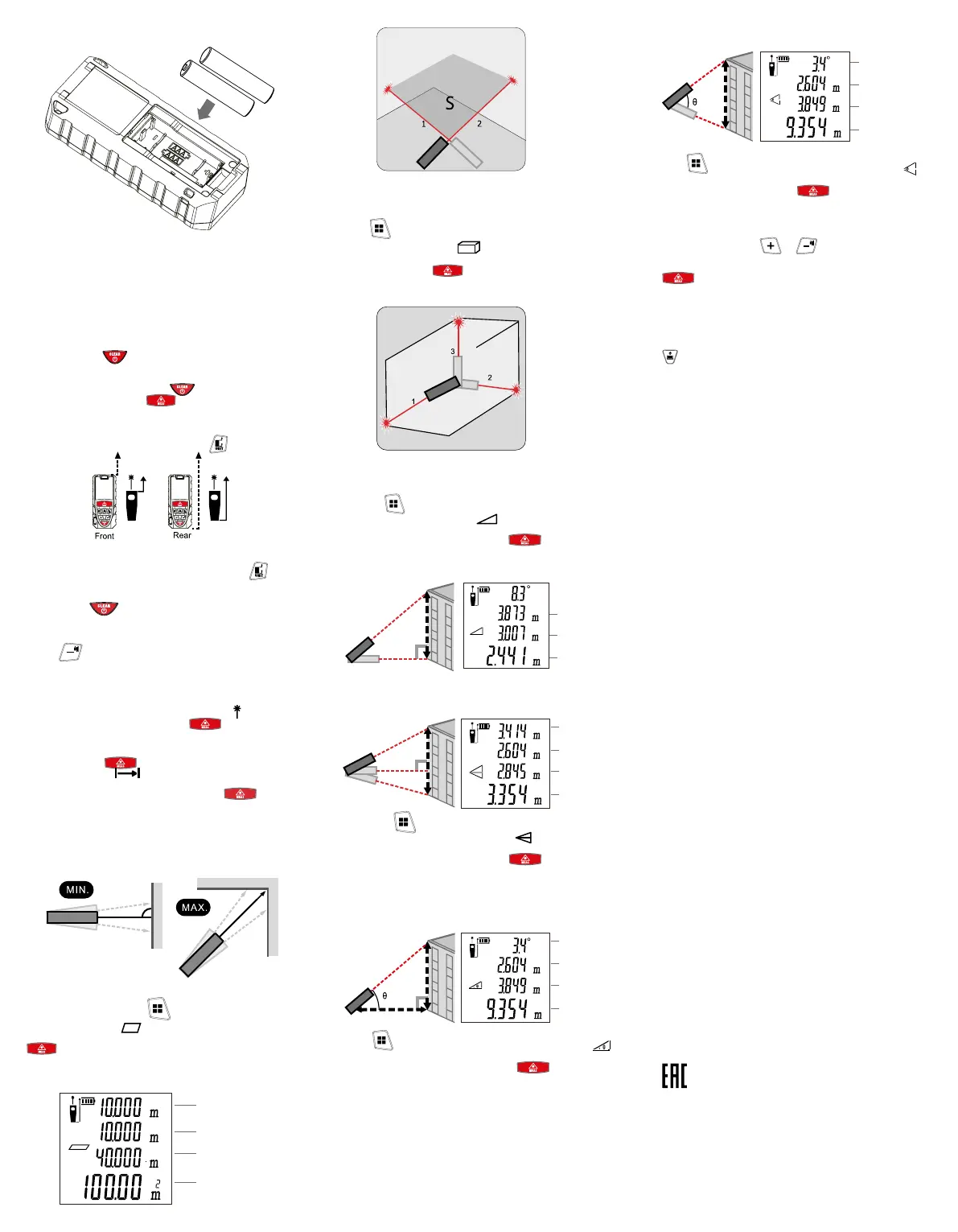
4.2 Battery replacement
Length
Width
Perimeter
Area
• Open the battery compartment cover
• Remove old batteries
• Insert 2 new AAA batteries*
• Close the battery compartment cover after changing
the batteries
* Be careful to observe polarity when changing batteries.
5 OPERATING INSTRUCTION
5.1 Turning the device on/off
Press and hold the
button until a beep is heard.
If the device is idle, the laser will turn off after 30 seconds. The device
will automatically power down after 180 seconds.
To turn off the laser, short press the
button.
To turn on the laser, press the button.
5.2 Selecting a reference point
By default, the reference point is the rear surface of the device.
To change the reference point, short press the
button.
5.3 Changing the measurement units
To change the units of measurement, press and hold the
button until the beep is heard.
5.4 Back/Delete function
Short press the
button to delete the last value or return back
to the menu.
5.5 Sound indication control
Use the
button to turn the sound indication (beeper) on and off.
5.6. Measuring
5.6.1 Single distance measurement
After being turned on, the device switches into single distance
measuring mode and the laser turns on.
The laser indicator icon will appear on the display -
. After aiming
the device at the target surface press the
button for a single
distance measurement.
5.6.2 Continuous distance measurement
Long press the
button to activate the continuous
measurement mode -
.
Slowly walk the laser dot up, down, left, and right of the target point
by tilting and panning the device. Then, press the
button to
stop - the display will show the maximum and minimum distance, as
well as the last recorded distance in the results line.
5.6.3 Area measurement
Short press the menu button -
to switch the device into the
area measuring mode -
.
The currently measured length will be ashing on the screen. Press
to measure length (1st line), press it again to measure width
(2nd line). The area will be calculated automatically and displayed in
the results line.
5.6.4 Volume measurement
Press
, to select the
volume measurement mode
.
A line corresponding to the direction to be measured will be blinking
on the display. Press
to measure the required dimensions
in sequence.
5.6.5 Indirect measurement (Pythagoras) mode - Option 1
5.6.6 Indirect measurement (Pythagoras) mode - Option 2
5.6.7 Automatic angle measurement
5.6.8 Automatic height measurement
Press the button to select the indirect measurement
mode using the Pythagorean theorem -
.
Using the ashing elements on the display as a guide, aim the
device at the appropriate target an press
. Repeat the same
operation for the remaining sections. The end result will be displayed
in the results line.
Press to switch to automatic angle measuring mode .
Using the ashing elements on the display as a guide, aim the
device at the appropriate target an press
. Measurement
result will be displayed as shown above.
5.6.10 Addition and subtraction
While measuring, press
or once to add or subtract the
value of the second measurement from the rst.
The addition/subtraction symbol will appear on the display. Press
to measure the second distance. The second measured
value will be automatically added/subtracted from the rst measured
value.
Note: This process can be repeated if necessary.
5.6.8 Storing and recalling a measurement from memory
Measurement data is saved automatically.
- press the button to recall the last saved
data.
The last 20 readings are stored in memory.
6 STORAGE AND TRANSPORTATION
Laser distance meters must be stored in a dry, clean place. Do not
store the device in a potentially corrosive environment.
Laser distance meters can be transported by any means of enclosed
transport that ensures protection of packaged products from impact
damage and weather exposure.
They shall be stored indoors, in their original packaging, at the
ambient temperatures from -0°C to +50°C and relative humidity of
max. 85% at +25°C.
7 DISPOSAL
Life-expired and failed products shall be disposed of in compliance
with the effective national and local laws and regulations.
To dispose of the product, send it to an authorized company for
recycling in compliance with the effective national and local laws and
regulations.
DO NOT dispose of used batteries with household waste! Please take
the empty batteries to the battery collection points for recycling.
If the packaging is no longer required, it can recycled.
8 MANUFACTURER’S WARRANTY
Service life: 10 years.
Shelf life from the manufacturing date: 2 years
Batteries shelf life from the manufacturing date: 12 months.
10.4 Warranty period from the date of sale: 12 months.
Laser distance meters EKF EXPERT have been manufactured in
compliance with the effective laws and regulations and have been
approved for operation.
Laser distance meters EKF EXPERT comply with the requirements
of IEC 61326-2-1:2020 electromagnetic compatibility (EMC)
requirements. Use strictly as intended.
Manufacturer: OOO Electroresheniya, Otradnaya st., 2b/9, 127273,
Moscow, Russia, tel. +7 (495) 788-88-15.
Importer and EKF trademark service representative оn the
territory of the Republic of Kazakhstan: TOO «Energoresheniya
Kazakhstan», Kazakhstan, Almaty, Bostandyk district,
Turgut Ozal st., d. 247, apt 4.
MEA regional headquarters: EKF ELECTRICAL SOLUTION FZCO,
Techno Hub-2, DSO, P.O. box 341079, Dubai, United Arab Emirates,
tel. +9 (714) 547-06-18.
Made in China.
ekfgroup.com
Date of sale:
Seller's signature
Quality control stamp
Press the
button to select the indirect measurement mode
using the Pythagorean theorem -
.
Using the ashing elements on the display as a guide, aim the
device at the appropriate target an press
. Repeat the same
operation for the remaining sections. The end result will be displayed
in the results line.
1
2
1st segment
Angle
2nd segment
1st distance
Vertical distance
Horizontal distance
3rd segment
Results
1
3
2
1st segment
2nd segment
Results
1
Angle
1st segment
2nd segment
Result
1
2
Press to switch to automatic angle measurement mode .
Using the ashing elements on the display as a guide, aim the device
at the appropriate target an press
. Measurement result will
be displayed as on the picture above.


 To Previous Page
 Loading...