11
12
HongKong Customer Center: +852 6940 4955
(Mon to Fri 9:00 am- 6:30 pm, UTC+8 HKT)
India Customer Center: +91 84319 76061
(Mon to Sat IST 9:30 am-6:00 pm) so that we may address
your concerns before you leave a product review.
Note
If you can’t connect the headset/headphones to your
devices, please ask us for complete FAQ guidance. You
can find the solution finally.
Depending on your head/ear size/shape, it may be a little
tight (feels like“on ear") for someone to wear which is
designed to avoid sound leakage. In case of that and to
get both audio and wearing comfort, please take off the
headphone every 1~2 hours to get your ears relaxed and
protect them from the muggy environment in use.
Please follow us on Facebook @EKSA Global, Twitter,
Instagram, and YouTube @EKSAtech for new product
release and promotion info.
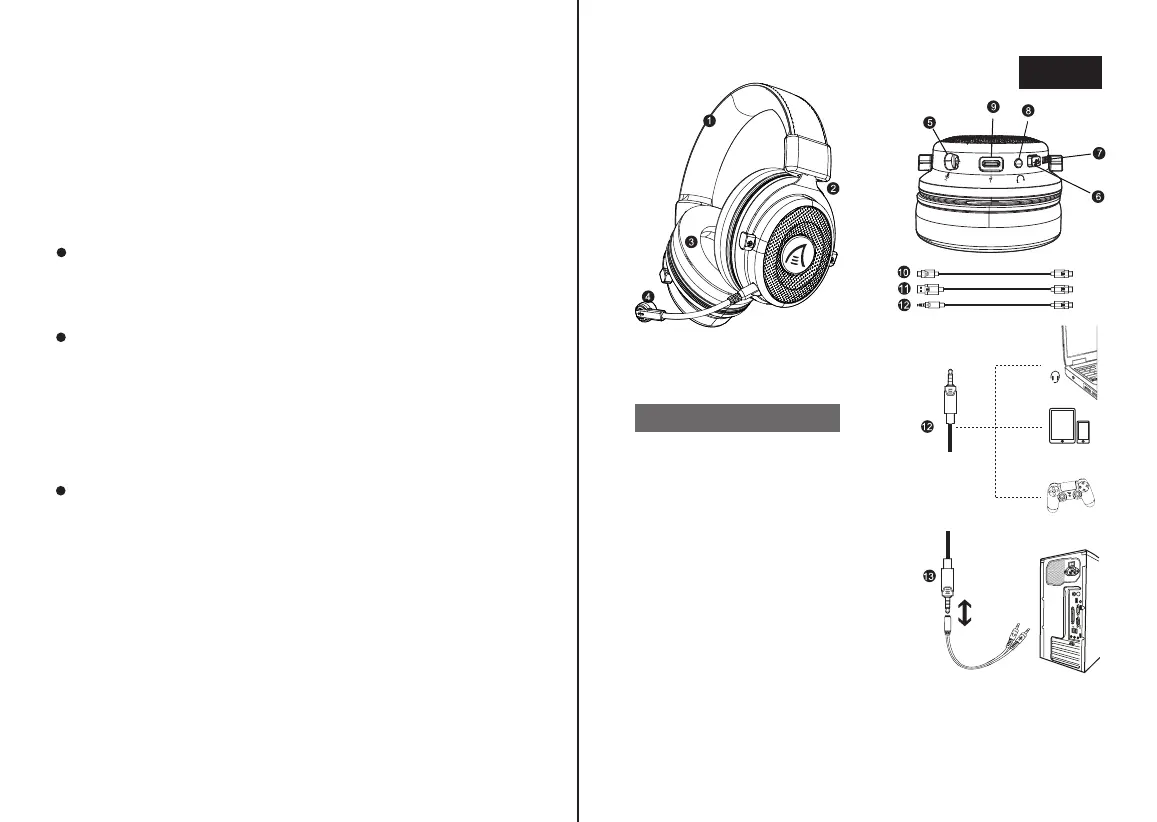
1. Kunstleder Stirnband
2. Verstellbares Stahlkopfband
3. Memory-Protein-Ohrenschützer
4. Abnehmbares Mikrofon mit
Geräuschunterdrückung
5. Mikrofonbuchse
6. Mikrofon-Stummschalter(Werk-
seitiger Stummschaltungsstatus)
7. Lautstärkeregler
8. Soundeffektschalter
9. Typ-C-Audioanschlussbuchse
10. Typ C Audiokabel
11. USB Audiokabel
12. 3.5 mm Audiokabel
13. Audio Splitter Kabel
Produktansicht
Deutsch



 To Next Page