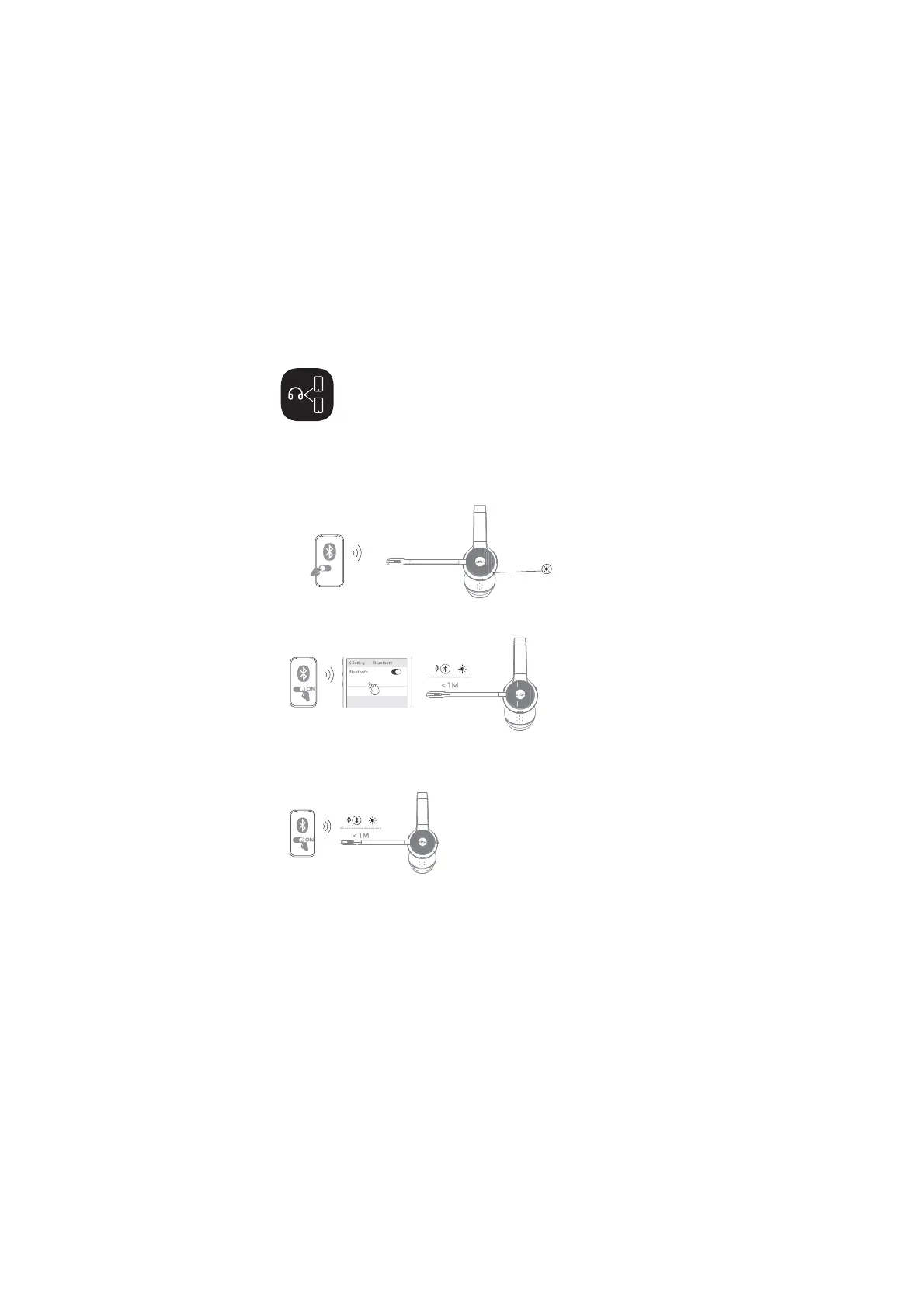
One to Two Bluetooth
Connection
EKSA-H16
0''
)LUVWFRQQHFWWKHKHDGVHWWRGHYLFH$WKURXJK%OXHWRRWKSDLULQJDQGWKHQ
WXUQRIIGHYLFH$$WWKLVWLPHWKHKHDGVHWLVGLVFRQQHFWHGDQGHQWHUVSDLULQJ
mode.
7KHQRSHQGHYLFH%DQGVXFFHVVIXOO\FRQQHFWZLWKWKHKHDGVHWWKURXJK
Bluetooth search pairing.
7XUQRQGHYLFH$DJDLQDQGWKHQFRQQHFWWKHKHDGVHWWKURXJKGHYLFH$
$IWHUWKHFRQQHFWLRQLVVXFFHVVIXOWKHKHDGVHWZLOOEHFRQQHFWHGWRGHYLFH$
and device B at the same time.
device A
device A
device B
device B
The headset supports the simultaneous connection of two devices
via Bluetooth. The specific steps are as follows:
Note: The headset is connected to two devices at the same time.
Only one of the devices works when using it. When the other
device needs to be used, the currently working device needs to
be suspended.


 To Next Page