The ELAD TM-2 is a USB 2.0 HID (Human Interface Device) controller designed as an accessory for Software Defined Radio (SDR) systems. It aims to provide a tactile and intuitive control experience for SDR software, mimicking the traditional feel of radio operation with physical knobs and buttons, thereby reducing the reliance on a computer screen, especially in situations where the screen is occupied by other applications like logging software, digital operation programs, or contest software.
Function Description:
The ELAD TM-2 serves as an external control unit for SDR software, allowing users to manage key functions of their SDR radio without direct interaction with the computer interface. It connects to a PC via a standard USB cable and is powered directly by the USB connection, eliminating the need for an external power supply. The device is designed to be compatible with various SDR software, either through direct support, Vcom and CAT protocols, or via a Software Development Kit (SDK) for custom applications. It features a multi-function color display that can be customized by the user in terms of RGB color range.
Important Technical Specifications:
- Interface: USB 2.0 HID device (no specific driver required).
- Power: USB (PC) Powered.
- Dimensions: 143mm (Length) x 78mm (Height) x 135mm (Width).
- Weight: 780g (without USB cable).
- Front Panel Inclination: 45°.
- Display: RGB custom display, 65 x 22 mm, with user-defined color options.
- Encoders:
- Main tuning knob with push button for incremental step VFO tuning (user-defined).
- Two detent encoders with push buttons for various functions (factory defined).
- Buttons: Six function keys (factory defined).
- Enclosure: Heavy metal ergonomic enclosure.
- Knobs: Heavy metal knobs.
- Compatibility: Compatible with remote operation (using serial to TCP converter).
- Direct Software Support: Directly supported (no CAT) in ELAD SW2 Software for the FDM-S1 & FDM-S2.
- SDK Compatibility: The ELAD TMate2 SDK is compatible with 32-bit and 64-bit editions of Windows Vista, 7, 8, 8.1, and 10.
Usage Features:
The ELAD TM-2 is designed for ease of use and flexibility across different SDR software platforms.
With ELAD FDM-SW2 Software:
- Plug-and-Play: When connected via USB, the ELAD FDM-SW2 software automatically detects the TMate2 and enables its control features.
- Customization: Users can configure the display backlight color, refresh time, and increment steps for the three knobs.
- Main Encoder: Controls frequency and toggles "Lock To CF" functionality.
- E1 Encoder: Modifies parameters such as volume, squelch, noise reducer, noise blanker, and auto notch. Pushing the E1 encoder button cycles through these parameter selections.
- E2 Encoder: Modifies the filter bandwidth. Pushing the E2 encoder button cycles through E2 parameter selections.
- Function Buttons (F1-F6):
- F1: Changes the selected receiver (if multiple receivers are active).
- F2: Changes the AGC setting.
- F3 and F4: Change the mode.
- F5 and F6: Change the step.
- LED Indicators:
- USB green LED: Indicates the TMate2 is operational.
- Tune Lock red LED: Indicates if the "Lock To CF" functionality is enabled.
With Perseus V5 Software:
- Virtual Com Port (VCP) Setup: Requires a VCP application (e.g., VSPE from Eterlogic) to create a connector and splitter connection (e.g., COM10 and COM10 => COM11).
- TMate2 CAT Console: The
Tmate2CatConsole.exe application (available from ELAD's website) is used to bridge the TMate2 with the Perseus software via the VCP.
- Configuration Order: It is crucial to launch the Virtual Com Software, then the Perseus Software, and finally the TMate Cat Console in that specific order for proper functionality.
- Perseus Software Settings: Ensure the Virtual COM port in Perseus software settings matches the VCP configured (e.g., COM10).
- TMate2 CAT Console Settings: Select the appropriate serial port (e.g., COM11) and connect to "PERSEUS". Users can set increment step speeds, default steps for various modes (AM/FM/DRM, LSB/USB, CW/RTTY), refresh time, encoder steps, and RX backlight colors.
With SDR-Console Software:
- Direct Support: SDR-Console by Simon Brown directly supports the ELAD TMate2 without additional software.
- Enablement: Users need to enable the TMate2 in SDR-Console's Tools > Options > Controllers > Tmate menu.
- Fixed Controls: While the background color can be changed, other options are hard-coded:
- E1: Volume.
- E2: Filter High / Low / Shift (push to select).
- Main Encoder: Current receiver Frequency (push for fast tuning).
- F1: Mute.
- F5/F6: Previous/next mode.
Maintenance Features:
- Upgradable Software: The TMate2 features upgradable software, allowing for future enhancements and compatibility updates.
- SDK for Customization: The availability of an SDK enables advanced users or developers to create custom applications and interfaces for the TMate2, extending its functionality beyond standard SDR software. The SDK provides libraries and sample projects to read encoder and key statuses and set LCD segments.
- No External Power Supply: Simplifies setup and reduces cable clutter, as it is powered directly by the USB connection.
- Robust Construction: Heavy metal ergonomic enclosure and heavy metal knobs contribute to durability and a premium feel.

 Need help?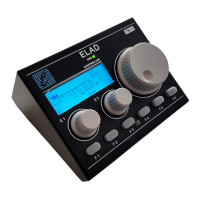

 To Next Page
 General