ELAD TM-2 User Manual - Rev 2 - 05/2021
© 2021 ELAD S.r.l. All rights reserved. No part of this document may be reproduced, published, used, disclosed or disseminated
in any form or by any means, electronic, photocopying or otherwise, without prior written permission of ELAD S.r.l.
4
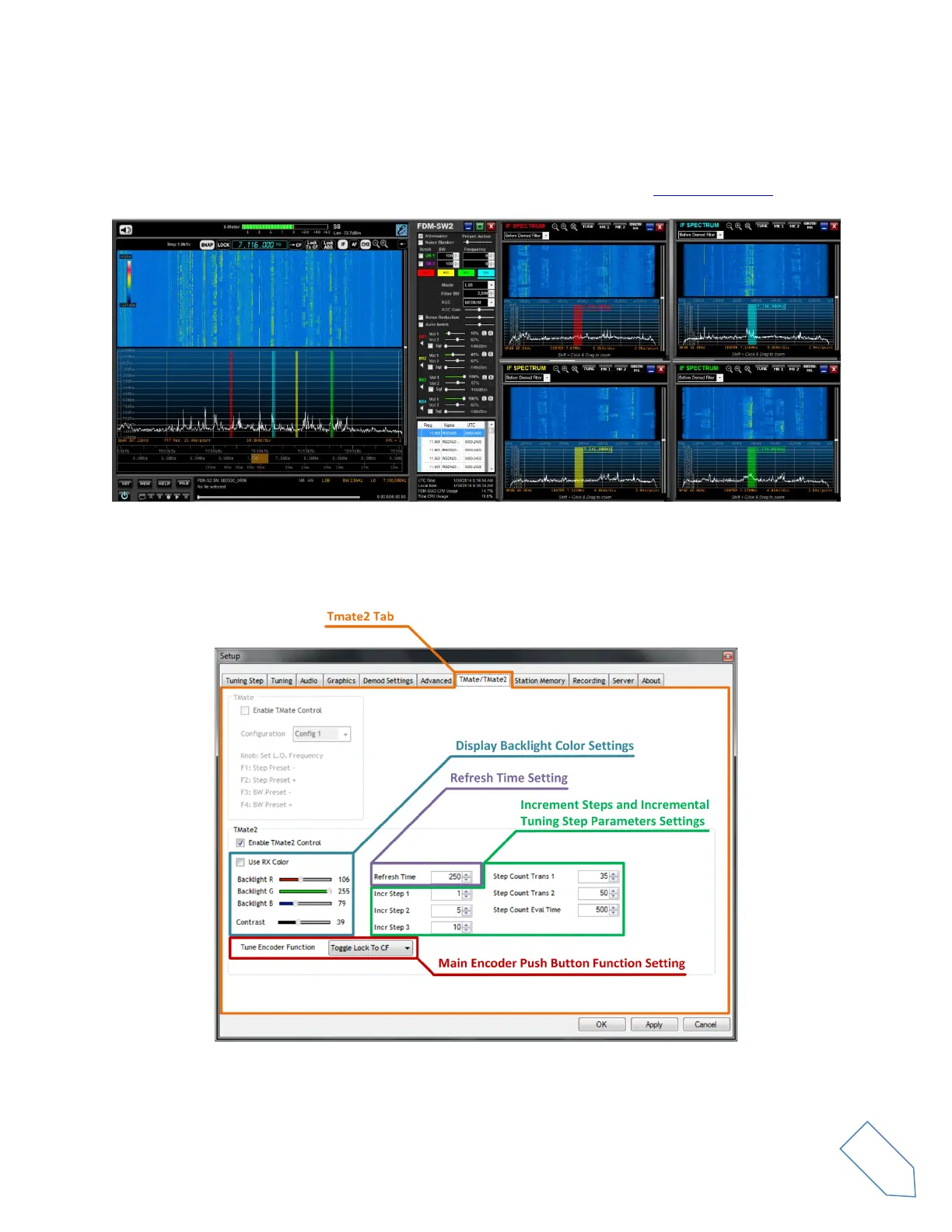
2 Using TMate2 with ELAD FDM-SW2
ELAD FDM-SW2 is a SDR (Software Defined Radio) software that is intended to be used with the ELAD
FDM SDR devices (for more information on ELAD SDR please visit our website www.eladit.com).
ELAD FDM-SW2 directly supports ELAD TMate2, no other software is required. Connect the USB cable to
a free USB port of your PC and run ELAD FDM-SW2; the software automatically sense the TMate2 device
and automatically enables TMate2 Tab in the setup window.
In this panel, the user can set the display backlight color, the refresh time, the increment steps of the
three knobs and incremental tuning step parameters.


 To Next Page