Vv CM78N_C02_1.ING.doc 28/05/2009 page 3/6
BASIC SETTING
CM78N-C02 can be configured by the user to fit to different operational modes.
The configuration is performed as follows:
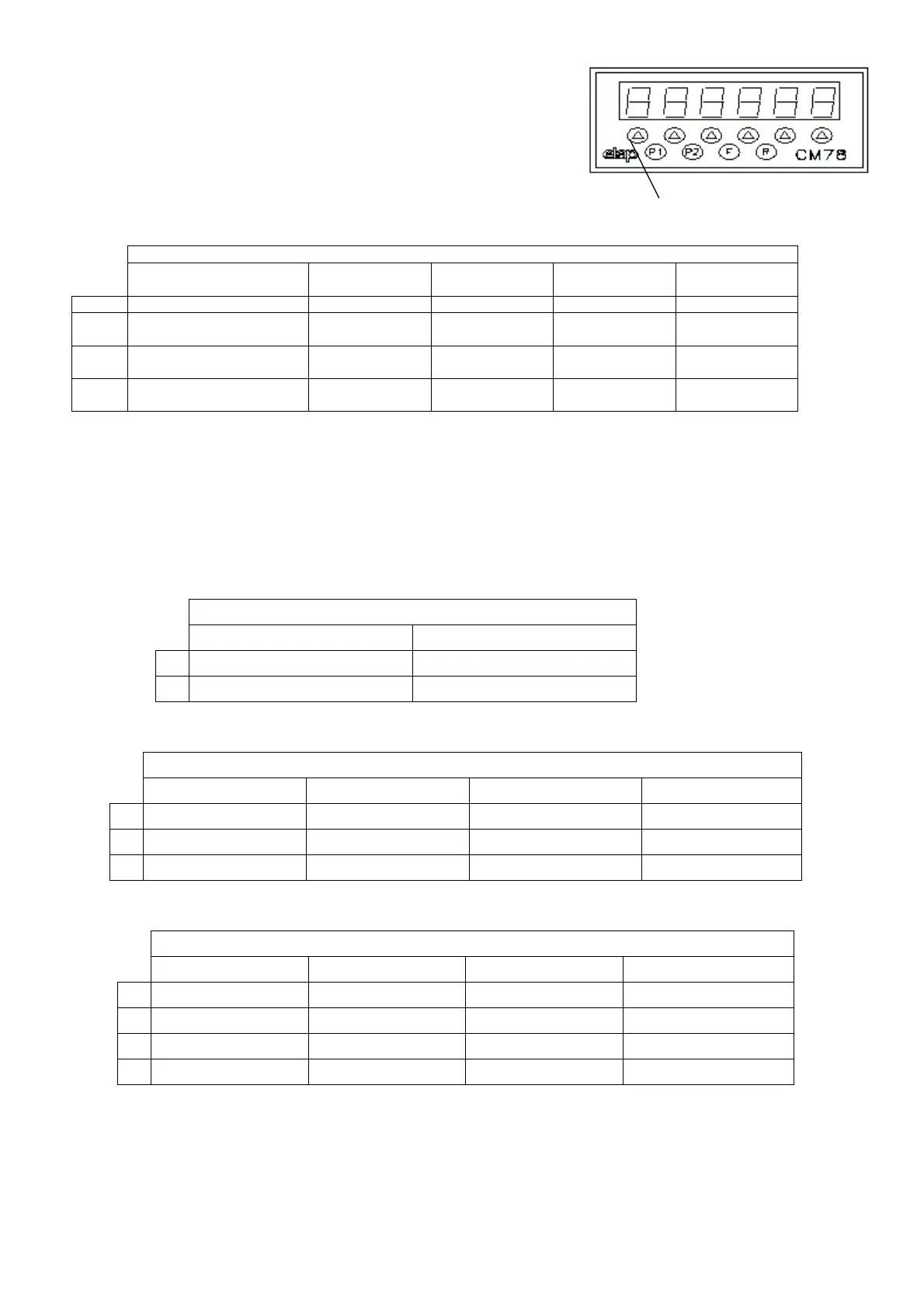
Press the key F to access the configuration phase. The display will show Ch.SEt.
Digit the key sequence R – Arrow 2 - Arrow 4 – within 5 seconds. The display will
show: F:XXXXX Now you can enter the configuration code.
The configuration code is composed according to the table hereunder: each code
position corresponds to a column of the table; each option corresponds to a line of
the table. The setting is made by pressing the arrow key corresponding to the digit to
be modified until reaching the number corresponding to the required function.
F.XXXXX BASIC SET-UP
OPERATING MODE Count type Functional
Inputs Polarity
Decimal Digits Input IN3
Function
0
Position visualiser Bidirectional x 4 NPN No one Count block
1
Position visualiser with
alarms
Bidirectional x 1 PNP 1 Display block
2
Absolute/relative position
visualiser with alarms
Monodirectional
up-counter
2
3
Monodirectional
down-counter
3
SETTING CONFIRMATION
After entering the required configuration code press F to confirm and access the setting of the operating functions specific for the
chosen operational mode.
SPECIFIC SETTINGS
This phase can also be accessed pressing F and, when the display shows Ch.Set, entering the key sequence Arrow 1, Arrow 6,
Arrow 2.
The setting is made by pressing the arrow key corresponding to the digit to be modified until reaching the number corresponding to the
required function.
According to the chosen operational mode you can meet three possible situations:
OPERATIONAL MODE 0
C.XX – OPERATIONAL MODE 0 – SPECIFIC SET-UP
LOAD BY KEYBOARD LOAD BY INPUT
0
Disabled On the closure state
1
Enabled On the closure front
OPERATIONAL MODE 1
C.XXX – OPERATIONAL MODE 1 – SPECIFIC SET-UP
LOAD BY KEYBOARD RELAY OPERATION END STROKE SETTING LOAD SETTING
0
Disabled Steady outputs Free Free
1
Enabled Pulse timed outputs Under set-up key Under set-up key
2
Under constants key Under constants key
OPERATIONAL MODE 2
C.XXXX – OPERATIONAL MODE 2 – SPECIFIC SET-UP
COMPARING MODE FACTOR 2 DECIMALS RELAY OPERATION STROKE END SETTING
0
Absolute record No one Steady outputs Free
1
Relative record 1 Timed pulse outputs Under set-up key
2
2 Under constants key
3
3
SETTING CONFIRMATION
After entering the required set-up press F to confirm. If the chosen selection involves the parameters entering under SET-UP key the
parameter setting phase is accessed; otherwise you switch to the main display page.
Key Arrow 1


 To Next Page