
 Need help?
Do you have a question about the Elation MIDIcon and is the answer not in the manual?
Emphasizes reading the manual thoroughly before operating the device for reliable performance.
Instructions for checking the device and its accessories after shipping, and listing box contents.
Critical warning about user serviceability, warranty voidance, and handling damages or repairs.
Details the main functional sections of the controller: Playbacks, Shortcuts, Memories, Data Entry Wheels, Touchpad, and Master/Blackout.
Explains operation of playback faders, shortcut buttons, and memory buttons, including MIDI messages.
Details operation of data wheels and touchpads for various functions like adjustments and effects.
Describes master fader, page controls, and physical connections on the rear panel of the device.
Guidance on configuring MIDIcon™ with Elation Emulation, ADJ MyDMX, and Elation Compu Show software.
Lists MIDI continuous controller and note messages for playback faders, buttons, and shortcut keys.
Specifies MIDI note messages for data wheels and MIDI note assignments for memory buttons by page.
Details MIDI messages for touchpads, grand master fader, blackout button, and page controls.
Explains how software sends messages to control device LEDs and page displays, and how the device defers control.
Lists control interfaces and connection types, including USB power and work light port.
Provides the physical dimensions and weight of the MIDIcon™ controller.
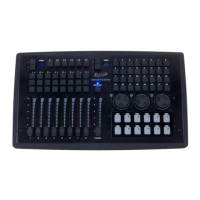
The Elation MIDIcon™ is a USB MIDI controller designed for use with Elation Lighting software packages and other MIDI-compatible lighting control software. This device is USB powered and utilizes standard USB class drivers, eliminating the need for additional driver installations on the host PC. It is compatible with both Windows™ and Apple™ operating systems. The MIDIcon™ communicates using standard MIDI messages, including note on/off messages for buttons and continuous controller messages for faders and page selects. It can also receive MIDI note and continuous controller messages to control its LEDs and page displays, allowing for synchronization with the software.
The MIDIcon™ is structured into several key sections to facilitate comprehensive lighting control:
Playbacks: Located on the left side of the control panel, this section features eight playback faders, each accompanied by three buttons (labeled A, B, C). The function of these buttons is software-dependent. The faders transmit 7-bit MIDI continuous controller messages, offering 128 steps of resolution, while the playback buttons send MIDI note messages. The upper-left page select section allows users to choose from 16 playback pages, with the controller using MIDI channels to page the playbacks. A page lock feature ensures that the MIDI channel for an active playback remains constant until its fader is returned to zero, keeping the current cue locked. An LED above each playback indicates its active status.
Shortcuts: Positioned above the playbacks, these six shortcut keys (S1-S6) are designed for frequently used software functions.
Memories: In the upper-right area, 32 buttons are available for recalling memories or scenes. A dedicated page display next to this section allows for 16 pages of these 32 buttons, with MIDI channels used for paging.
Data Entry Wheels: Below the memory buttons, three data wheels provide for data entry or direct control of lighting parameters. These wheels send MIDI note on messages for increment and decrement and can also be pressed down, acting as an additional button. They are not paged and consistently use MIDI channel 1. They are typically used to adjust channel values, color mixing, fade times, and other parameters within the active programming screen of the software.
Touchpad: Situated below the data wheels, this section comprises 12 touch buttons for triggering momentary lighting effects. An LED above each touchpad illuminates upon touch. These touchpads are not paged and always send MIDI note messages on MIDI channel 1.
Master and Blackout: Centrally located, a grand master fader controls the overall level of stage dimmers. Above it, a blackout button with an LED indicates the current blackout state. The controller toggles the blackout LED when the switch is pressed, and some software programs can control this LED for synchronization.
The MIDIcon™ is a robust and versatile controller designed to enhance the user experience with lighting control software, offering a tactile and intuitive interface for complex lighting operations.
 General
| Brand | Elation |
|---|---|
| Model | MIDIcon |
| Category | Recording Equipment |
| Language | English |

 To Next Page