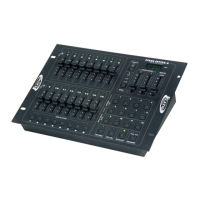
Stage Setter 8™ Controls and Functions
Rear Panel - Controls and Functions
17. DC Power Input:
This jack is used to connect to external power supply. Only use the
included DC 12~20V, 500 mA minimum power supply. If it becomes
necessary to replace the original power supply, only use an approved
Elation power supply.
18. Power Switch:
This switch is used to turn the unit’s main power On/Off.
19. DMX Out:
This XLR jack is used to send DMX data to your DMX dimmer packs or
other DMX fixtures.
20. DMX Out:
This is another XLR jack that is used to send DMX data to your DMX
dimmer packs or other DMX fixtures.
23222120191817
Rear Panel Label
Rear Panel
Elation Professional
® - www.elationlighting.com - Stage Setter 8™ Instruction Manual Page 13
Front Panel - Controls and Functions (Cont.)
16. Fog Machine Button:
This button is used to control fog output to compatible Elation fog
machine. These fog machine include the Master Blaster 700 and 1000,
Vaporizer, and the Dyno Fog. This button not only eliminates the need
of a separate fog machine controller, but also allows quick and easy
access to a fog machine output. For an updated list of compatible fog
machines please contact our support department.
17. Patterns 1-8:
These buttons are used to access any of the eight patterns you may
create yourself. A pattern LED will glow when a corresponding pattern
was selected for operation.
Stage Setter 8™ Controls and Functions
©Elation® - www.elationlighting.com - Stage Setter 8™ Instruction Manual Page 12


 To Previous Page