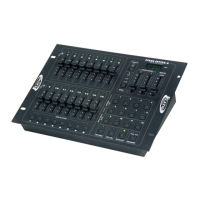
Stage Setter 8™ Introduction
FEATURES:
Stage Setter 8™ features include:
• 2 x 3-pin XLR OUT
• Three different operating modes: 2 x 8, 8 x 8, and 1 x 16
• 12 pattern option: 4 built in and 8 user programmable
• 32 steps (scenes) per a program
• MIDI compatible
• Fog machine output button
• Scene crossfader
• Tap SYNC button
• 8 Bump Buttons
• Back up memory protection
• Full functional, 4 digit LCD display
Elation Professional® - www.elationlighting.com - Stage Setter 8™ Instruction Manual Page 4
Stage Setter 8™ Memory Dump
Elation Professional® - www.elationlighting.com - Stage Setter 8™ Instruction Manual Page 21
Memory Dump:
This functions allows you to reset the unit’s default settings. Caution:
This will erase all user programs. To reset the unit:
1. Be sure main power is off.
2. Hold Bump Buttons 2, 3, 6, and 7 down.
3. While holding down the above Bump Buttons turn main
power on.
4. The unit will now return to the default settings.


 To Next Page