8-11
HOW TO USE YOUR CARAVAN’S EQUIPMENT
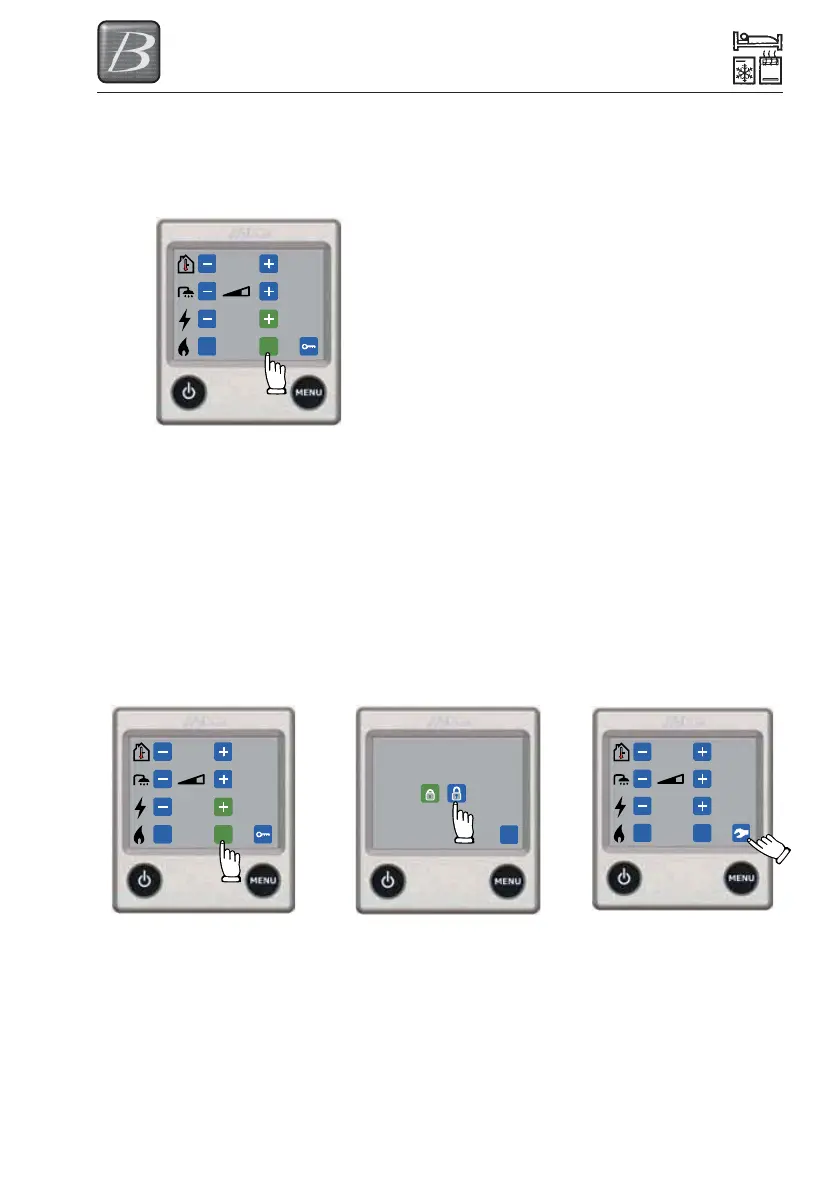
Heating with gas
Do as follows to activate heating with gas. If
both electricity and gas are selected,
electricity is given priority.
Unlocking the tool menu
It is possible to go from the setting menu to
the tool menu. Under the tool menu you can
access the other functions of the control
panel.
1. The control panel in setting
menu. Press the unlock
symbol.
2. The control panel in
unlocking menu. Press on
open padlock, then OK or
MENU to unlock the tools
menu. When activated the
symbol changes colour to
green.
3. The control panel in
setting menu with
unlocked tool menu. In
order to get to the tool
menu, press the symbol.
+22°C
ON
2 kW
OnOff
OK
f
+22°C
ON
2 kW
OnOff
Truma Telemetric link to the Alde
heating system
Your Alde heating system can be supplied
with an option of a Truma Telemetric Link
which can operate the Heating system via a
mobile phone link. When this option is taken,
the operational instructions and the sim card
for the Link will be provided within the
document wallet supplied with your caravan.
Please read these instructions before
operating the Link.



 To Next Page