8 Rascal P321 Powerchair Owner’s Manual & Service Record
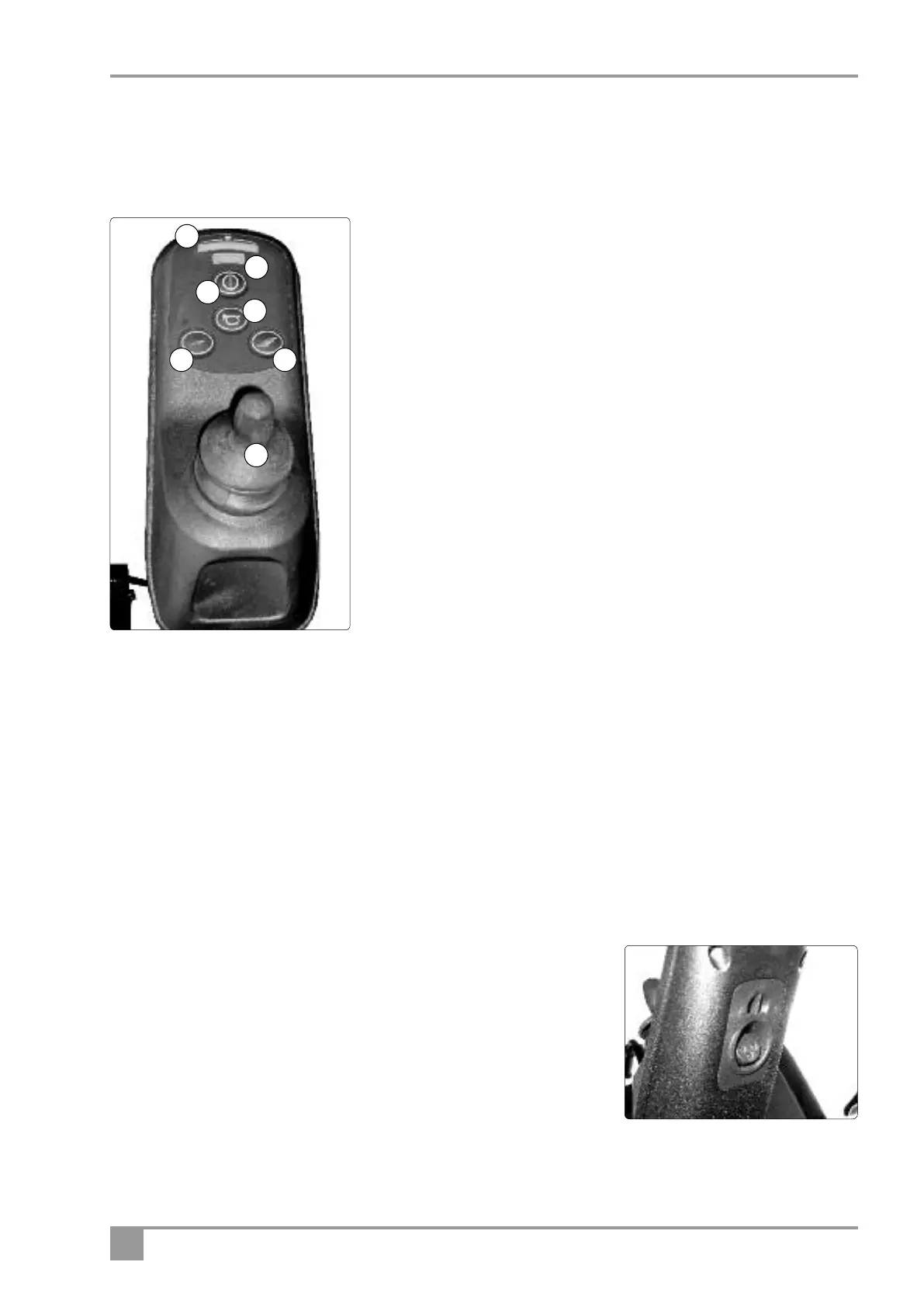
Controls - Joystick Assembly
Before driving your vehicle it is important to familiarise yourself with the controls. Do not attempt to drive the
vehicle before reading the rest of this Handbook.
Description of controls
1. Battery Indicator: These lights show the level of charge in the batteries.
When in the green lights show the batteries are fully charged. When in
t
he yellow and red lights show the batteries need recharging and when
only the red lights show the batteries urgently need recharging. Note:
When the vehicle is climbing an incline or starting off, the level may drop
momentarily; this is normal.
2. Maximum Speed Indicator: This shows what speed setting has been
selected by the controls 5 and 6. The more lights that show, the higher
the maximum speed. It is advisable to set the maximum speed at the
slowest setting until you are familiar with controlling your P321
Powerchair.
3. Ignition On Off Button: Switch the power on and off using the power
button. Remember to switch off when not in use. Do not leave the
ignition on when not in use, especially when charging the vehicle. Note
that this switch can also be used to “lock” the Powerchair to prevent it
being used, or stolen. (see unlocking and locking page 9)
4. Horn: Press the button and the horn will sound. Release and the horn will cease.
5/6. Speed Controls: These controls enable you to increase or decrease the top speed of your Powerchair. When
the speed increase button (6) is pressed the maximum speed the powerchair can achieve is increased; when
the decrease button (5) is pressed the maximum achievable speed is reduced. The speed indicator shows a
number of lamps to indicate the maximum speed set. Set the maximum speed to low until you are confident of
driving your Powerchair safely. Do not adjust the speed when the vehicle is moving, but reset it when you are
stationary. If you become alarmed at your speed, release the joystick and the vehicle will slow down immediately.
7. Joystick: The more you move the joystick forward, the faster you will go forwards. Move the joystick back
and you will go back. Move the joystick to the right and you will turn to the right; move it to the left and
you will turn left.
Charging Point: The charging point is situated beneath the joystick controller
at the front.
4
7
1
2
3
5
6


 To Next Page