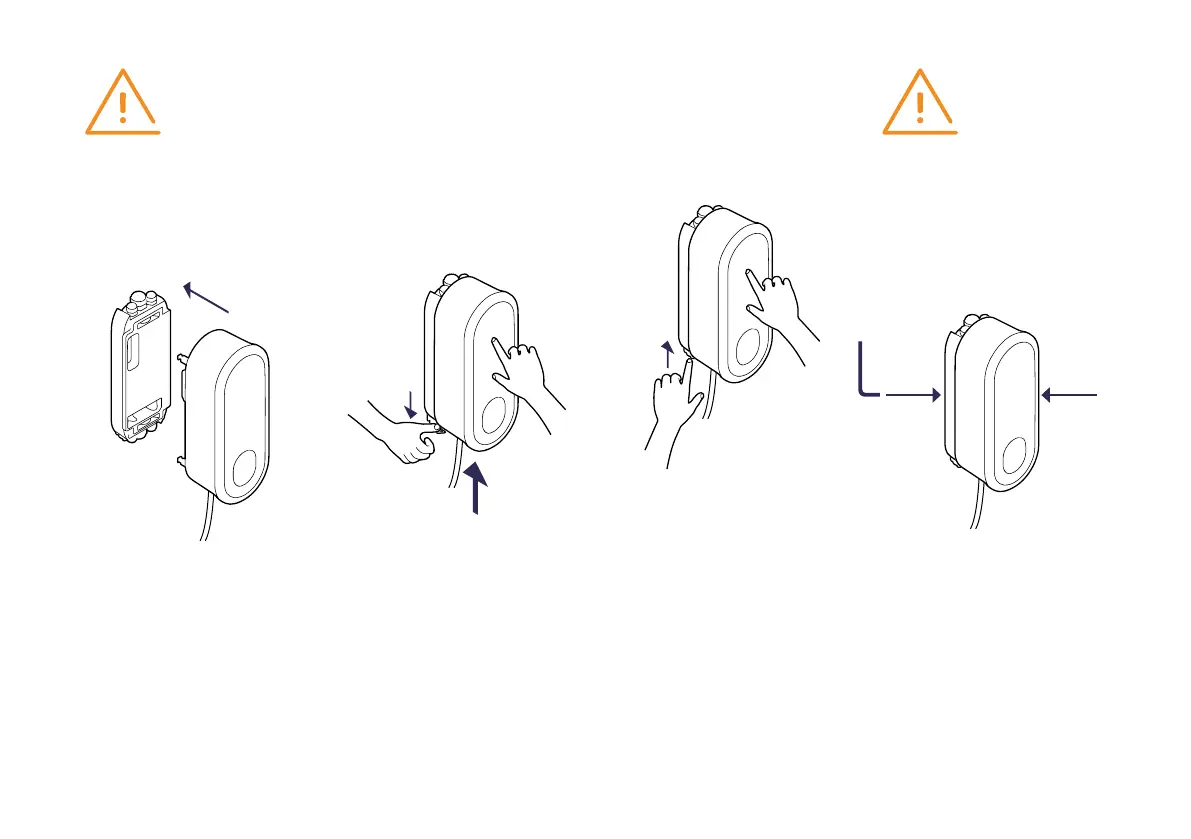
CLICKING THE CHARGER INTO THE DOCK
05
Keep a firm hold on the charger
while pulling down the spring-
loaded locking clip on the Dock.
Now release the locking clip. As
soon as the locking clip is in place
and properly aligned, strongly
press the charger onto the Dock.
06
If necessary, readjust the locking
bracket until it is properly aligned.
Alignment marks (triangular
recesses) are visible on the locking
clip of the Dock. Check that the
locking bracket is fully inserted.
The triangular alignment marks
to the left and right of the locking
bracket must be flush with the
Dock-housing.
04
Place the charger carefully on
the Dock, and push in the charger
until it is fully inserted.
CAUTION
Ensure that the flat ribbon
data cables are not trapped
between the Dock and charger
when mounting the charger.
CAUTION
The set screws should only be
fully inserted when the locking
clip is fully inserted.
07
Tighten the two set screws using
the allen wrench at the rear left
and rear right of the Dock to
secure the locking mechanism
in place and the charger on the
Dock.
08
Power on the Dock circuit.


 To Next Page