12
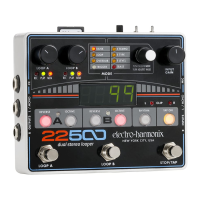
5. RECORD Footswitch
Depending on the 95000’s current mode, the RECORD footswitch serves a few purposes, all of which
enable the 95000 to enter/exit one of the recording modes: Record, Overdub or Punch-In. The red
RECORD LED will light up solid anytime the 95000 is recording or overdubbing audio. The RECORD LED
blinks at a medium rate when the 95000 is in Record-Ready mode. The table below explains the result
of pressing the RECORD footswitch in relation to the current mode of the 95000.
Idle (with loop in memory)
6. PLAY ( ) Footswitch
The PLAY ( ) footswitch is used to toggle Playback on and off. The green PLAY LED will light
anytime the 95000 is playing or overdubbing audio. The table below explains the result of pressing the
PLAY button in relation to the current Record/Playback mode of the 95000. NOTE: Each time a loop
cycles back to the beginning, the PLAY LED blinks once to signify the start of the loop.
Idle (with loop in memory)
Playback or Overdubbing
(Fade-out disabled)
Playback or Overdubbing
(Fade-out enabled)
LED BLINKS until fade-out is
complete, then LED OFF
Record-Ready
(loop in memory)
Playback of current loop if it
contains audio
Overdubbing, sets loop length
7. LOOP Selection Footswitches
Loop selection is incremented or decremented using the LOOP UP and LOOP DOWN footswitches.
Press and hold either footswitch to advance through the loops at a faster speed. The table below
explains the result of pressing the LOOP UP and LOOP DOWN footswitches in relation to the
current mode of the 95000. NOTE: You can also change the current loop by using the VALUE knob.
Refer to the LED DISPLAY AND CONTROL section later in this manual to learn about the use of the
VALUE knob.
Loop increments or decrements by one with each press and release
of the LOOP and footswitches.
Current loop continues to play. Loop increments or decrements and
loop display number blinks. If the blinking loop number contains
audio, the New Loop number begins playback when the old loop
reaches its end point. If the blinking loop number has no audio, the
old loop continues playing indefinitely.
Cancels Record-Ready. Loop increments or decrements by one with
each press and release of the LOOP and footswitches.
Recording New Loop (no change)


 To Next Page