EasyManua.ls Logo

Electro-Harmonix XO MICRO POG - User Manual

Electro-Harmonix XO MICRO POG
2 pages
Print Icon
To Next Page IconTo Next Page
Loading...
FCC COMPLIANCE
Note:
This equipment has been tested and found to comply with the limits for a Class
B digital device, pursuant to part 15 of the FCC Rules. These limits are designed to
provide reasonable protection against harmful interference in a residential
installation. This equipment generates, uses and can radiate radio frequency energy
and, if not installed and used in accordance with the instructions, may cause harmful
interference to radio communications. However, there is no guarantee that
interference will not occur in a particular installation. If this equipment does cause
harmful interference to radio or television reception, which can be determined by
turning the equipment off and on, the user is encouraged to try to correct the
interference by one or more of the following measures:
Reorient or relocate the receiving antenna.
Increase the separation between the equipment and receiver.
Connect the equipment into an outlet on a circuit different from that to
which the receiver is connected.
Consult the dealer or an experienced radio/TV technician for help.
Modifications not expressly approved by the manufacturer could void the user's
authority to operate the equipment under FCC rules.
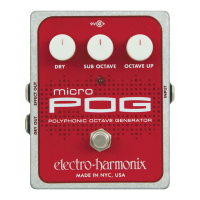
MICRO POG
Polyphonic Octave Generator
Congratulations on your purchase of the XO MICRO POG Polyphonic Octave
Generator. What does that mean exactly? Well, the MICRO POG can
simultaneously generate multiple octaves from your input signal. Whether
you play single notes, arpeggios or full chords, the MICRO POG will track,
every note or chord that you play, with precision. With the MICRO POG, you
can mix together your original "dry signal" with two different octaves (one
above and one below your original note) to create totally new inspiring
tones.
-CONTROLS-
DRY Knob – Controls the output volume of the DRY signal. The DRY signal
is the signal present at the INPUT jack. As this knob is turned clockwise, the
volume of the DRY signal will increase.
SUB OCTAVE Knob – Controls the output volume of the SUB OCTAVE
signal. The SUB OCTAVE signal is one octave below the original input signal,
half the frequency of the input signal. As this knob is rotated clockwise, the
volume of the SUB OCTAVE signal will increase.
OCTAVE UP Knob – Controls the output volume of the OCTAVE UP signal.
The UP OCTAVE signal is one octave above the original input signal or twice
the frequency of the original input signal. The volume of the UP OCTAVE
signal will increase as this knob is rotated clockwise.
STATUS LED – This LED indicates the current state of the unit. When the
LED is lit up, the box is in EFFECT mode. When the LED is off, the box is in
BYPASS mode. Pressing the Footswitch will toggle between effect and
bypass modes.
INPUT Jack – This ¼” jack is the audio input to the POG. The input
impedance presented at the Input Jack is 2 M.
WARNING: Use only the 9.6VDC/200mA AC adapter the Micro POG
comes supplied with. Do not use any other AC adapters. Using other AC
adapters, even those made by Electro-Harmonix, could cause harm to the
unit, the adapter or you. The Micro POG does not use batteries.
Question and Answer IconNeed help?

Do you have a question about the Electro-Harmonix XO MICRO POG and is the answer not in the manual?

Summary

MICRO POG Controls

DRY Knob

Controls the output volume of the DRY signal. Clockwise rotation increases volume.

SUB OCTAVE Knob

Controls the output volume of the SUB OCTAVE signal, one octave below the original input.

OCTAVE UP Knob

Controls the output volume of the OCTAVE UP signal, one octave above the original input.

STATUS LED

Indicates the current state of the unit: ON for EFFECT mode, OFF for BYPASS mode.

INPUT Jack

The 1/4" audio input jack for the POG, presenting a 2 MΩ input impedance.

Operation Notes and Sound Settings

12-string Guitar Setting

Simulate a 12-string guitar by adjusting INPUT (60%) and +1 OCTAVE (70%) knobs.

8-string;16-string Bass Setting

Achieve realistic bass tones by balancing dry signal with +1 octave for more strings.

Phat Bass Setting

Turn guitar into bass by setting INPUT to 50-75% and SUB OCTAVE to maximum.

Organ Setting

Create a 3-stop organ pad sound, suggest using with modulation pedals.

Overview

The Electro-Harmonix MICRO POG Polyphonic Octave Generator is a device designed to simultaneously generate multiple octaves from an input signal. It can track single notes, arpeggios, or full chords with precision. The MICRO POG allows users to mix their original "dry signal" with two different octaves: one below and one above the original note, enabling the creation of new and inspiring tones.

Function Description:

The core function of the MICRO POG is polyphonic octave generation. It takes an input audio signal and processes it to produce three distinct output signals:

  • DRY Signal: The original, unprocessed input signal.
  • SUB OCTAVE Signal: A signal one octave below the original input signal, meaning it has half the frequency of the input.
  • OCTAVE UP Signal: A signal one octave above the original input signal, meaning it has twice the frequency of the input.

These three signals can be independently controlled and mixed to achieve a wide range of sonic textures.

Controls:

The device features three main control knobs and a status LED:

  • DRY Knob: This knob controls the output volume of the DRY signal. Turning it clockwise increases the volume of the original input signal present at the output.
  • SUB OCTAVE Knob: This knob controls the output volume of the SUB OCTAVE signal. Rotating it clockwise increases the volume of the signal that is one octave below the input.
  • OCTAVE UP Knob: This knob controls the output volume of the OCTAVE UP signal. Turning it clockwise increases the volume of the signal that is one octave above the input.
  • STATUS LED: This LED indicates the current operational mode of the unit. When the LED is lit, the device is in EFFECT mode, meaning the octave generation is active. When the LED is off, the device is in BYPASS mode, meaning the input signal passes through unprocessed. The Footswitch toggles between these two modes.

Important Technical Specifications:

  • Power Supply: The MICRO POG requires a 9.6VDC/200mA AC adapter. It is crucial to use only the supplied adapter and avoid other AC adapters, even those from Electro-Harmonix, as this could cause harm to the unit, adapter, or user. The device does not use batteries.
  • Input Jack: This is a 1/4" jack for the audio input. The input impedance presented at this jack is 2 MΩ.
  • EFFECT OUT Jack: This 1/4" jack outputs the combined effect signal (dry, sub octave, and octave up). The output impedance at this jack is 250 Ω.
  • DRY OUT Jack: This 1/4" jack outputs a buffered version of the input signal. The output impedance at this jack is 250 Ω. This allows for the original signal to be routed separately if desired.
  • 9V Power Jack: This jack, located at the top of the Micro POG, is where the output plug from the AC Adapter is connected. The Micro POG accepts Boss-style AC Adapters.

Usage Features:

The manual provides several useful sound settings and operational notes to help users get started and explore the device's capabilities:

  • 12-string Guitar: To transform a 6-string guitar into a 12-string sound, set all knobs to 0. Bring the INPUT knob (presumably the DRY knob, as "INPUT knob" is mentioned but not explicitly labeled as a control) to about 60%. While listening to the dry signal, rotate the +1 OCTAVE knob (OCTAVE UP knob) clockwise to about 70%. A touch of the Sub Bass (SUB OCTAVE knob) can be added for extra body.
  • 8-string/16-string Bass: When used with a 4-string or 5-string bass, bring up the dry bass signal (DRY knob) and rotate the +1 octave knob (OCTAVE UP knob) until the proper balance is achieved. This setup can create realistic 8-string and 10-string bass sounds, with tracking improving with more strings on the input instrument.
  • Phat Bass: To turn a guitar into a great-sounding bass, set all knobs to 0. Rotate the INPUT Knob (DRY knob) up to 50-75%. Set the SUB OCTAVE knob to its maximum position. This configuration provides perfect tracking and a rich bass sound suitable for adding bottom to performances or demos.
  • Organ: The MICRO POG can create a "3 stop organ" sound. When combined with a volume pedal, it can produce an interesting pad. Further modulation from other pedals like a Nano Small Stone, Polyphase, XO Clone theory, Stereo Pulsar, or other favorite modulation pedals can create animated tones.

Maintenance Features:

  • FCC Compliance: The device has been tested and found to comply with Class B digital device limits under part 15 of the FCC Rules. These rules are designed to provide reasonable protection against harmful interference in residential installations. If the equipment causes harmful interference to radio or television reception, users are advised to:
    • Reorient or relocate the receiving antenna.
    • Increase the separation between the equipment and receiver.
    • Connect the equipment into an outlet on a circuit different from that to which the receiver is connected.
    • Consult the dealer or an experienced radio/TV technician for help.
    • Modifications not expressly approved by the manufacturer could void the user's authority to operate the equipment under FCC rules.
  • Warranty Information: Electro-Harmonix offers a one-year warranty from the date of purchase, covering defects in materials and workmanship. This applies only to original purchasers who bought their product from an authorized Electro-Harmonix retailer. Repaired or replaced units are warranted for the unexpired portion of the original warranty term.
  • Product Registration: Users are encouraged to register online at http://www.ehx.com/product-registration or complete and return the enclosed warranty card within 10 days of purchase.
  • Service & Returns: If service is needed within the warranty period, customers in the USA and Canada must obtain a Return Authorization Number (RA#) from EHX Customer Service before returning the product. The returned unit must include a written description of the problem, the user's name, address, telephone number, e-mail address, RA#, and a copy of the receipt showing the purchase date. Customers outside these regions should contact EHX Customer Service at info@ehx.com or +1-718-937-8300 for warranty repair information.

For further information or to hear demos of EHX pedals, users can visit www.ehx.com or email info@ehx.com.

Electro-Harmonix XO MICRO POG Specifications

General IconGeneral
BrandElectro-Harmonix
ModelXO MICRO POG
CategoryRecording Equipment
LanguageEnglish

Related product manuals