EasyManua.ls Logo

Electro-Harmonix XO OCTAVE MULTIPLEXER - User Manual

Electro-Harmonix XO OCTAVE MULTIPLEXER
2 pages
Print Icon
To Next Page IconTo Next Page
Loading...
FCC COMPLIANCE
Note:
This equipment has been tested and found to comply with the limits for a Class B digital
device, pursuant to part 15 of the FCC Rules. These limits are designed to provide reasonable
protection against harmful interference in a residential installation. This equipment generates,
uses and can radiate radio frequency energy and, if not installed and used in accordance with
the instructions, may cause harmful interference to radio communications. However, there is no
guarantee that interference will not occur in a particular installation. If this equipment does
cause harmful interference to radio or television reception, which can be determined by turning
the equipment off and on, the user is encouraged to try to correct the interference by one or
more of the following measures:
Reorient or relocate the receiving antenna.
Increase the separation between the equipment and receiver.
Connect the equipment into an outlet on a circuit different from that to which the
receiver is connected.
Consult the dealer or an experienced radio/TV technician for help.
Modifications not expressly approved by the manufacturer could void the user's authority to
operate the equipment under FCC rules.
OCTAVE MULTIPLEXER
Sub-Octave Generator
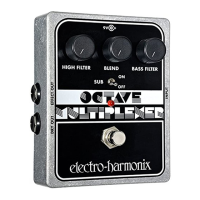
The Electro-Harmonix OCTAVE MULTIPLEXER is the result of many years of
engineering research. To get the best results from it please put aside an
hour or two for practice in a quiet room…just you, your guitar and amp, and
the OCTAVE MULTIPLEXER.
The OCTAVE MULTIPLEXER produces a sub-octave note one octave below
the note you play. With two filter controls and a SUB switch, the OCTAVE
MULTIPLEXER allows you to shape the tone of the sub-octave from deep
bass to fuzzy sub-octaves.
-CONTROLS-
HIGH FILTER Knob – Adjusts a filter that will shape the tone of the sub-
octave’s higher order harmonics. Turning the HIGH FILTER knob clockwise
will make the sub-octave sound more gnarly and fuzzy.
BASS FILTER Knob – Adjusts a filter that will shape the tone of the sub-
octave’s fundamental and lower order harmonics. Turning the BASS FILTER
knob counter-clockwise will make the sub-octave sound deeper and bassier.
PLEASE NOTE: the BASS FILTER knob is only active when the SUB switch is
set to ON.
SUB Switch Switches the Bass Filter in and out. When SUB is set to ON
the Bass Filter and its corresponding knob are activated. When the SUB
switch is set to OFF, only the High Filter is active. Turning the SUB switch on
gives the sub-octave a deeper, bassier sound.
BLEND Knob – This is a wet/dry knob. Counter-clockwise is 100% dry.
Clockwise is 100% wet.
STATUS LED – When the LED is lit; the Octave Multiplexer effect is active.
When the LED is off, the Octave Multiplexer is in True Bypass Mode. The
footswitch engages/disengages the effect.
INPUT Jack Connect your instrument to the input jack. The input
impedance presented at the input jack is 1Mohm.
Question and Answer IconNeed help?

Do you have a question about the Electro-Harmonix XO OCTAVE MULTIPLEXER and is the answer not in the manual?

Summary

Octave Multiplexer Controls

High Filter Knob

Adjusts a filter for the sub-octave's higher harmonics. Clockwise makes the sound more gnarly and fuzzy.

Bass Filter Knob

Adjusts a filter for the sub-octave's fundamental and lower harmonics. Counter-clockwise for deeper, bassier sound.

Sub Switch

Activates the Bass Filter when ON. When OFF, only the High Filter is active. Provides a deeper, bassier sound.

Blend Knob

Wet/dry control. Counter-clockwise is 100% dry, clockwise is 100% wet.

Status LED and Footswitch

LED indicates active effect. Footswitch engages/disengages effect. OFF means True Bypass.

Input Jack

Connect your instrument to this jack. The input impedance is 1Mohm.

Output and Power Jacks

Effect Out Jack

Connect this jack to your amplifier for the Octave Multiplexer's output signal.

Dry Out Jack

Outputs the original instrument signal separately from the sub-octave.

9 V Power Jack

Connects to a 9V battery or a 9VDC battery eliminator (min 100mA, center negative).

Operating Instructions and Hints

Filter Usage by String

Use Bass Filter for bottom strings (SUB ON) and High Filter for higher strings (SUB OFF).

Sub Switch Guitar Setting

Typically ON for guitars for a deep bass sound, but can be OFF for other instruments or different guitar tones.

Playing Technique

Primarily a one-note device. Dampen silent strings, especially on rising runs.

Clean Triggering Tips

Use rhythm pickup, play away from bridge, and ensure strings are not worn or dirty.

Power and Battery Information

Internal Battery Power

Powered by internal 9-volt battery, activated by plugging into input jack. Remove cable when not in use.

Battery Replacement

Requires removing 4 bottom screws to access and change the 9-volt battery.

Warranty Information

Warranty Registration

Register online or return card within 10 days of purchase for warranty.

Service and Contact

Contact EHX Customer Service for warranty repairs, obtain RA#, and include problem description.

Overview

The Electro-Harmonix OCTAVE MULTIPLEXER is a sub-octave generator designed to produce a note one octave below the one you play. This effect pedal allows for extensive tone shaping of the sub-octave sound, ranging from deep bass to fuzzy textures, through its two filter controls and a SUB switch. To achieve the best results, it is recommended to practice with the device in a quiet environment.

Function Description

The core function of the OCTAVE MULTIPLEXER is to generate a sub-octave note. This means that for every note you play on your instrument, the pedal will produce a corresponding note that is exactly one octave lower. The device is equipped with several controls to manipulate this sub-octave sound:

  • HIGH FILTER Knob: This control adjusts a filter that shapes the higher-order harmonics of the sub-octave. Turning this knob clockwise will introduce a more "gnarly" and "fuzzy" quality to the sub-octave sound.
  • BASS FILTER Knob: This control adjusts a filter that shapes the fundamental and lower-order harmonics of the sub-octave. Turning this knob counter-clockwise will make the sub-octave sound deeper and bassier. It's important to note that the BASS FILTER knob is only active when the SUB switch is set to ON.
  • SUB Switch: This switch engages or disengages the Bass Filter. When the SUB switch is set to ON, both the Bass Filter and its corresponding knob are activated, resulting in a deeper, bassier sub-octave sound. When the SUB switch is set to OFF, only the High Filter remains active.
  • BLEND Knob: This is a wet/dry control. When turned fully counter-clockwise, the output is 100% dry (only the original instrument signal). When turned fully clockwise, the output is 100% wet (only the sub-octave effect). This allows you to mix the original signal with the effect to your preference.
  • STATUS LED: This LED indicates whether the Octave Multiplexer effect is active. When the LED is lit, the effect is engaged. When the LED is off, the pedal is in True Bypass Mode, meaning the signal passes through without any effect processing. The footswitch toggles between these two states.
  • INPUT Jack: This is where you connect your instrument.
  • EFFECT OUT Jack: This is the output of the Octave Multiplexer, which should be connected to your amplifier.
  • DRY OUT Jack: This jack provides a direct connection to the Input Jack, allowing you to separately amplify your original instrument signal independently of the sub-octave effect. This can be useful for creating layered sounds or for specific live setups.

Usage Features

The OCTAVE MULTIPLEXER is primarily designed as a one-note device, meaning it performs best when playing single notes rather than chords. If attempting to play chords, the lowest string must be struck significantly harder than the others for proper tracking. To ensure clean triggering, it is recommended to dampen silent strings, especially during rising runs.

Playing Technique and Tone Shaping:

  • Bass Filter Usage: The Bass Filter is ideal for emphasizing the lowest fundamental note, particularly when playing on the bottom strings. For the deepest sound, set the knob counter-clockwise and ensure the SUB switch is ON.
  • High Filter Usage: For higher strings or when playing other instruments, the High Filter is typically used, and the SUB switch should be turned OFF.
  • SUB Switch in Guitar Usage: When using the MULTIPLEXER with a guitar to achieve a deep bass sound, the SUB switch should generally be ON. If the SUB switch is OFF, the unit can accept much higher notes and inputs from other instruments. Some guitars may track better with the switch set to OFF.
  • Addressing Body Resonance: Some guitars may have body resonance that over-emphasizes certain frequencies. If these frequencies coincide with the first overtone of a played note (an octave above the fundamental), the OCTAVE MULTIPLEXER might mistakenly trigger the overtone, leading to a "yodeling effect." To mitigate this, it's often helpful to use the rhythm pickup (closest to the fingerboard) as it typically provides the strongest fundamental. Setting the tone filter controls to a mellow setting and playing the strings well away from the bridge can also help.

Powering the Device:

The Octave Multiplexer can be powered by a 9V battery or an optional 9VDC battery eliminator. When using a battery, power is activated by plugging into the INPUT jack. To conserve battery life, the input cable should be removed when the unit is not in use. If a battery eliminator is used, the pedal will remain powered as long as the wall-wart is plugged in. The battery can be left in or removed when using an eliminator.

Maintenance Features

Battery Replacement:

To change the 9-volt battery, you will need to remove the four screws located on the bottom of the Octave Multiplexer. Once the screws are removed, the bottom plate can be taken off to access and replace the battery. It is crucial to avoid touching the circuit board while the bottom plate is off to prevent any potential damage to components.

Troubleshooting Dirty Triggering:

One common cause of "dirty triggering" (where the sub-octave sound glitches in the middle of a sustained note) is worn or dirty strings. Worn strings can develop small kinks that prevent proper contact with the frets, causing overtones to go sharp. Replacing worn or dirty strings can often remedy this issue.

FCC Compliance:

The device has been tested and found to comply with Class B digital device limits, as per part 15 of the FCC Rules. These limits are designed to provide reasonable protection against harmful interference in a residential installation. If the equipment causes harmful interference to radio or television reception, which can be determined by turning the equipment off and on, users are encouraged to try to correct the interference by:

  • Reorienting or relocating the receiving antenna.
  • Increasing the separation between the equipment and receiver.
  • Connecting the equipment into an outlet on a circuit different from that to which the receiver is connected.
  • Consulting the dealer or an experienced radio/TV technician for help. Modifications not expressly approved by the manufacturer could void the user's authority to operate the equipment under FCC rules.

Electro-Harmonix XO OCTAVE MULTIPLEXER Specifications

General IconGeneral
TypeOctave Pedal
TechnologyAnalog
Inputs1 x 1/4"
Outputs1 x 1/4"
BypassTrue Bypass
Current Draw10 mA
Power Supply9V DC
Input Impedance1M Ohm
Output Impedance10k Ohms

Related product manuals