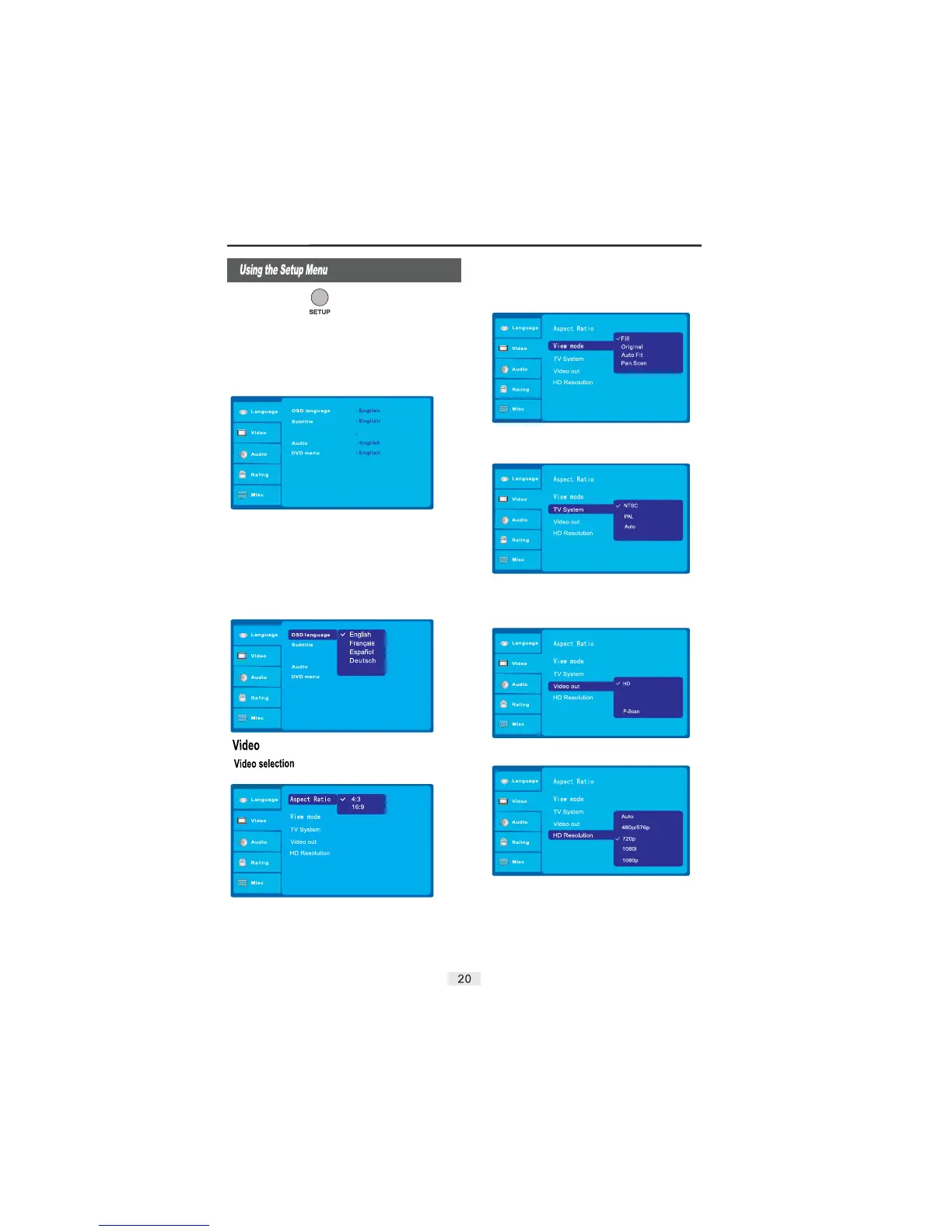
Press the button to enter the DVD player setup menu.
(This can only be accessed when the unit is not playing back
a disc).
1) Press the or buttons to change items.
2) Press the button to enter the submenu.
3) Press the to confirm and return to the upper menu.
4) Press the button at any time to exit the setup menu.
SETUP
LEFT RIGHT
ENTER
ENTER
SETUP
Video:
Audio:
Rating:
Misc:
Language
Video setup.
Audio setup.
Parental control setup.
Further audio / video settings.
: Language setup
Note: The language setup is used to set the
language of the OSD (On-Screen Display),
Subtitle, MEPG 4, Audio and DVD Menus.
View Mode: This option allows you to set the TV viewing mode:
Fill, Original, Auto Fit, or Pan Scan..
TV System: This option allows you to set the type of system your
television uses: NTSC, PAL and Auto. Choose the proper system
that relates to your TV (Refer to your Televisions instruction
manual if you are unsure).
Video Output: This Option is used to select the appropriate signal
type for a cable connection.
MEPG 4 Subtitle
Italiano
YUV
The aspect ratio of the picture provided by the DVD player can
vary depending on the type of TV in use.
4:3: Choose this setting if your DVD player is connected to a
standard ratio TV.
16:9: Choose this setting when you connect to a wide screen TV.
This setting will allow the original aspect ratio to be displayed.
HD Resolution: This option is used for a High Definition signal.
Choose any of the available resolution options: Auto, 480p/576p,
720p, and 1080i. Please use an HDMI cable when setting this
option.
MEPG 4 Subtitle
Off
Composite


 To Next Page