User manual
9
4 First start
Read the safety precautions on page 5 before using the cabinet.
Read this User Manual before beginning to use the drying cabinet.
• Make sure that the cabinet is secured to the wall.
• Make sure that no packaging material is left out.
• Use a mild dish soap with hot water to wipe the inside and outside of the drying cabinet. Wipe thoroughly.
• If the cabinet has been on its side or tilted sharply, it must stand upright for 24 hours before being started.
4.1 Language setting
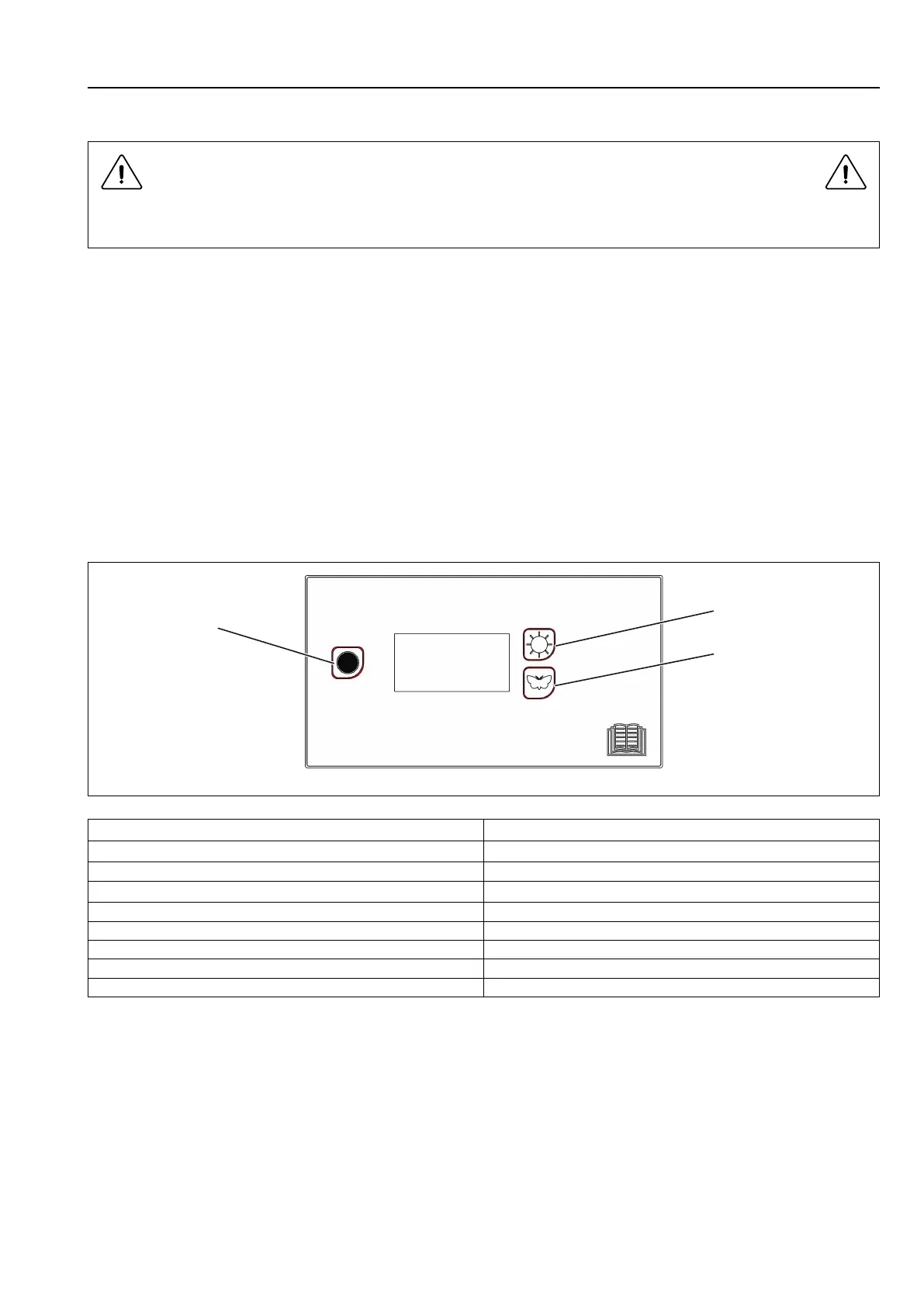
Press Stop (1) + Sun (2) + Butterfly (3). Press the Stop button first and then the other buttons simultaneously. The
display lights up and shows a flashing value on the top row.
Step forward or back with the Sun (increase) or Butterfly (decrease) button until "P 105" is shown.
Once the display shows "P105", press Stop to confirm. The row below will now flash with the language symbol. Each
language is assigned a number symbol as listed below. The unit is factory-set to "1" (Swedish).
Step to the required language with the Sun or Butterfly button.
Press Stop to save.
Press Stop + Butterfly (Stop button first) to close.
fig.W01296
Language symbol Display language
0 English
1 Swedish
2 Norwegian
3 Danish
4 Finnish
5 Russian
6 French
7
German


 To Next Page