5
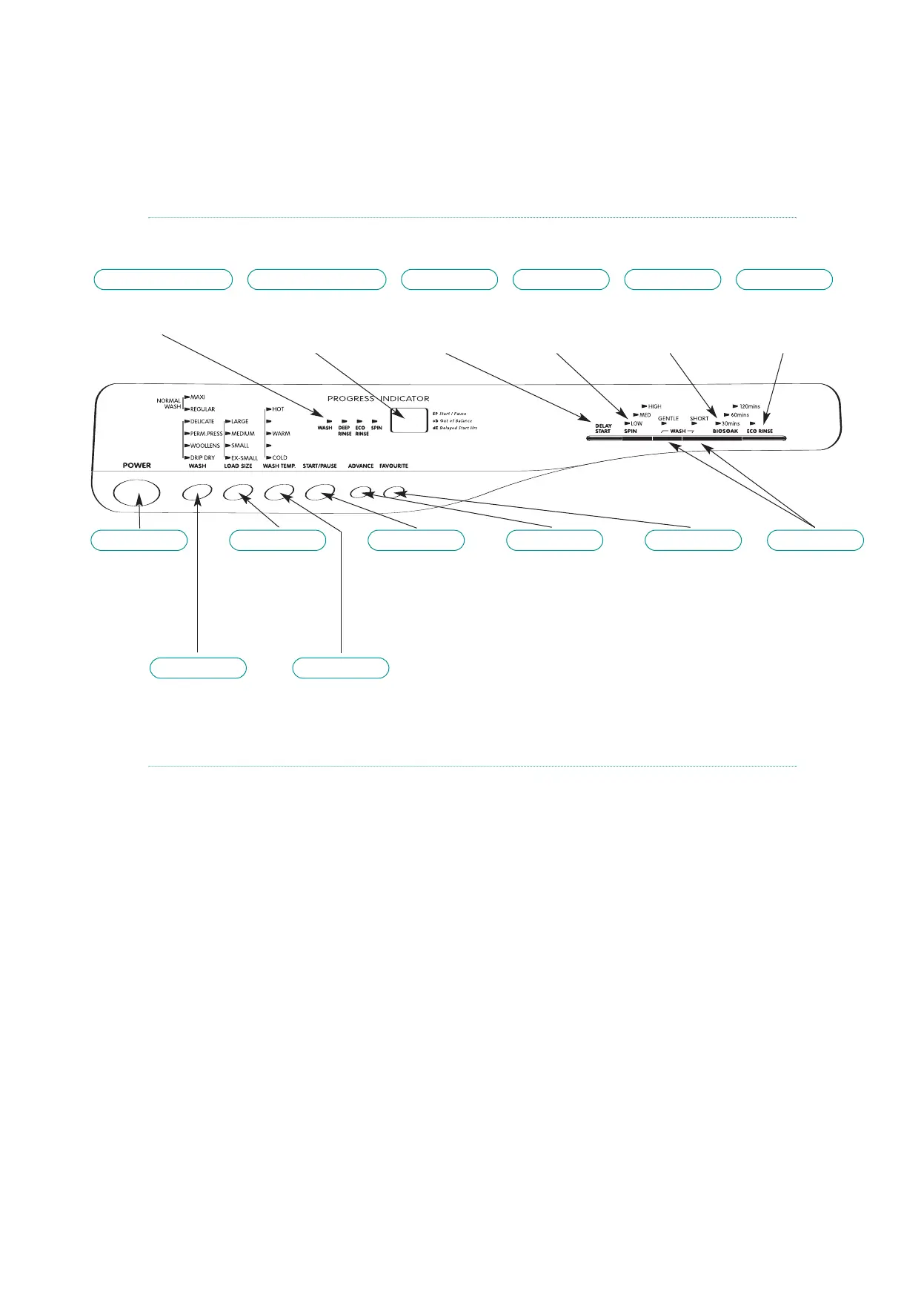
The Control Panel
MODEL 816
POWER
❊ Switches the
power on and
off see page 9.
LOAD SIZE
❊ Sets the water
level in the
wash bowl see
page 10.
START/PAUSE
❊ Starts the wash
cycle see page 10.
❊ Puts the washing
machine into pause
see page 11.
ADVANCE
❊ Advances the
programme see
page 11.
❊ Sets favourite
cycle see page 12.
FAVOURITE
❊ Starts your
favourite wash
programme see
page 12.
WASH
❊ Sets the wash
programme
see page 9.
WASH TEMP.
❊ Sets the temperature
of the wash water
see page 10.
WASH
❊ Sets the wash
action see page 15.
❊ Sets short wash
see page 15.
PROGRESS
INDICATOR
❊ Indicates stage of
wash programme
ELECTRONIC
DISPLAY
❊ Displays cycle times.
❊ Displays other modes
see page 11
DELAY START
❊ Selects the
delay start
see page 13
SPIN
❊ Sets the spin
speed
see page 14
BIO
SOAK
❊ Sets the soak
time
see page 14
ECO
RINSE
❊ Selects the
rinse cycle.
See page 12
Button and pad response
Once the washing machine has commenced a wash cycle the only
button or pad that will have any effect is the START/PAUSE pad.
Pressing this pad will stop the wash programme allowing changes
to be made.
When you press a button or pad you will get a short ‘BEEP’ to
acknowledge the entry.
If you press a button or pad that is not serving a purpose at this
particular time, a long ‘ERROR BEEP’ will be heard.
Sometimes you will get a delay after pressing a button or pad
before the washing machine starts the particular sequence.
NOTE: All functions of the washing machine will stop when the lid is open,
except for pump out before a spin.
When the lid is open the electronic display will show ‘Ld’
accompanied by a series of ‘beeps’.



 To Next Page