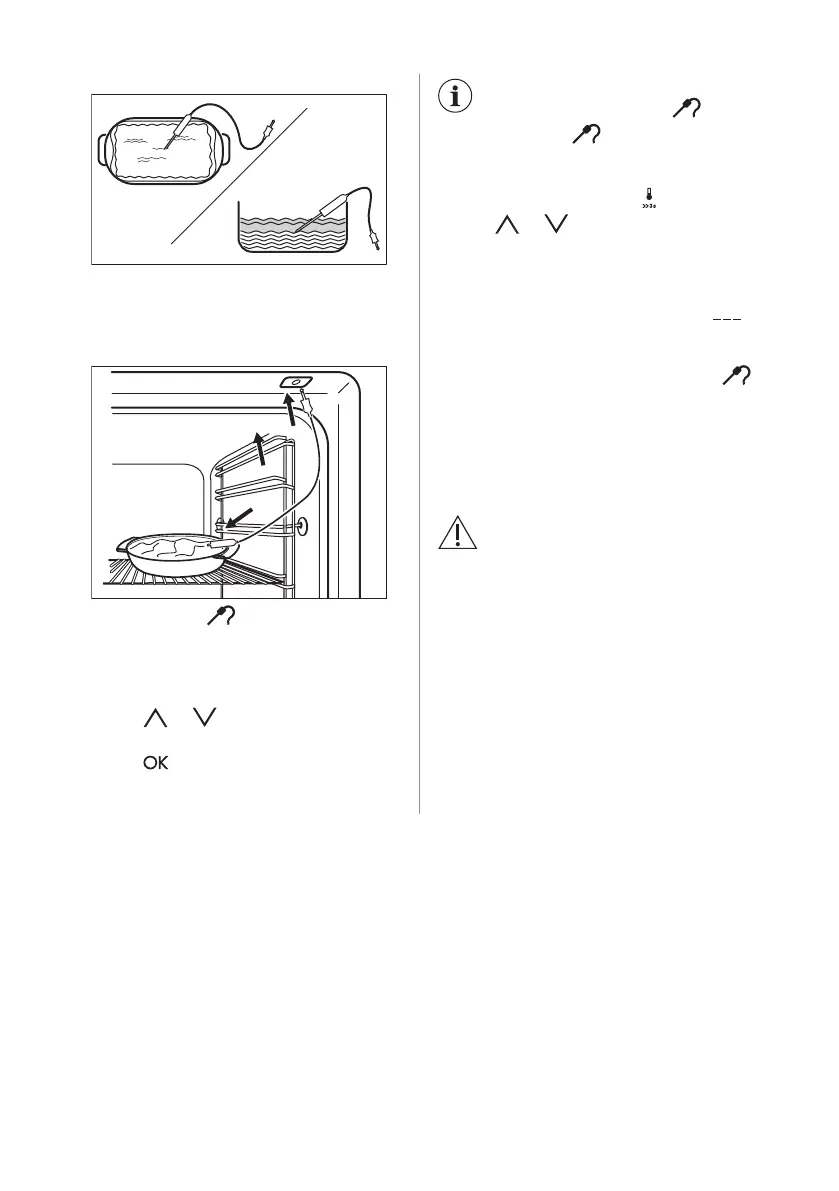
bottom of a baking dish.
4. Cover the core temperature sensor with
the remaining ingredients.
5. Put the plug of the core temperature
sensor into the socket on the side wall of
the appliance.
The display shows flashing and the
default set core temperature. The
temperature is 60 °C for the first operation,
and the last set value for each subsequent
operation.
6. Touch or to set the core
temperature.
7. Touch or the settings save
automatically after 5 seconds.
You can set the core
temperature only when
flashes. If is in the
display but does not flash
before you set the core
temperature, touch
and
or to set a new value.
8. Set the oven function and the oven
temperature.
The display shows the current core
temperature and the heat up symbol .
When the dish is at the set core temperature,
an acoustic signal sounds for 2 minutes and
the value of the core temperature and
flash. The appliance deactivates.
9. Touch a sensor field to deactivate the
acoustic signal.
10. Remove the core temperature sensor
from the socket and remove the dish
from the appliance.
WARNING!
There is a risk of burns as the
core temperature sensor
becomes hot. Be careful when
you unplug it and remove it from
the dish.
10.2 Inserting accessories
A small indentation at the top increases
safety. The indentations are also anti-tip
devices. The high rim around the shelf
prevents cookware from slipping of the shelf.
18 ENGLISH



 To Next Page