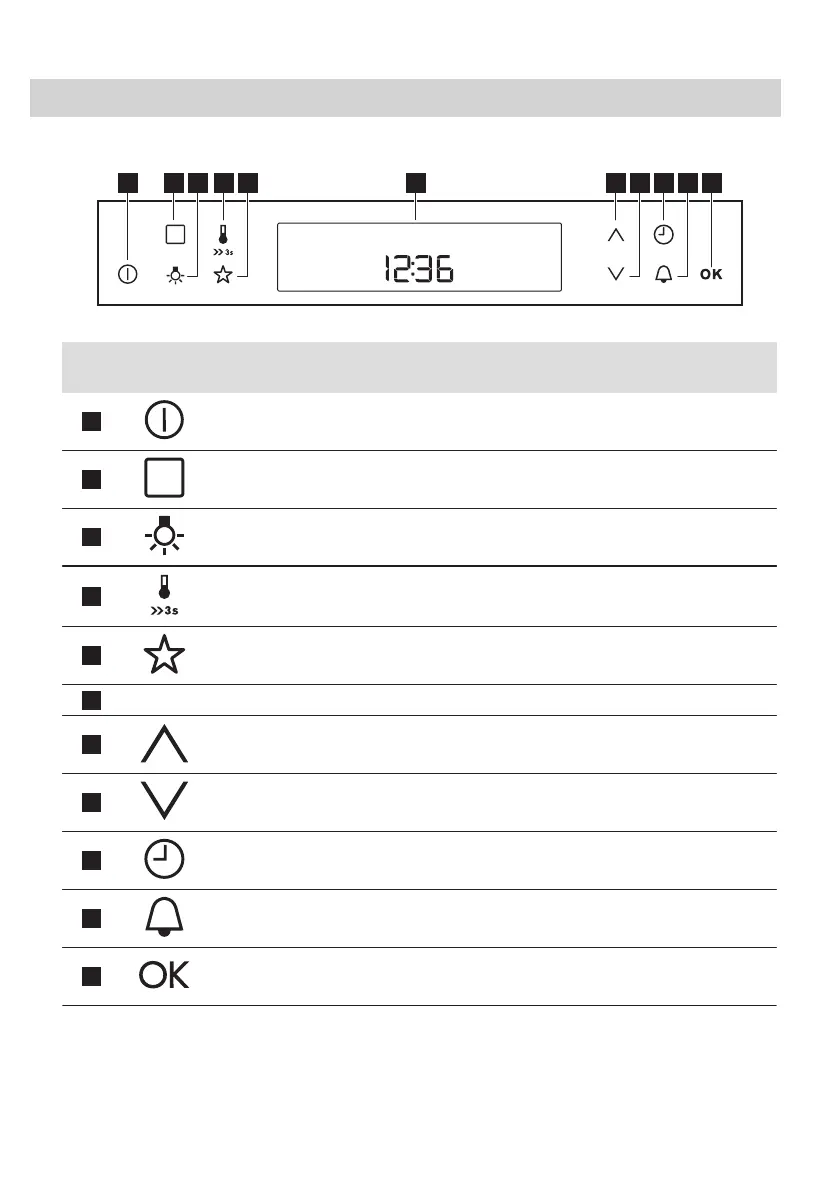
5. CONTROL PANEL
5.1 Electronic programmer
Use the sensor fields to operate the oven.
Sensor
Field
Function Description
1
ON / OFF To turn the oven on and off.
2
Options To set a heating function, a cleaning function or an automatic
programme.
3
Oven Light To turn the oven lamp on and off.
4
Temperature / Fast Heat
Up
To set or check the temperature.
Press and hold it for three seconds to turn on and off the
function: Fast Heat Up.
5
My Favourite Programme To store your favourite programme. Use it to access your fa‐
vourite programme directly, also when the oven is off.
6
-
Display Shows the current settings of the oven.
7
Up To move up in the menu.
8
Down To move down in the menu.
9
Clock To set the clock functions.
10
Minute Minder To set the Minute Minder.
11
OK To confirm the selection or setting.
10 ENGLISH




 To Next Page