Setting Oven Controls
I lilt,, ILl, I 11
i ;
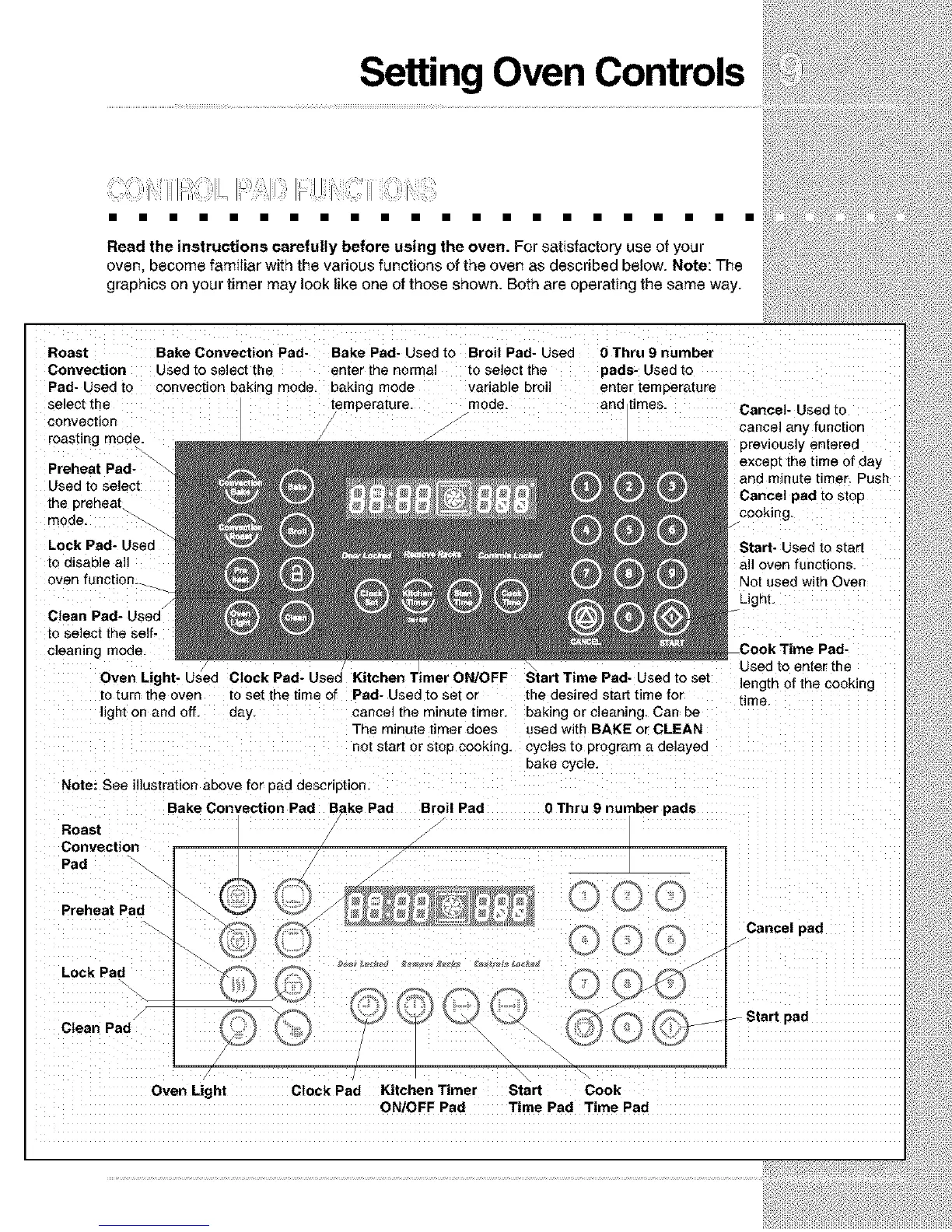
Read the instructions carefully before using the oven. For satisfactory use of your
oven, become familiar with the various functions of the oven as described below. Note: The
graphics on your timer may look like one of those shown. Both are operating the same way.
Roast
Convection
Pad- Used to
select the
convection
roasting mode.
Preheat Pad-
Used to select
the prenea_
mode.
Lock Pad- Used
to disable all
oven function._
Clean Pad- Used
to select the self-
cleaning mode.
Bake Convection Pad- Bake Pad- Used to Broil Pad- Used
Used to select the enter the normal ro select the
convection baking mode, baking mode variable broil
temperature mode.
Oven Light- Used
to turn the oven to set the time of
light on and off. day
0 Thru 9 number
pads- Used [o
enter temperature
and Limes. Cancel- Used to
cancel any function
previously entered
except the time of day
and minute timer. Push
Cancel pad to stop
cooking
Start- Used to start
all oven functions
Not used with Oven
Light.
Pad- Used to set or
cancel the minute timer.
The minute timer does
not start or stop cooking.
Pad-
Used to enter the
leng[n of the cooking
the desired start time for time
baking or cleaning Can be
used with BAKE or CLEAN
cycles to program a delayed
bake cycle.
Note: See illustration above for 3ad description
Bake Convection Pad Bake Pad Broil Pad
Roast
Convection
Pad
Preheat Pad
Lock Pad
Clean Pad
0 Thru 9 number pads
Cancel pad
-- Start pad
Oven Light Clock Pad Kitchen Timer Start Cook
ON/OFF Pad Time Pad Time Pad







 To Next Page