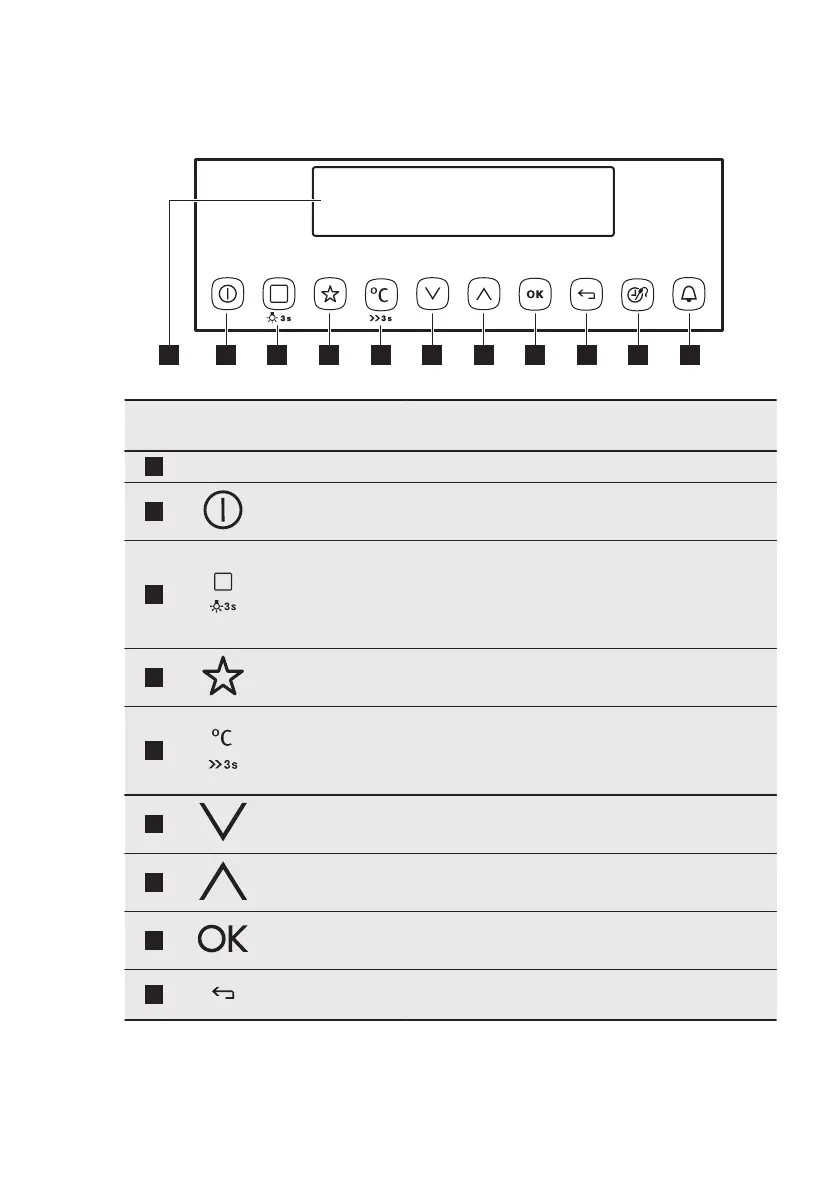
4. CONTROL PANEL
4.1 Electronic programmer
Use the sensor fields to operate the appliance.
Sensor
field
Function Comment
1
- Display Shows the current settings of the appliance.
2
ON / OFF To turn on and off the appliance.
3
Heating Func-
tions or Recipes
Press the sensor field to choose the menu: Rec-
ipes or Heating Functions. To turn on or turn off
the light, press the field for 3 seconds. You can
turn on the light also when the appliance is
turned off.
4
Favourites To save and access your favourite programmes.
5
Temperature se-
lection
To set the temperature or show the current tem-
perature in the appliance. Press the field for 3
seconds to turn on or turn off the function: Fast
Heat Up.
6
Down key To move down in the menu.
7
Up key To move up in the menu.
8
OK To confirm the selection or setting.
9
Back key To go back one level in the menu. To show the
main menu, press the field for 3 seconds.
www.electrolux.com8



 To Next Page