AnwendungAnwendung
(2 min.)
BEEP
min
BEEP
- Press button with your finger tip –> set within 5 seconds!
Start-up
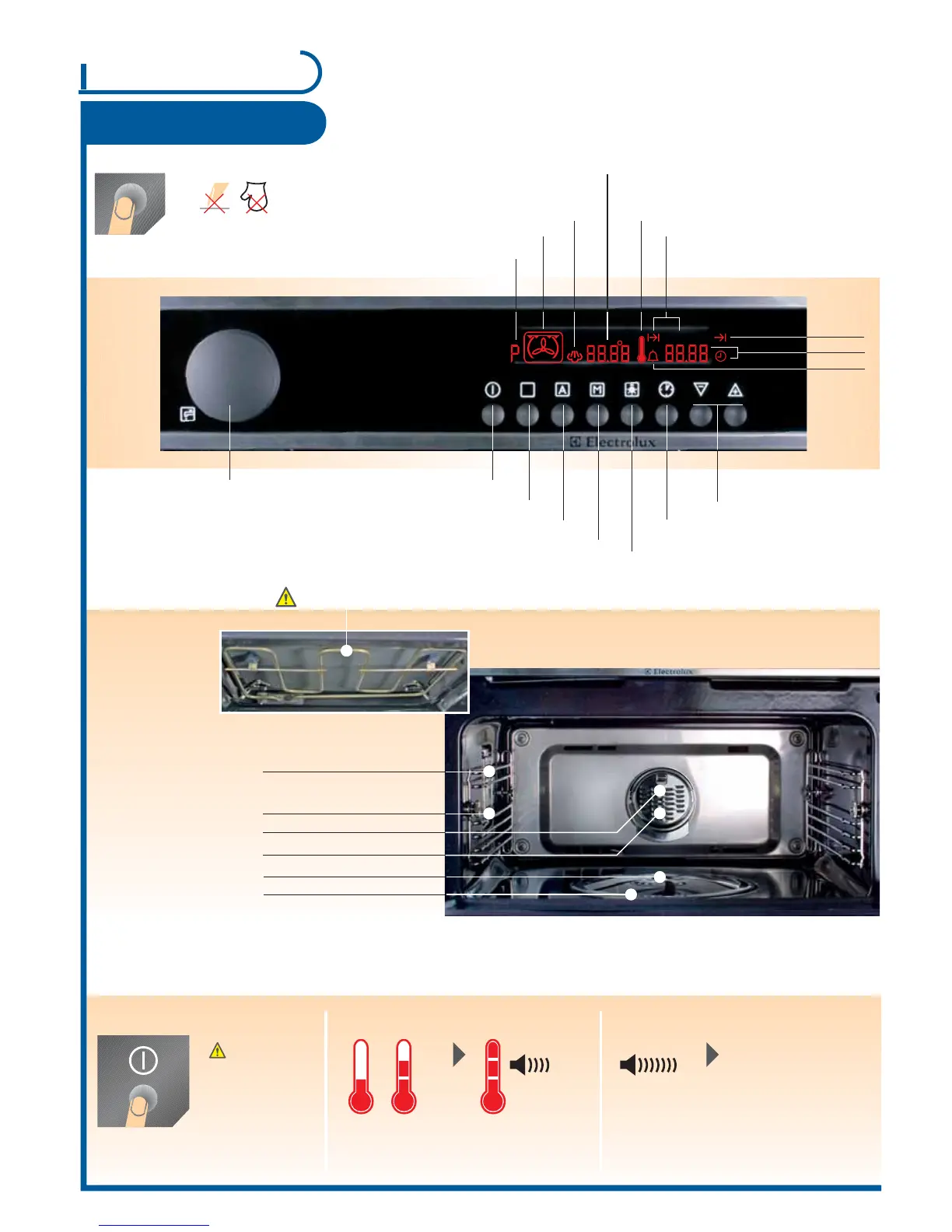
Control panel
Use
Oven functions
Automatic programme
Memory function Light ON/OFF
(during operations)
Clock functions
Setting
temperature & time
P = Memory function
(d = Demo function)
Oven function
Steaming
Thermometer symbol
End time
Time
Griddle guides (4 oven levels)
Grill elements
Do not place aluminium foil / aluminium tray on the oven base!
Baking area
Count down
Cook time
ON / OFF
Rear wall heating element
Oven light
- is switched on as soon as a function
is started or the door is open
-
goes out after 10 minutes when the door
is open and appliance is switched off
General
Appliance switches
off automatically
Switch off BEEP:
Press any button
Temperature display
Appliance heats up Temperature reached
If time / end is up
Have you already set the time? See page 5
P = Automatic programme 1-12
Temperature
Time
Switch on/off appliance
When the appliance is switched off the
residual heat is displayed until the
temperature has dropped to 40 °C
Steam rosette
Steam generator
Water drawer
Meat fat filter
After switching off the appliance the fan runs
until the temperature is less than 80 °C.
No function when
door opened
1
Page



 To Next Page