Programmes
1)
Dryness Level Gentle Dry
Extra Anti‐
crease
Time Dry
Synthetics ■ ■ ■ ■ ■ ■
Energy Saver ■ ■
Refresh ■
Denim ■ ■ ■
Sports ■ ■
Easy Iron ■ ■ ■
Shirts ■ ■
Wool ■
Delicates ■ ■ ■
1)
Together with the programme you can set 1 or more options. To activate or deactivate
them, press the related touch button.
8. SETTINGS
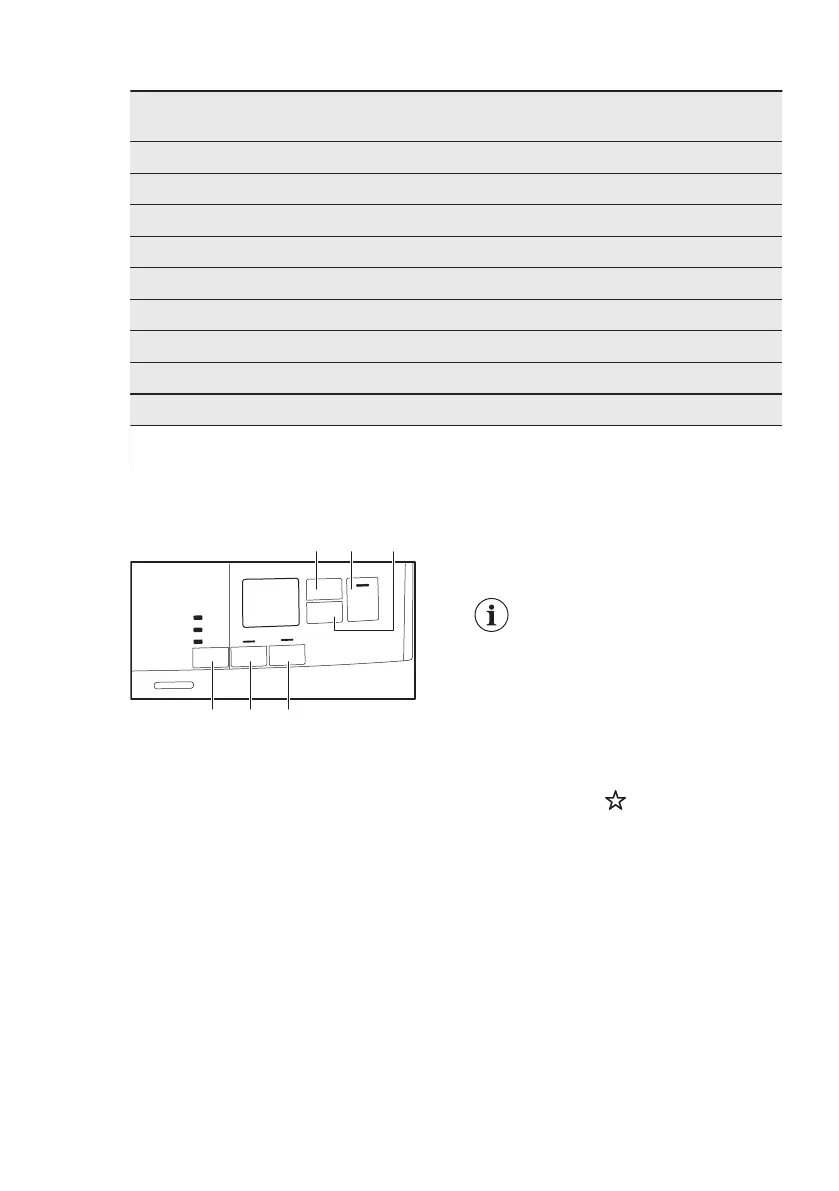
A. Time Dry touch button
B. Start/Pause touch button
C. Delay Start touch button
D. Extra Anticrease touch button
E. Gentle Dry touch button
F. Dryness Level touch button
8.1 Child lock function
This option prevents children playing with
the appliance while a programme is
operating. The touch buttons are locked.
Only the on/off button is unlocked.
Activating the child lock option:
1. Press the on/off button to activate the
appliance.
2. Press and hold touch button (D) for a
few seconds.
The child lock indicator comes on.
It is possible to deactivate
the child lock option while a
programme operates. Press
and hold the same touch
buttons until the child lock
indicator goes off. The Child
Lock function isn't available
for 8 s after switching on the
appliance.
8.2 Favourite
You can do your configuration of
programme and options and memorise in
the appliance memory.
To memorise your
configuration:
1. Press the on/off button to activate the
appliance
2. Set the programme and available
options.
3. Press the (E) button for some
seconds.
ENGLISH 11




 To Next Page