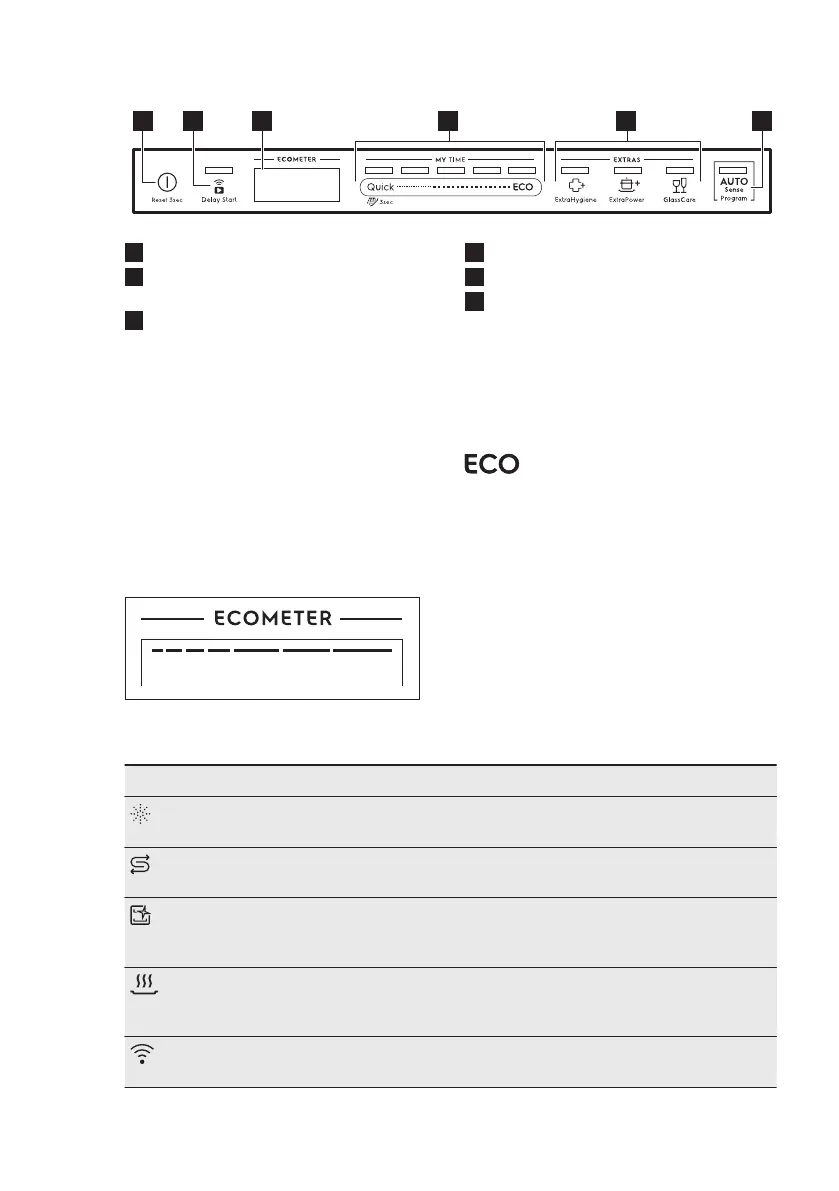
4. CONTROL PANEL
1
On/Off button / Reset button
2
Delay Start button / Remote start
button
3
Display
4
MY TIME selection bar
5
EXTRAS buttons
6
AUTO Sense program button
4.1 Display
The display shows the following
information:
• ECOMETER
• Indicators
• Programme names and durations
• Delay start time
• Information texts
4.2 ECOMETER
The ECOMETER indicates how the
programme selection impacts energy
and water consumption. The more bars
are on, the lower the consumption is.
indicates the most
environmentally friendly programme
selection for a normally soiled
dishwashing load.
4.3 Indicators
Indicator Description
Rinse aid indicator. It is on when the rinse aid dispenser needs refill‐
ing. Refer to "Before first use".
Salt indicator. It is on when the salt container needs refilling. Refer to
"Before first use".
Machine Care indicator. It is on when the appliance needs internal
cleaning with the Machine Care programme. Refer to "Care and
cleaning".
Drying phase indicator. It is on when you select a programme with the
drying phase. It flashes when the drying phase operates. Refer to
"Programme selection".
Wi-Fi indicator. It is on when you activate the wireless connection. Re‐
fer to "Wireless connection".
www.electrolux.com8



 To Next Page