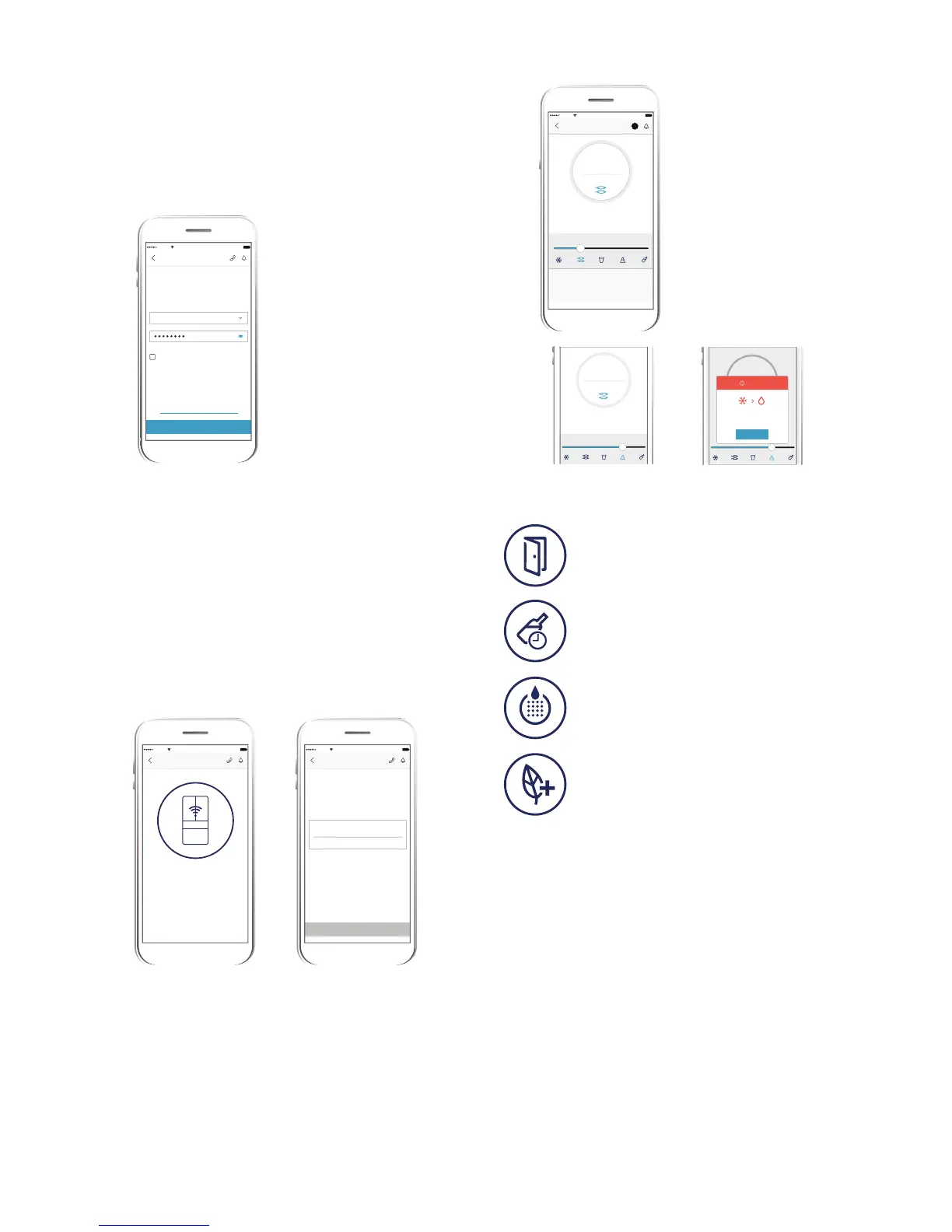
CONNECTION SUCCESS!
100%
Add Appliance
Carrier
1:20 PM
COMPLETE
100%
Add Appliance
Carrier
1:20 PM
Fill up the details below to complete
warranty registration.
Purchase Date
My Fridge
Display Appliance Name as
Complete warranty registration
STEP 4/4
Connect your fridge to your home Wi-Fi*
Y
ou’ll need to select your Wi-Fi network name and
input your password.
*For iOS devices, you will then be prompted go to
‘SETTINGS’ on your phone and select your Home Wi-Fi, then return to
the Electrolux Life app.
Connection success!
Please proceed to the next screen to register the
appliance.
Product registration
Simply add your fridge’s name and the purchase date.
Congratulations!
Now you’re all setup, you can start exploring the
Electrolux Life App.
Deli Snacks
3°
0°
-2
For fresher, better-tasting food, the right
temperature is important. Perfect for storing
your everyday food items like fruits, vegeta-
° 7°
3°
SEE MORE
0°
-2 ° 7
°
3°
WARNING
Deli Snacks
For fresher, better-tasting food, the right
temperature is important. Perfect for storing
your everyday food items like fruits, vegeta-
3°
GOT IT
WARNING
You ha
ve chosen to convert from
freezerto fridge. The FlexFresh
compartments is now suitable for chilling
only. Any frozen food will thaw.
100%Carrier
1:20 PM
ws you to store the
ingr
Planning meals for the week ahead?
Ultra
Chill allo edients for
upcoming meals without having to
defrost.
FLEXFRES
H
Ultra Chill
0°
3° 7°
-2°
SEE MORE
Useful Alerts on your App
Fr
idge Door Open
The door has been open for more than five
minutes. Please close it to save energy and
avoid the loss of cold air.
Drinks Chill
The drinks in your freezer are now chilled.
Please remove them from the freezer to
avoid freezing.
Water Filter
Ensure you always have fresh filtered
water, as you get a reminder when it’s time
to change the filter cartridge.
Eco Mode
Eco Mode is on. This mode helps save
energy.
Ot
her Cool Features of your Fridge
TasteLock™ Easy Glide Crispers
Automatic humidity control ensures your fruit and
vegetables are preserved in the optimal environment.
Designed with your comfort in mind, the easy glide
crispers open effortlessly and provide easy access
even when they’re full.
SmartSplit Door Design
With optimally split doors you have more usable
space in your refrigerator door and can effortlessly
reach for larger items, saving you the need to open
bo
th doors every time.
Flip Up Shelves
With the ability to flip up some of the refrigerator
shelving your taller Instagram worthy creations stay in
o
ne piece, ready for their big reveal.
-2°
Network Personal
Can’t find your home Wi-Fi network?
Select home Wi-Fi network name
100%
Add Appliance
Setup Home Wi-Fi network on
on your appliance
STEP 3/4
Carrier
1:20 PM
Unsecured network
NEXT
Only 2.4GHz network is supported
FlexFresh Drawer
W
hether you are preparin
g
the perfect frozen dessert or
need that extra drink space,
we make sure that your
refrigerator is the ultimate
secret to the perfect night of
entertainment.
At the slide of a button, the
convertible drawer can
adjust from Freezer to +7°C*,
with 5 predefined settings so
that you can enjoy food at its
finest. *within 2.5 hours




 To Next Page