6 Controls
IQoTouch TM (somemodems)
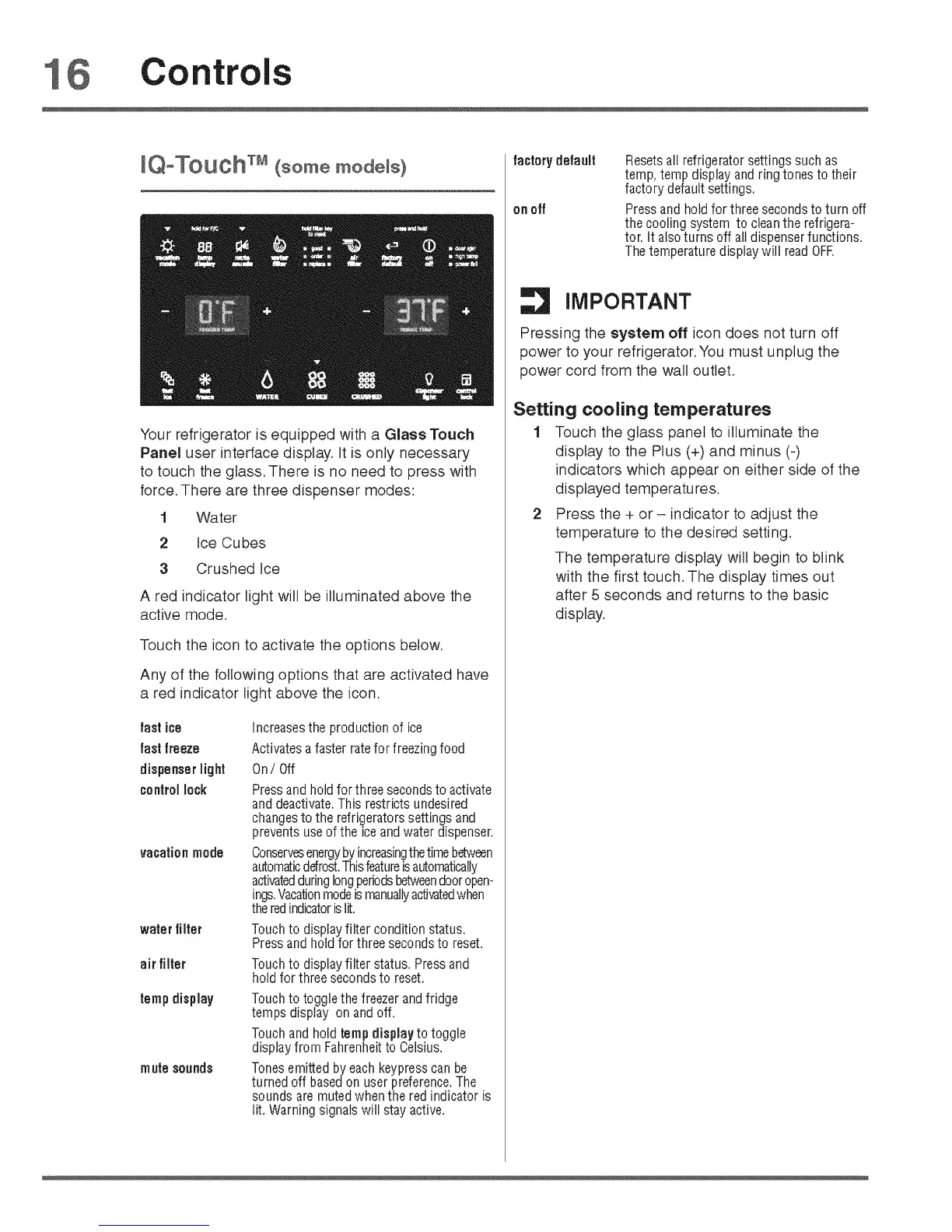
Your refrigerator is equipped with a Glass Touch
Panel user interface display. It is only necessary
to touch the glass, There is no need to press with
force. There are three dispenser modes:
1 Water
2 Ice Cubes
3 Crushed tce
A red indicator light will be illuminated above the
active mode.
Touch the icon to activate the options below.
Any of the following options that are activated have
a red indicator light above the icon.
fastice
fastfreeze
dispenserlight
controllock
vacationmode
waterfilter
air filter
tempdisplay
mufe sounds
Increasesthe production of ice
Activates a faster ratefor freezing food
0ni Off
Press and hold for three secondsto activate
and deactivate.This restricts undesired
changes to the refrigerators settings and
prevents useof the ice and water dispenser,
Conservesenergyby increasingthetimebetween
automaticdefrost.Thisfeatureisautomatically
activatedduringlongperiodsbetweendooropen-
ings.Vacationmodeismanuallyactivatedwhen
theredindicatoris lit.
Touchto displayfilter conditionstatus.
Pressandholdfor threesecondsto reset.
Touchto displayfilter status,Pressand
holdforthreesecondsto reset.
Touch to toggle the freezer and fridge
temps display on and off.
Touch and hold temp display to toggle
display from Fahrenheit to Celsius.
Tones emitted by each keypress can be
turned off based on user preference. The
sounds are muted when the red indicator is
lit. Warning signals will stay active.
factorydefault
on off
Resetsall refrigerator settings such as
temp, temp display and ring tones to their
factory default settings.
Press and hold for three seconds to turn off
the cooling system to clean the refrigera-
tor. It also turns off all dispenser functions.
The temperature display will read 0FR
iMPORTANT
Pressing the system off icon does not turn off
power to your refrigerator, You must unplug the
power cord from the wall outlet.
Setting cooling temperatures
1 Touch the glass panel to illuminate the
display to the Plus (+) and minus (-)
indicators which appear on either side of the
displayed temperatures.
2 Press the + or- indicator to adjust the
temperature to the desired setting.
The temperature display will begin to blink
with the first touch, The display times out
after 5 seconds and returns to the basic
display.



 To Next Page