8
5. CONTROL PANEL
11
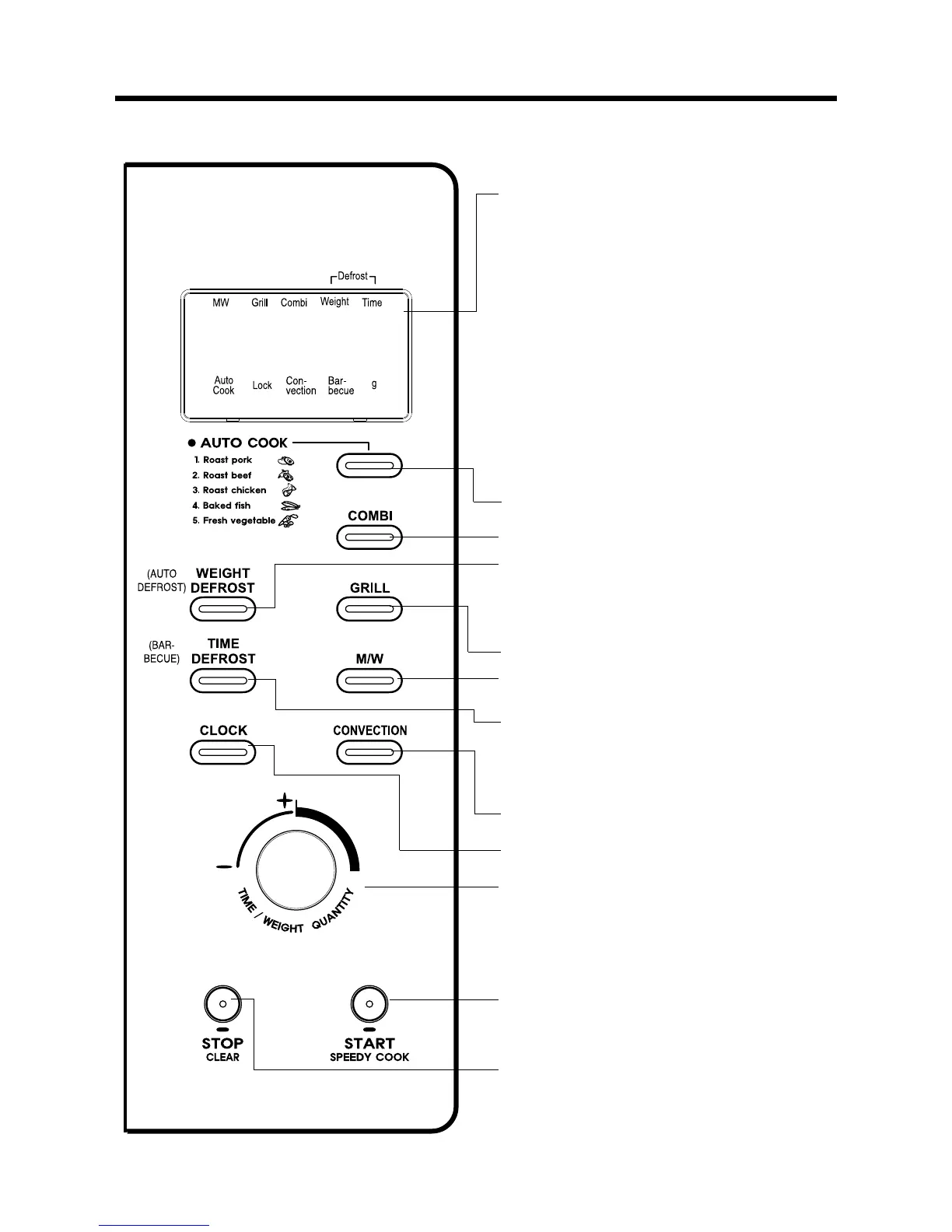
Display : Cooking time, power level, indicators and
present time are displayed.
MW : When blinking, the oven is operating in
MICROWAVE COOK.
Grill : When blinking, the oven is operating in GRILL.
Combi : When blinking, the oven is operating in COMBI.
Defrost Weight : When blinking, the oven is operating in
WEIGHT DEFROST.
Time : When blinking, the oven is operating in TIME
DEFROST.
Auto-cook : When blinking, the oven is operating AUTO
COOK.
Lock : When lighting, the oven is CHILD LOCK.
Con-vection : When blinking, the oven is operating in
CONVECTION.
g : When blinking, the oven is operating in weight input
mode.
Barbecue : When blinking, the oven is operating in
barbecue. (KOC-9N7T7SA2 only)
22
Auto cook : Used to cook or reheat.
33
Combi : Used to select combi.
44
Weight Defrost : Press to select the weight defrosting
cooking. (KOC-9N4T7S/9N4T7S24/9N5T7S/9N5T7R/
9N5T7S21/9N7T7S/9N7T7S21 only)
Auto Defrost : Press to select the auto defrosting
cooking. (KOC-9N7T7SA2 only)
55
Grill : Used to select grill.
66
MW : Used to set power level of micro wave.
77
Time Defrost : Press to select the time defrosting
cooking. (KOC-9N4T7S/9N4T7S24/9N5T7S/9N5T7R/
9N5T7S21/9N7T7S/9N7T7S21 only)
Barbecue : Press to select the barbecue cooking.
(KOC-9N7T7SA2 only)
88
Convection : Used to select convection and selected
temp.
99
Clock : Used to set clock.
00
Dial knob : Used to set time, weight and quantity.
qq
START/SPEEDY COOK : Used to start a programmed,
also for speedy start(each press adds 30 seconds
microwave cooking time).
ww
STOP/CLEAR : Used to stop the oven operation or to
delete the cooking data.




 To Next Page