Menu Weight
A6
Potato
200 g
400 g
600 g
A7
Pizza
200 g
400 g
A8
Soup
200 g
400 g
7.2 Delayed Start
You can programme the appliance for 2
stages maximum.
1. Press the Function button and set the
power level.
2.
Press
to confirm.
3.
Turn the Setting knob to set the cook-
ing time.
4.
Press
to programme the start of
the appliance.
5.
Turn the Setting knob to enter the
amount of hours.
6.
Press
to confirm.
7.
Turn the Setting knob to enter the
amount of minutes.
8.
Press
to end the settings.
The appliance starts automatically
when the set time is reached.
8. USING THE ACCESSORIES
WARNING!
Refer to the Safety chapters.
8.1 Inserting the turntable set
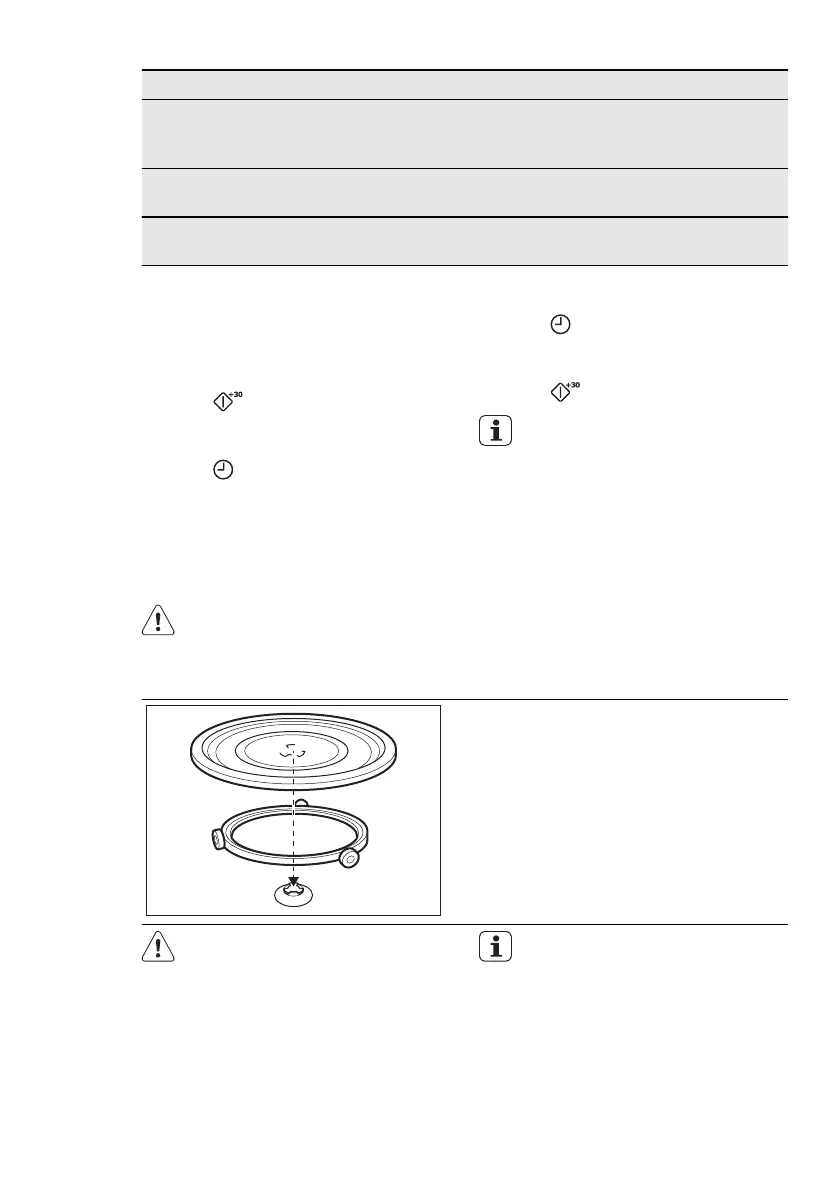
1.
Place the roller guide around the turn-
table shaft.
2.
Place the glass cooking tray on the
roller guide
CAUTION!
Do not cook food without the
turntable set. Use only the turnta-
ble set provided with the appli-
ance.
Never cook food directly on the
glass cooking tray.
28
www.electrolux.com






 To Next Page