2. Clean the glass cover.
3. Replace the oven light bulb with applica-
ble 300°C heat-resistant oven light bulb.
4. Install the glass cover.
Oven door and glass panels
To clean the oven door remove it.
Caution! Be careful when you remove
the door from the appliance. The door is
heavy!
Put the oven door with the outer side
down on a soft and level surface to pre-
vent scratches.
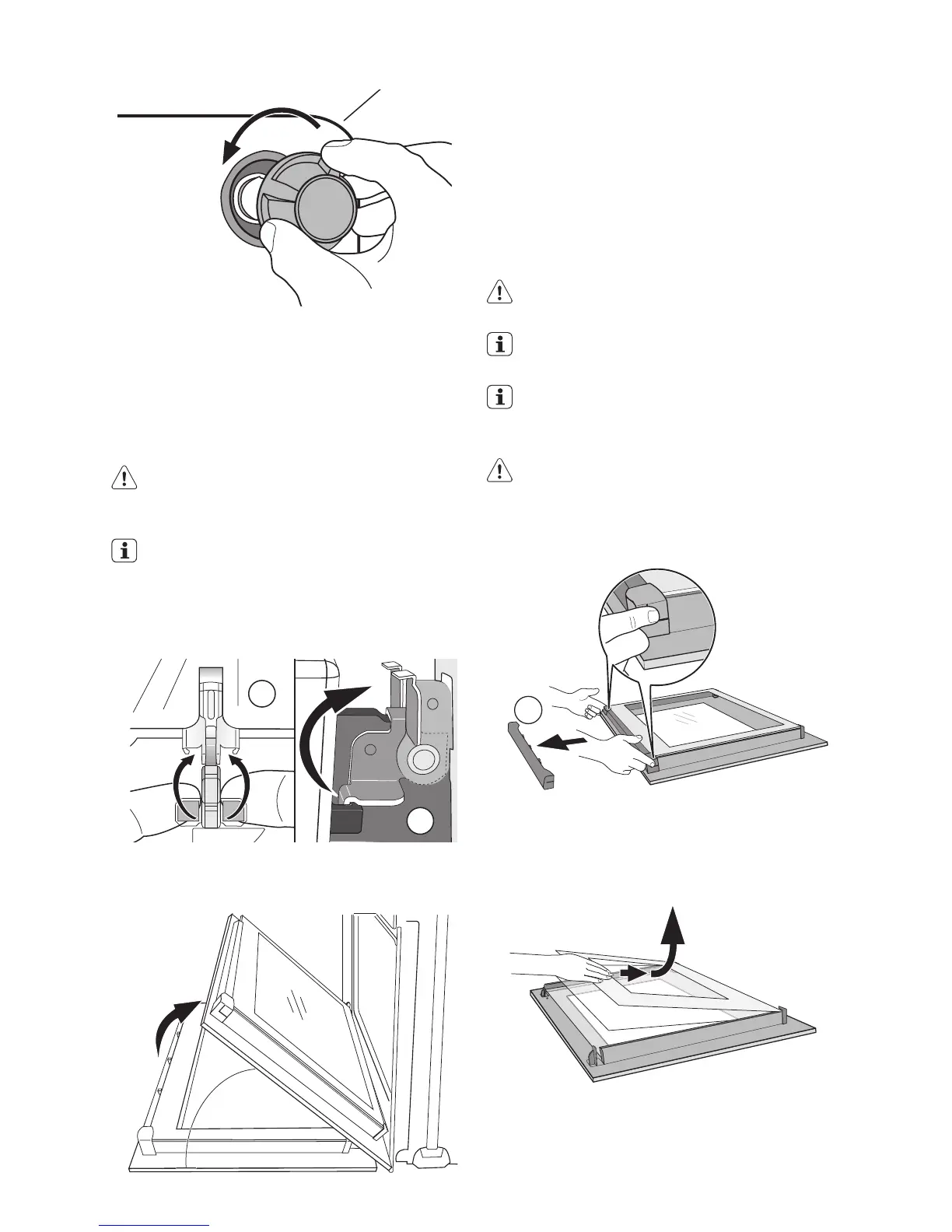
Removing the oven door
1. Open the oven door as far as it goes.
2.
Lift up clamping levers (A) on the two door
hinges fully.
3.
A
A
45°
Close the oven door until the first position
(angle approx. 45°).
4. Hold of the oven door with one hand on
each side and pull it away from the oven
at an upwards angle.
5. Now you can remove the inner glass pan-
els and clean them.
To install the door follow the procedure in
reverse.
Caution! Be careful with the glass, it can
break.
The oven door has 2, 3 or 4 panels of
glass (depends on the model)
Put the oven door with the outer side
down on a soft and level surface to pre-
vent scratches
Caution! Rough handling, especially
around the edges of the front panel, can
cause the glass to break.
Removing and cleaning the door glasses
1.
Hold the door trim (B) on the top edge of
the door at the two sides and push in-
wards to release the clip seal.
2.
Pull the door trim to the front to remove
it.
B
16 electrolux



 To Next Page