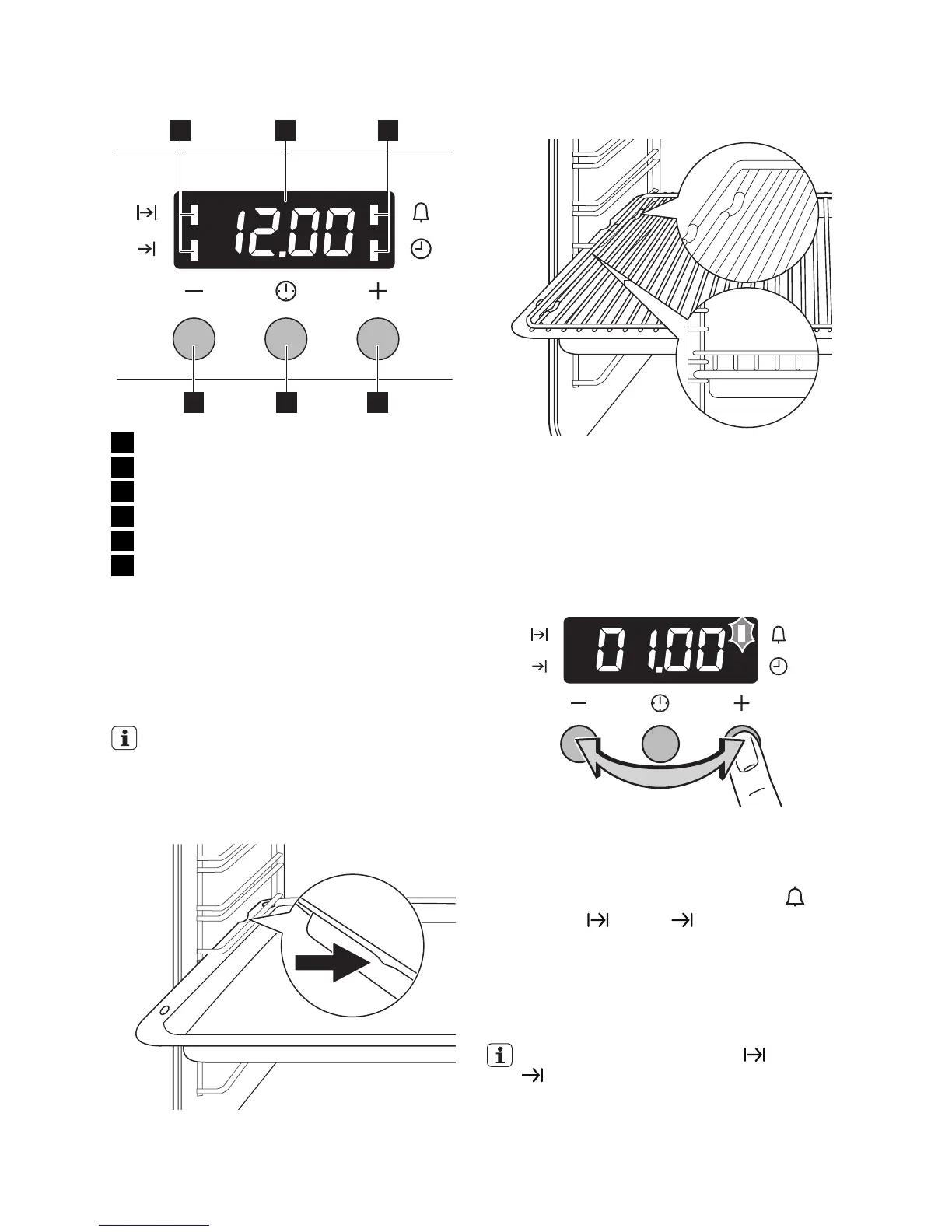
Display
1 2 3
456
1 Function Indicators
2 Time display
3 Function Indicators
4 Button " + "
5 Selector Button
6 Button " - "
Inserting the oven accessories
Put in the slide-in accessories so that the
double side edges are at the back of the oven
and point down to the bottom. Push the
slide-in accessories between the guide-bars
of one of the oven levels.
The deep roasting pan and the oven
shelf have double side edges. These
edges and the shape of the guide-bars
causes the anti-tilt safety for the oven
accessories.
Inserting the oven shelf and deep
roasting pan together
Put the oven shelf on the deep roasting pan.
Push the deep roasting pan between the
guide-bars of one of the oven levels.
Setting the clock functions
1.
Push the Selection button again and
again until necessary function indicator
flashes.
2.
To set the time for Minute minder
,
Duration
or End , use " + " or " - "
button.
The related function indicator comes on.
When the time period is completed, the
function indicator flashes and an acoustic
signal sounds for 2 minutes.
With the functions Duration and End
the oven switches off automatically.
3. Push any button to stop the signal.
electrolux 5



 To Next Page