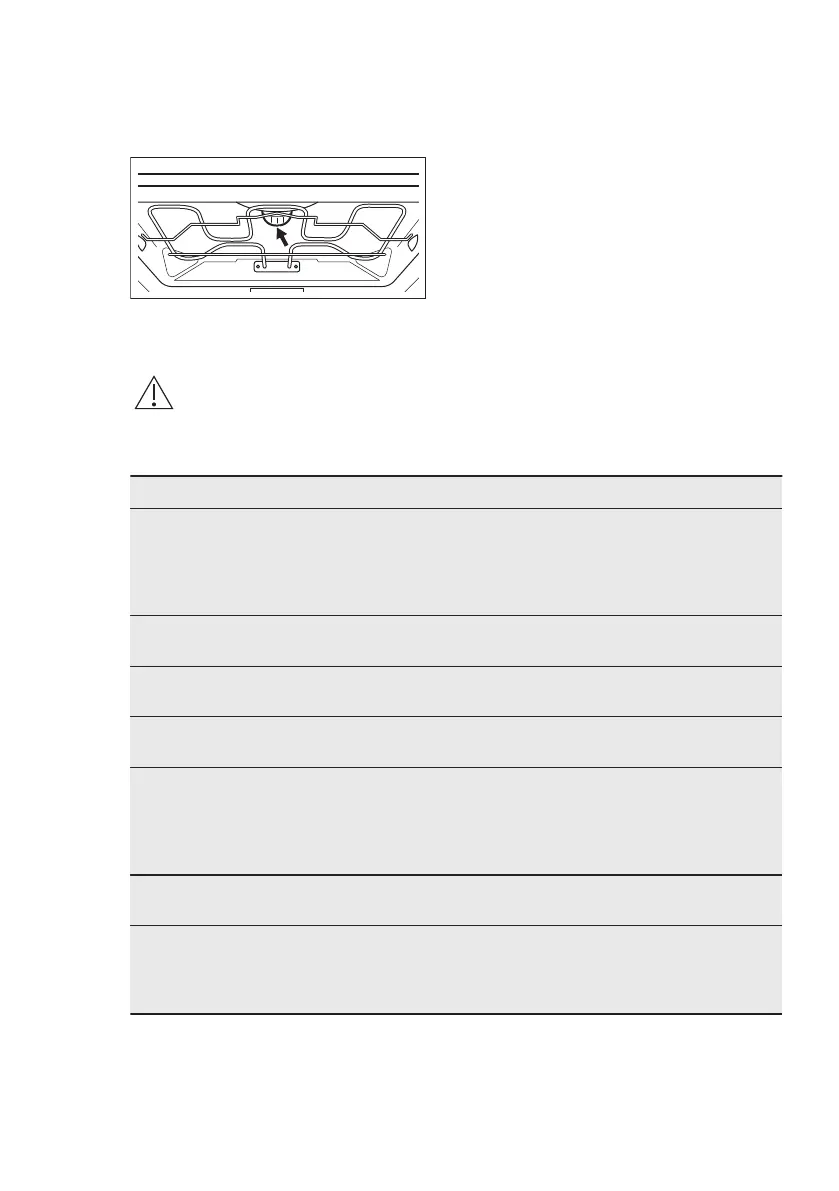
The top lamp
1. Turn the lamp glass cover to remove
it.
2. Clean the glass cover.
3. Replace the lamp with a suitable 300
°C heat-resistant lamp.
4. Install the glass cover.
12. TROUBLESHOOTING
WARNING!
Refer to Safety chapters.
12.1 What to do if...
Problem Possible cause Remedy
You cannot activate or op‐
erate the oven. The display
shows “400” and an acous‐
tic signal sounds.
The oven is incorrectly
connected to an electrical
supply.
Check if the oven is cor‐
rectly connected to the
electrical supply (refer to
the connection diagram if
available).
The oven does not heat
up.
The oven is deactivated. Activate the oven.
The oven does not heat
up.
The clock is not set. Set the clock.
The oven does not heat
up.
The necessary settings are
not set.
Make sure that the settings
are correct.
The oven does not heat
up.
The fuse is blown. Make sure that the fuse is
the cause of the malfunc‐
tion. If the fuse is blown
again and again, contact a
qualified electrician.
The lamp does not oper‐
ate.
The lamp is defective. Replace the lamp.
Steam and condensation
settle on the food and in
the cavity of the oven.
You left the dish in the
oven for too long.
Do not leave the dishes in
the oven for longer than 15
- 20 minutes after the
cooking process ends.
12.2 Service data
If you cannot find a solution to the
problem yourself, contact your dealer or
an Authorised Service Centre.
The necessary data for the service
centre is on the rating plate. The rating
plate is on the front frame of the oven
cavity. Do not remove the rating plate
from the oven cavity.
ENGLISH 27




 To Next Page