2.8 Service
• To repair the appliance contact an
Authorised Service Centre.
• Use original spare parts only.
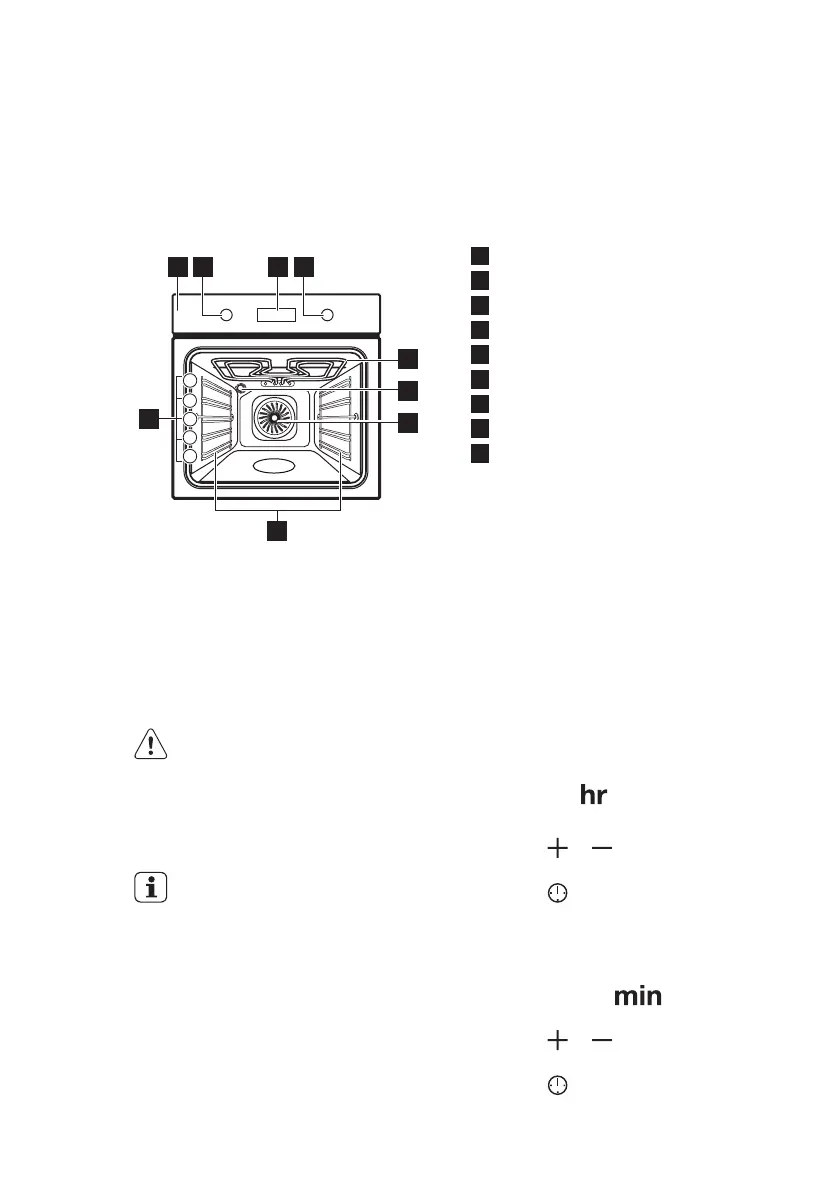
3. PRODUCT DESCRIPTION
3.1 General overview
1
Control panel
2
Knob for the oven functions
3
Electronic programmer
4
Knob for the temperature
5
Heating element
6
Lamp
7
Fan
8
Shelf support, removable
9
Shelf positions
3.2 Accessories
• Wire shelf
For cookware, cake tins, roasts.
• Grill- / Roasting pan
To bake and roast or as pan to collect
fat.
4. BEFORE FIRST USE
WARNING!
Refer to Safety chapters.
4.1 Initial Cleaning
Remove all accessories and removable
shelf supports from the appliance.
Refer to "Care and cleaning"
chapter.
Clean the appliance before first use.
Put the accessories and the removable
shelf supports back to their initial
position.
4.2 Setting the time
After the first connection to the mains, all
symbols in the display are on for some
seconds. For the subsequent few
seconds the display shows the software
version.
After the software version goes off, the
display shows and "12:00". "12"
flashes.
1. Press
or to set the current
hour.
2. Press to confirm. This is
necessary only when you set the
time for the first time. Later the new
time will be saved automatically after
5 seconds.
The display shows and the set
hour. "00" flashes.
3. Press or to set the current
minutes.
4. Press to confirm. This is
necessary only when you set the
ENGLISH 7





 To Next Page