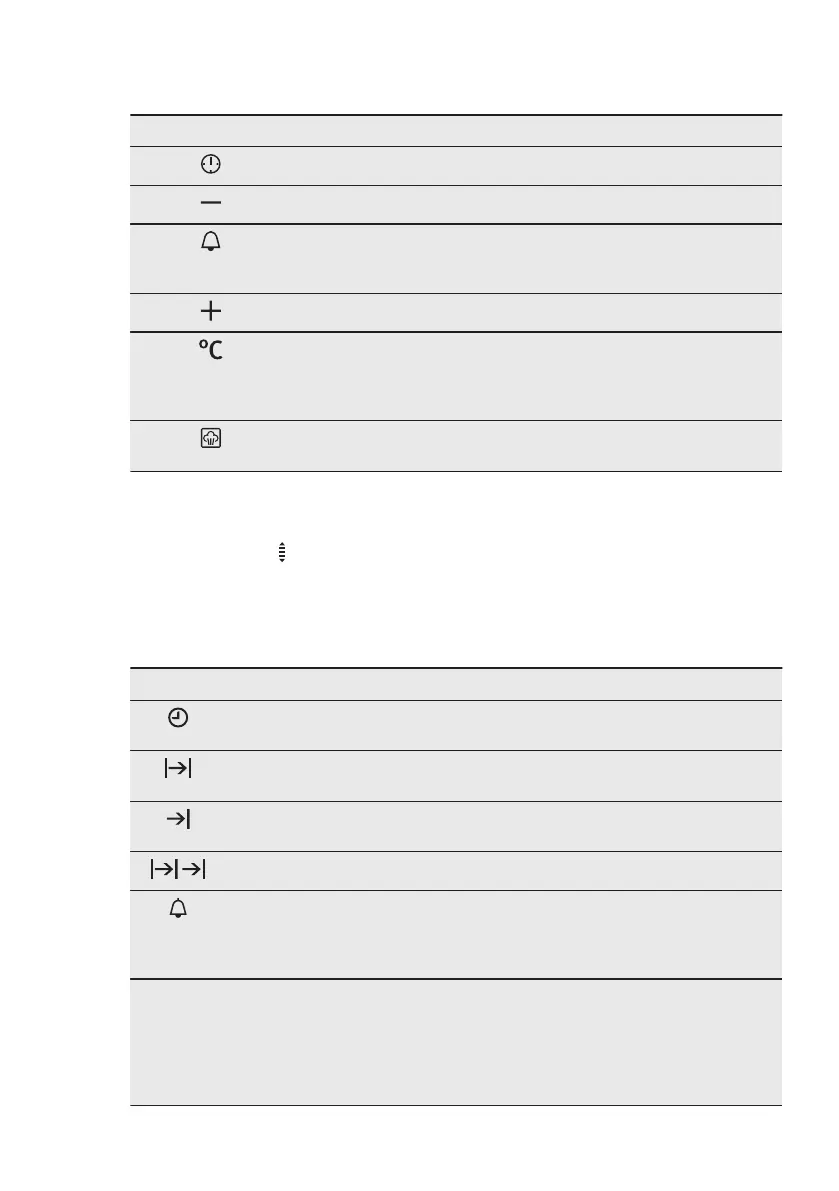
5.7 Buttons
Button Function Description
CLOCK To set a clock function.
MINUS To set the time.
MINUTE MINDER To set the MINUTE MINDER. Hold the
button for more than 3 seconds to acti‐
vate or deactivate the oven lamp.
PLUS To set the time.
TEMPERATURE To check the oven temperature or the
temperature of the core temperature
sensor (if applicable). Use only while
an oven function is in operation.
Plus Steam To activate the True Fan Cooking
PLUS function.
5.8 Heat-up indicator
When you activate an oven function, the
bars in the display
come on one by
one. The bars show that the oven
temperature increases or decreases.
6. CLOCK FUNCTIONS
6.1 Clock functions table
Clock function Application
TIME OF DAY To show or change the time of day. You can change
the time of day only when the appliance is off.
DURATION To set how long the appliance operates. Use only
when an oven function is set.
END To set when the appliance deactivates. Use only
when an oven function is set.
TIME DELAY To combine DURATION and END function.
MINUTE MINDER Use to set a countdown time. This function has no
effect on the operation of the appliance. You can set
the MINUTE MINDER at any time, also if the appli‐
ance is off.
00:00 COUNT UP TIM‐
ER
If you do not set any other clock function the
COUNT UP TIMER automatically monitor how long
the appliance operates. It is on immediately when
the oven starts to heat.
The Count Up Timer cannot be used with the func‐
tions: DURATION, END.
ENGLISH 11





 To Next Page