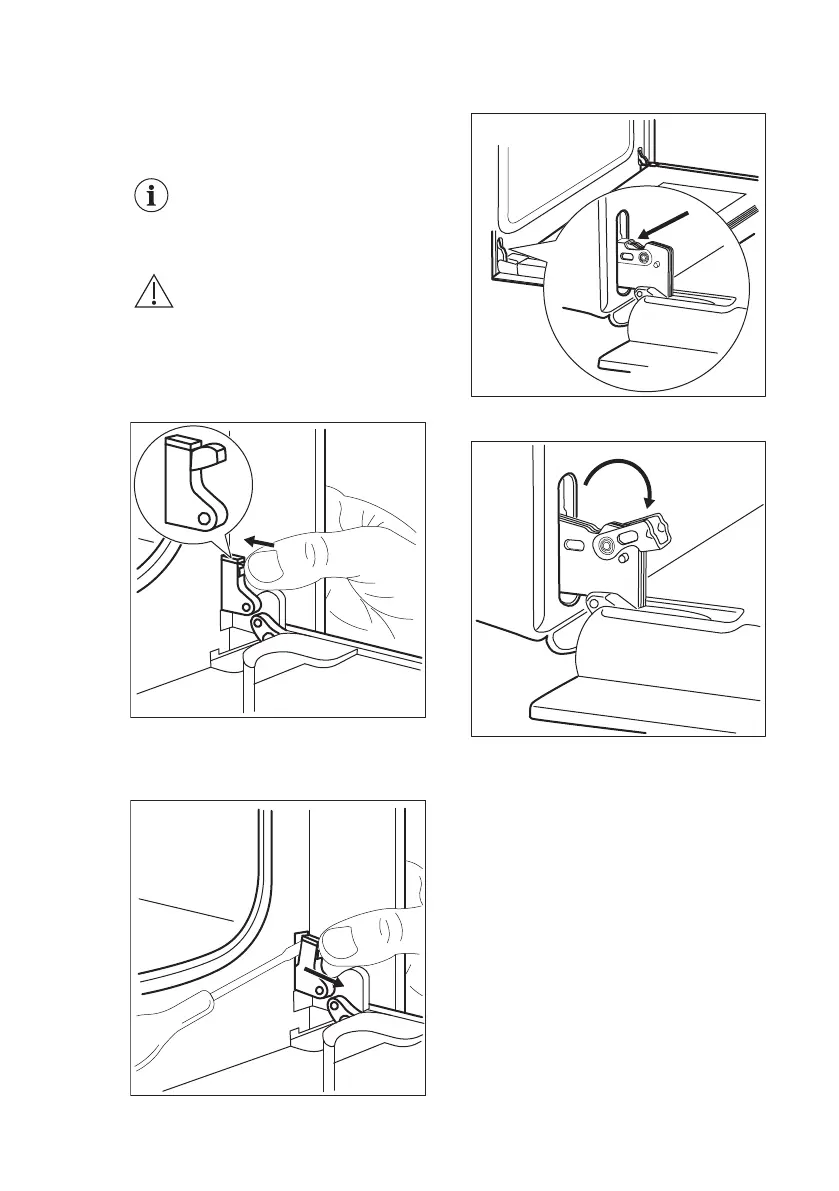
10.7 Cleaning the oven door
The oven door has four glass panels.
You can remove the oven door and the
internal glass panels to clean them.
The oven door can close if
you try to remove the glass
panels before you remove
the oven door.
CAUTION!
Do not use the appliance
without the glass panels.
1. Fully open the door and identify the
hinge to the right side of the door.
2. Push the tightening component until
it pulls back.
3. Hold the pushed component with one
hand. Use a screwdriver with the
other hand to lift and turn the right
side hinge lever.
4. Identify the hinge to the left side of
the door.
5. Lift and turn the lever on the left
hinge.
6. Close the oven door halfway to the
first opening position. Then pull
forward and remove the door from its
seat.
ENGLISH 27





 To Next Page