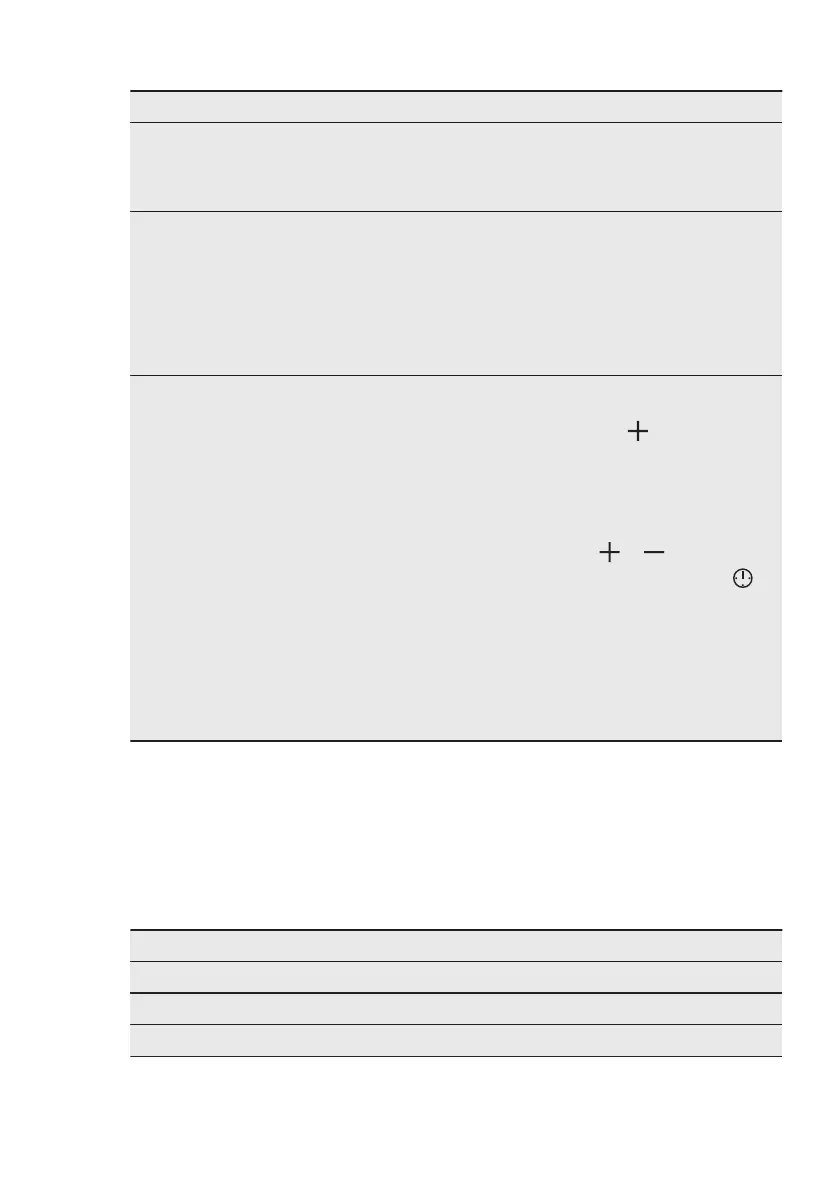
Problem Possible cause Remedy
The water in the cavity em‐
bossment does not boil.
The temperature is too low. Set the temperature at
least to 110 °C.
Refer to “Hints and tips”
chapter.
The water comes out of
the cavity embossment.
There is too much water in
the cavity embossment.
Deactivate the oven and
make sure that the appli‐
ance is cold. Wipe the wa‐
ter with a cloth or sponge.
Add the correct amount of
water to the cavity em‐
bossment. Refer to the
specific procedure.
The appliance is activated
and does not heat up. The
fan does not operate. The
display shows "Demo".
The demo mode is activa‐
ted.
1. Deactivate the oven.
2. Press and hold the but‐
ton .
3. The first digit on the
display and Demo indi‐
cator start to blink.
4. Enter the code 2468 by
pressing the buttons
or to change the
values and press to
confirm.
5. The next digit starts to
blink.
6. Demo mode deacti‐
vates when you con‐
firm the last digit and
the code is correct.
11.2 Service data
If you cannot find a solution to the
problem yourself, contact your dealer or
an Authorised Service Centre.
The necessary data for the service
centre is on the rating plate. The rating
plate is on the front frame of the
appliance cavity. Do not remove the
rating plate from the appliance cavity.
We recommend that you write the data here:
Model (MOD.) .........................................
Product number (PNC) .........................................
Serial number (S.N.) .........................................
ENGLISH 31





 To Next Page