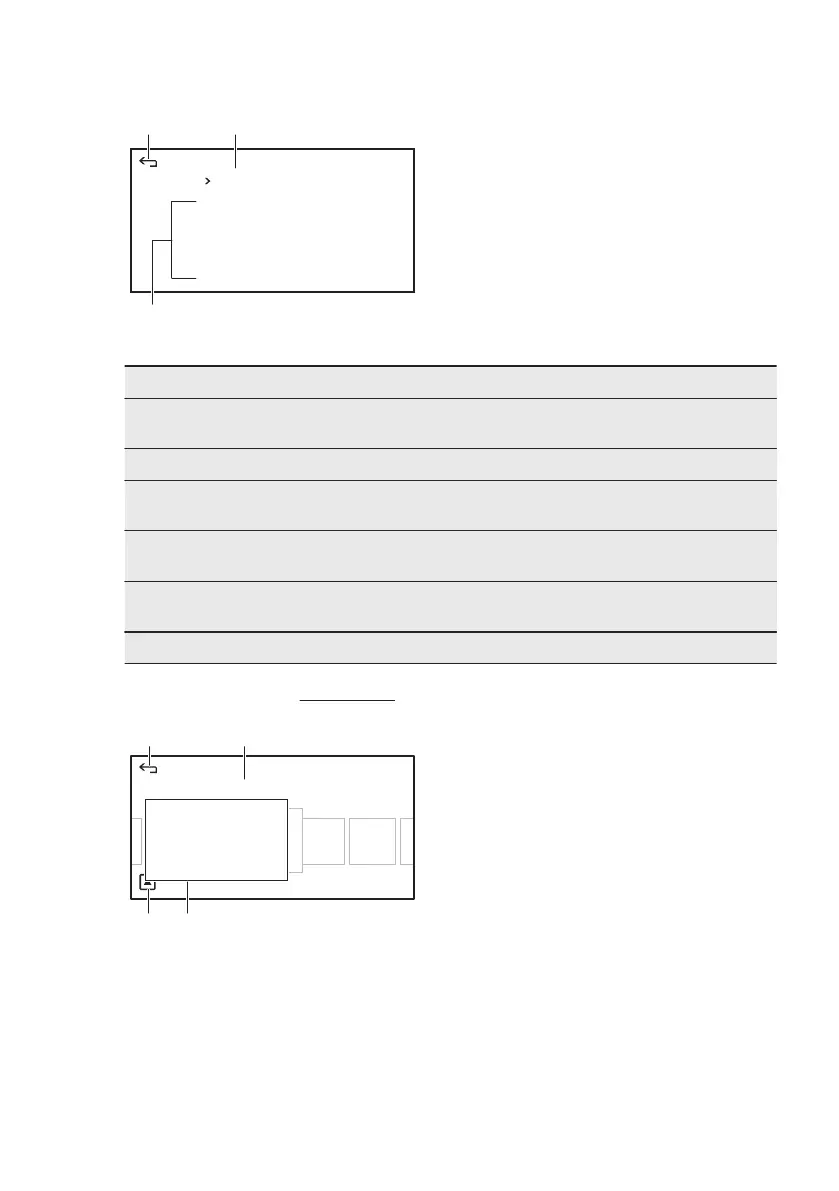
7.3 The menu in overview
Menu
Timers
Options
Functions
BA
C
A. Return to menu
B. Current menu level
C. List of functions
Main menu
Menu item Description
Functions It contains a list of the heating functions, spe‐
cials, cleaning and favourite programmes.
Timers It contains a list of clock functions.
Options It contains a list of other options for Safety func‐
tions, Lamp, Heat + Hold, Set + Go.
Recipes It contains a list of automatic cooking pro‐
grammes.
Last and most used It shows which function was last used and
which are the most used.
Basic Settings It contains a list of basic settings.
7.4 Submenu for: Functions
True Fan Cooking
Heating Functions
Special
Cleaning
Favourites
A B
CD
A. Return to menu
B. List of heating functions
C. List of available options
D. More options
7.5 Setting a heating function
1. Scroll through the functions to find
the one you want and touch it.
2. To change the temperature touch the
temperature shown on the display
and scroll through the list to find the
one you need.
3. Touch the temperature to confirm it.
4. To activate the function touch: Start.
An acoustic signal sounds when the
appliance is at approximately the set
temperature. The signal sounds again at
the end of the cooking time.
www.electrolux.com12





 To Next Page