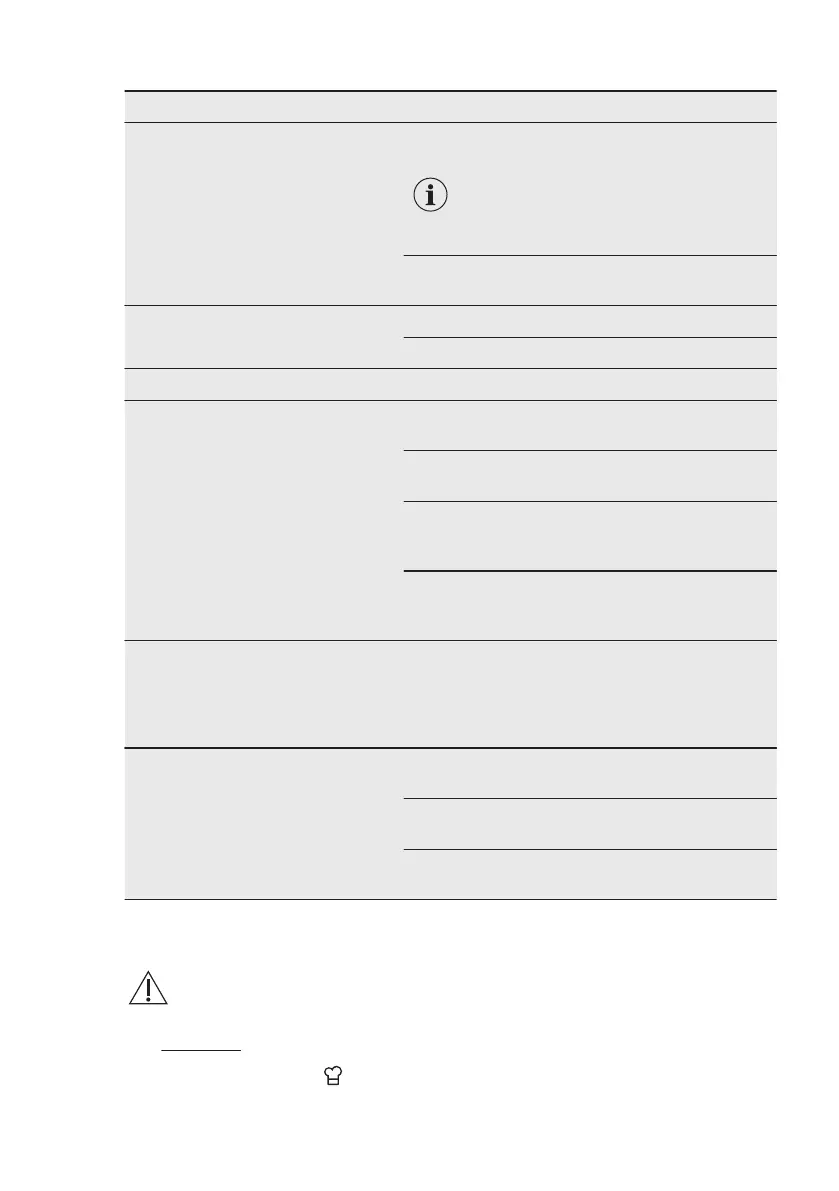
Menu item Description
Display
Choose the display settings.
Brightness
You can select 4 brightness modes.
Set the brightness of the display in
ON state. Time of day in OFF state
is not adjustable.
Background images On / Off
Show or hide the background pictures.
Sound
Sound Settings.
Volume
Type (Beep / Click / No sound)
Language Set your preferred language.
Time and Date
Set the time and date and other op‐
tions related to how time is shown.
Time
Set or adjust the time.
Date
Set or adjust the date.
Format
Choose your preferred time format: HH:MM or
AM/PM.
Clock style
Define what the clock looks like when the oven
is switched off.
DEMO mode
For shop usage only. When active,
the heating elements are discon‐
nected and DEMO is visible on the
screen.
Activation code
Service
Shows the software version and
configuration.
Software Version
Shows the software version of the oven.
Reset all settings
Resets all settings to factory default.
Licence
Shows the licence in English language.
8. ASSISTED COOKING
WARNING!
Refer to Safety chapters.
8.1 Recipes
Menu / Recipes or touch:
You can choose to use the function:
Cookbook or Quickstart.
8.2 Activating the function
1. Scroll through the food category list
and touch on the one you want to
choose.
www.electrolux.com20





 To Next Page