4. To activate the function touch:
Screen Lock.
The appliance is locked.
When the appliance is deactivated, the
function deactivates automatically.
Deactivating the function:
Screen Lock
1. Tap the display.
2. Follow the instructions on the display.
7.18 Submenu for: Recipes
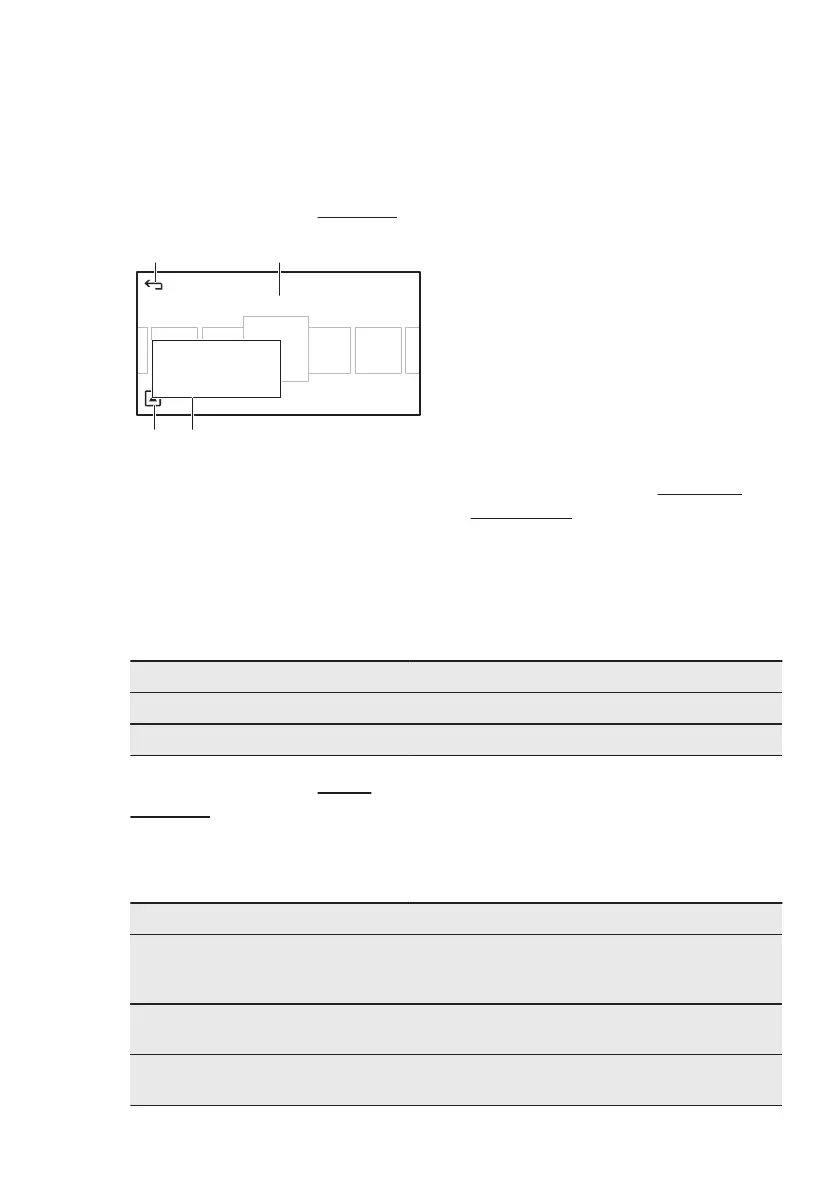
Oven Dish
Quickstart
Cookbook
A B
CD
A. Return to menu
B. Food category
C. Cookbook and Quickstart
D. More options
A cookbook containing inspiring
automatic recipes and a VarioGuide
function providing our recommended
oven settings for your dishes. The time
and temperature of the VarioGuide can
be adjusted according to your needs. By
touching the chef hat of the dish, our
recommended settings are displayed.
7.19 Submenu for: Last and
most used
Easily accessible list of last and most
used functions, recipes and quickstarts.
Menu item Description
Last used It shows the last used 5 functions.
Most used It shows the most used 5 functions.
7.20 Submenu for: Basic
Settings
The set settings stay fixed each time you
activate the appliance.
Menu item Description
Fast heat-up On / Off When turned ON, the oven's heat-up time will
decrease for certain heating functions. It is visi‐
ble on the screen with >> when active.
Odour Filter On / Off An odour filter to remove the smell from the
ventilation air.
Cleaning Reminder On / Off Choose if you wish the oven to remind you to
use the cleaning cycle.
ENGLISH 19





 To Next Page