Step 3 When the cooking ends, turn the knobs
to the off position to turn off the oven.
7.2 Setting the function: True Fan Cooking PLUS
WARNING!
Risk of burns and damage to the appliance.
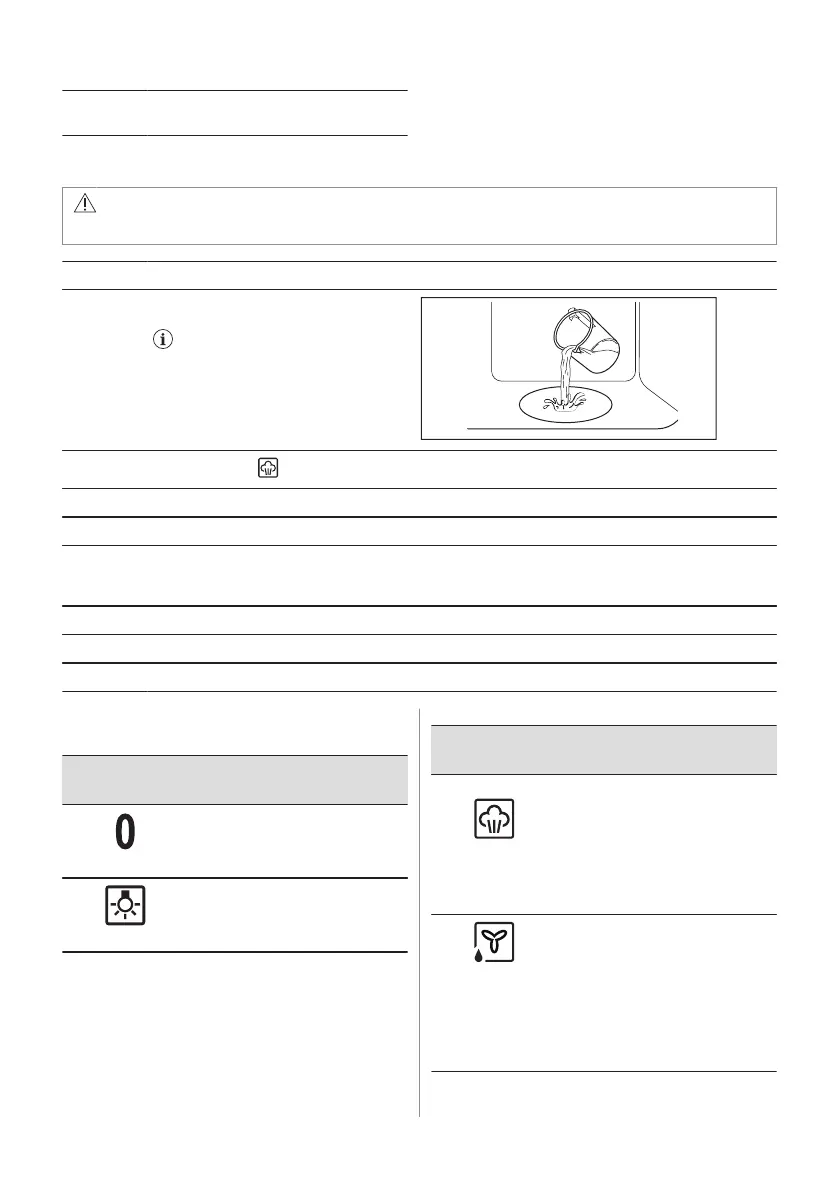
Step 1 Make sure that the oven is cold.
Step 2 Fill the cavity embossment with tap wa‐
ter.
The maximum capacity of the cavity
embossment is 250 ml. Do not refill the
cavity embossment during cooking or
when the oven is hot.
Step 3
Set the function: .
Step 4 Turn the control knob for the temperature to set temperature.
Step 5 Preheat the empty oven for 10 min to create humidity.
Step 6 Put food in the oven.
Refer to "Hints and tips" chapter.
Do not open the oven door during cooking.
Step 7 Turn the knob for the heating functions to the off position to turn off the oven.
Step 8 After the function ends, carefully open the door. Released humidity can cause burns.
Step 9 Make sure that the oven is cold. Remove the remaining water from the cavity embossment.
7.3 Heating functions
Heating func‐
tion
Application
Off position
The oven is off.
Light
To turn on the lamp.
Heating func‐
tion
Application
True Fan Cooking
PLUS / Aqua
Clean
To add humidity during the cook‐
ing. To get the right colour and
crispy crust during baking. To
give more juiciness during re‐
heating.
Refer to "Care and cleaning"
chapter for more information
about: Aqua Clean.
Moist Fan Baking
This function is designed to save
energy during cooking. When
you use this function, the tem‐
perature in the cavity may differ
from the set temperature. The
heating power may be reduced.
For more information refer to
"Daily Use" chapter, Notes on:
Moist Fan Baking.
ENGLISH 11



 To Next Page