12 www.electroluxarabia.com
Function Icon Operation (depending on model)
1
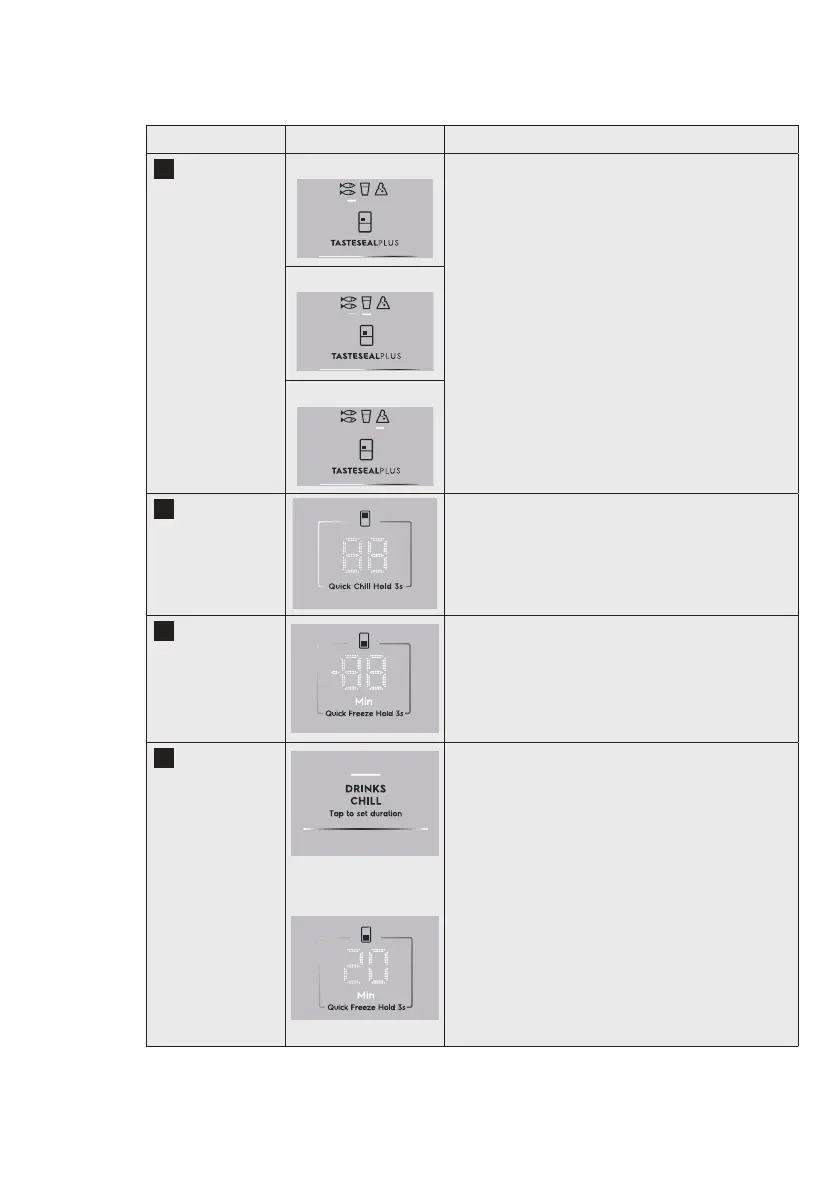
TasteSeal Plus
Control
Meat & Fish Tap on TasteSealPlus button, Actives the next
mode. The LED of the next mode lights up.
TasteSeal plus has 3 temperature modes:
-2°C Meat & Fish
-0°C Cold Drinks
3°C Deli snack
Cold Drinks mode
Deli snack mode
2
Fridge Temp
Control
Taps on the display to cycle through the
temperature range supported by the Fridge.
From 7°C
To 1°C
Default 4°C
3
Freezer Temp
Control
Taps on the display to cycle through the
temperature range supported by the Freezer
From -14°C
To -23°C
Default -18°C
4
Drinks Chill
Button
Drinks Chill timer
indicator
The Drinks Chill timer is used to quickly chill a bottle
inside the freezer compartment and to warn the
user when it ends.
Tap on Drinks Chill button, Freezer display shows
20 ,"Min" and Drink Chill LED turns on.
The timer option is from 20 minutes and the user
can add time in 5 min intervals up to 45 minutes.
After it starts the timer will show the countdown
minute by minute.
NOTE:
When timer countdown is in progress, the timer
duration cannot be adjusted. User will need to
deactivate Drinks Chill and activate Drinks chill
again to set a new timer.




 To Next Page